
Tooltips for Glossaries, Dictionaries, and Documentation






⭐ The code lives at github.com/alhassy/org-special-block-extras —star it, or discuss it there! 
Sometimes I want to use the same tooltipA remark, CONTENTS, on MARKER in the text: in HTML, a tooltip on MARKER, hovered on a desktop, tapped on a
phone; in LaTeX, MARKER followed by CONTENTS as a margin note, numbered by COUNTER, as footnotes are; in beamer, whose
slides have no margins, a footnote. Sans MARKER, the note’s number alone in LaTeX, and “°” in HTML.
It’s a /Allah[[margin:][The God of Abraham]] does not burden a soul …/
#+begin_tooltip simple
Squint, and Maybe ℕ is ℕ.
#+end_tooltip
exercise.
The block is one-off, “inline footnotes”; Org’s own [fn::…] are such remarks too. For a note used repeatedly, consider
declaring it with ‘documentation’ and citing it with ‘doc’.
WIDTH, COUNTER, and COLOR are LaTeX’s: the note is WIDTH wide, coloured COLOR, its number in black. Since verbatim
environments fail as arguments to \marginpar, CONTENTS is saved in a minipage within a LaTeX box, then unfolded in the
margin; hence, src blocks may appear within margin notes (•̀ᴗ•́)و For LaTeX, a ‘#+resize:’ line has the rest of the
note resized, to 1.3 the margin’s width ---requiring \usepackage{adjustbox}.
‘tooltip’ is an alias, for when we think in HTML rather than LaTeX.
An alias of ‘org-block/margin’.
Regarding the Lisp function:
+ BACKEND refers to the current export backend.
+ RAW-CONTENTS refers to the text as the user wrote it, sans its least indentation.
⇒ Its body asks, by &context, for CONTENTS: the ‘org parsed’ version of user text.
⇒ CONTENTS and RAW-CONTENTS are identical for the description of a link; whence the LINK? of &context is non-nil.
For example, upon LaTeX export, the Org special block
#+begin_tooltip
Hello, world
#+end_tooltip
is rewritten to the result of the call
(org-block/tooltip ‘latex "Hello, world") multiple times, so I write
the tooltip content once in a documentationA glossary entry: CONTENTS defines NAME, cited as doc:LABEL; a heading tagged :documentation: is one too.
The entries live in ‘org--docs’.
A documentation entry may have its LABEL, its primary identifier,
be:
1. Omitted
2. Given as a single symbol
3. Given as a many aliases ’(lbl₀ lbl₁ … lblₙ)
The third case is for when there is no canonical label to refer to
an entry, or it is convenient to use multiple labels for the same
entry.
In all of the above cases, two additional labels are included:
The entry name with spaces replaced by underscores, and again but
all lower case.
Documentation blocks are not shown upon export;
unless SHOW is non-nil, in which case they are shown
using the ‘box’ block, with the provided COLOR passed to it.
Alternatively, a heading tagged :documentation: is an entry, which
exports as an ordinary section: its title is the NAME, its :DOC_KEYS:
property holds the labels, and its own text is the entry.
* Category Theory                                            :documentation:
:PROPERTIES:
:DOC_KEYS: cat cats
:END:
A theory of typed composition; e.g., typed monoids.
Entries are read afresh before each export, so they may be cited before
they are defined; see ‘org--docs-prepare’.
Regarding the Lisp function:
+ BACKEND refers to the current export backend.
+ RAW-CONTENTS refers to the text as the user wrote it, sans its least indentation.
⇒ Its body asks, by &context, for CONTENTS: the ‘org parsed’ version of user text.
⇒ CONTENTS and RAW-CONTENTS are identical for the description of a link; whence the LINK? of &context is non-nil.
For example, upon LaTeX export, the Org special block
#+begin_documentation
Hello, world
#+end_documentation
is rewritten to the result of the call
(org-block/documentation ‘latex "Hello, world") block and then
reference it using the the doc/bin/bash: line 1: wn: command not found
link type.
Now I can reference this documentation entry using its label as in
Category Theory
A theory of typed composition; e.g., typed monoids, such as matrices and matrix multiplication.
A theory of typed composition; e.g., typed monoids, such as matrices and matrix multiplication.
A theory of typed composition; e.g., typed monoids, such as matrices and matrix multiplication.
The :label is optional; when not provided it defaults to the name of
the entry with spaces replaced by ‘_’. For more, see
org-block/documentationA glossary entry: CONTENTS defines NAME, cited as doc:LABEL; a heading tagged :documentation: is one too.
The entries live in ‘org--docs’.
A documentation entry may have its LABEL, its primary identifier,
be:
1. Omitted
2. Given as a single symbol
3. Given as a many aliases ’(lbl₀ lbl₁ … lblₙ)
The third case is for when there is no canonical label to refer to
an entry, or it is convenient to use multiple labels for the same
entry.
In all of the above cases, two additional labels are included:
The entry name with spaces replaced by underscores, and again but
all lower case.
Documentation blocks are not shown upon export;
unless SHOW is non-nil, in which case they are shown
using the ‘box’ block, with the provided COLOR passed to it.
Alternatively, a heading tagged :documentation: is an entry, which
exports as an ordinary section: its title is the NAME, its :DOC_KEYS:
property holds the labels, and its own text is the entry.
* Category Theory :documentation:
:PROPERTIES:
:DOC_KEYS: cat cats
:END:
A theory of typed composition; e.g., typed monoids.
Entries are read afresh before each export, so they may be cited before
they are defined; see ‘org--docs-prepare’.
Regarding the Lisp function:
+ BACKEND refers to the current export backend.
+ RAW-CONTENTS refers to the text as the user wrote it, sans its least indentation.
⇒ Its body asks, by &context, for CONTENTS: the ‘org parsed’ version of user text.
⇒ CONTENTS and RAW-CONTENTS are identical for the description of a link; whence the LINK? of &context is non-nil.
For example, upon LaTeX export, the Org special block
#+begin_documentation
Hello, world
#+end_documentation
is rewritten to the result of the call
(org-block/documentation ‘latex "Hello, world"). Entry names do not need to be unique,
but labels do! ( The labels are like the addresses used to look up a
person's home. )
In this way, I can create a custom glossary.
An entry may also be a heading —an Org file as data— tagged :documentation:; its
title is the name, its :DOC_KEYS: property holds space-separated labels, and its own
text is the entry. Unlike the block, the heading exports as an ordinary section.
* Category Theory :documentation: :PROPERTIES: :DOC_KEYS: cat cats :END: A theory of typed composition; e.g., typed monoids.
Entries are read afresh before each export, so #+print_glossary: lists every citation in a
single export, wherever it sits; and the files in org-docs-libraries are read, not
exported, so loading them is quick.
My personal documentation library can be seen here:


Moreover, the doc/bin/bash: line 1: wn: command not found
link type lets me reference Emacs-documentation such as
loop/bin/bash: line 1: wn: command not found
or thread-lastThread FORMS elements as the last argument of their successor.
Example:
(thread-last
5
(+ 20)
(/ 25)
-
(+ 40))
Is equivalent to:
(+ 40 (- (/ 25 (+ 20 5))))
Note how the single ‘-’ got converted into a list before
threading.
(fn &rest FORMS), and English-dictionary entries such as
happiness/bin/bash: line 1: wn: command not found
.
Finally, in Emacs, these links also have tooltips ☺️ As it stands, Emacs tooltips only appear after an export has happened: The export updates the dictionary variable which is used for the tooltips utility. TODO: Make a method docs-update to update the docs database, regardless of export. Low priority. THIS EXISTS AS (org-docs-load-libraries) ??
Notice how hovering over items makes them appear, but to make them disappear you should click on them or scroll away. This is ideal when one wants to have multiple ‘definitions’ visible ;-)
Eye-candy ---A gallery of images
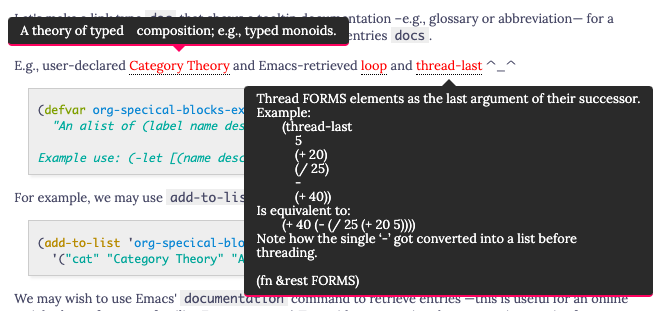
Figure 1: Tooltips for documentation and glossary items –in the browser!
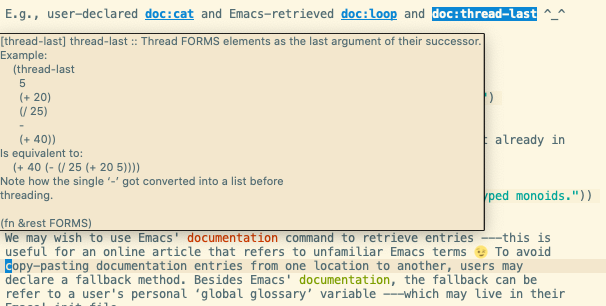
Figure 2: Tooltips for documentation and glossary items –in Emacs!
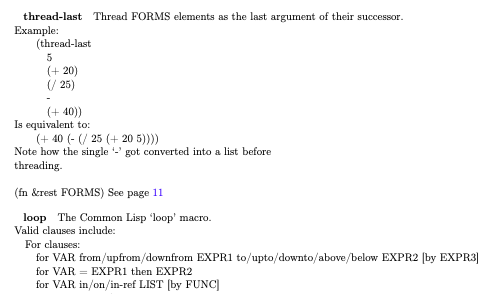
Figure 3: Tooltips for documentation and glossary items –in the PDF!
#+endquote
Below are the entries in my personal glossary ;-)
Category Theory
A theory of typed composition; e.g., typed monoids, such as matrices and matrix multiplication.
A theory of typed composition; e.g., typed monoids, such as matrices and matrix multiplication.
A theory of typed composition; e.g., typed monoids, such as matrices and matrix multiplication.
A theory of typed composition; e.g., typed monoids, such as matrices and matrix multiplication.
A theory of typed composition; e.g., typed monoids, such as matrices and matrix multiplication.
A theory of typed composition; e.g., typed monoids, such as matrices and matrix multiplication.
A “transitive” verb is a verb that requires an object to express a complete thought, otherwise it is “intransitive”.
Some verbs are both transitive and intransitive.
A “transitive” verb needs to transfer its action to something or someone —the object.
In essence, transitive means “to affect something else.”
For example, “Please bring coffee.” would not be a complete thought without the object “coffee”.
That is, “Please bring.” is an incomplete thought: What or whom should we bring? As such, “bring” is a transitive verb.
In contrast, “Please sing.” is a complete thought, and so “sing” is an intransitive verb —actually, it's also transitive.
In Arabic, the Form-4 أفْعَلَ pattern turns intransitive verbs into transitive ones; and turns transitive verbs into
doubly-transitive verbs —which means it takes two objects: E.g., “I gave the boy the ball”, here “gave” is
doubly-transitive. E.g., in Form-4, ر−س−ل “to send” gives the transitive verb أرْسَلَ which means it can be followed by two
objects: أرْسَلَ الولد لكتاب “The boy sent the book”.
A theory of typed composition; e.g., typed monoids, such as matrices and matrix multiplication.
A theory of typed composition; e.g., typed monoids, such as matrices and matrix multiplication.
A theory of typed composition; e.g., typed monoids, such as matrices and matrix multiplication.
A “transitive” verb is a verb that requires an object to express a complete thought, otherwise it is “intransitive”.
Some verbs are both transitive and intransitive.
A “transitive” verb needs to transfer its action to something or someone —the object.
In essence, transitive means “to affect something else.”
For example, “Please bring coffee.” would not be a complete thought without the object “coffee”.
That is, “Please bring.” is an incomplete thought: What or whom should we bring? As such, “bring” is a transitive verb.
In contrast, “Please sing.” is a complete thought, and so “sing” is an intransitive verb —actually, it's also transitive.
In Arabic, the Form-4 أفْعَلَ pattern turns intransitive verbs into transitive ones; and turns transitive verbs into
doubly-transitive verbs —which means it takes two objects: E.g., “I gave the boy the ball”, here “gave” is
doubly-transitive. E.g., in Form-4, ر−س−ل “to send” gives the transitive verb أرْسَلَ which means it can be followed by two
objects: أرْسَلَ الولد لكتاب “The boy sent the book”.
A theory of typed composition; e.g., typed monoids, such as matrices and matrix multiplication.
A theory of typed composition; e.g., typed monoids, such as matrices and matrix multiplication.
A theory of typed composition; e.g., typed monoids, such as matrices and matrix multiplication.
A “transitive” verb is a verb that requires an object to express a complete thought, otherwise it is “intransitive”.
Some verbs are both transitive and intransitive.
A “transitive” verb needs to transfer its action to something or someone —the object.
In essence, transitive means “to affect something else.”
For example, “Please bring coffee.” would not be a complete thought without the object “coffee”.
That is, “Please bring.” is an incomplete thought: What or whom should we bring? As such, “bring” is a transitive verb.
In contrast, “Please sing.” is a complete thought, and so “sing” is an intransitive verb —actually, it's also transitive.
In Arabic, the Form-4 أفْعَلَ pattern turns intransitive verbs into transitive ones; and turns transitive verbs into
doubly-transitive verbs —which means it takes two objects: E.g., “I gave the boy the ball”, here “gave” is
doubly-transitive. E.g., in Form-4, ر−س−ل “to send” gives the transitive verb أرْسَلَ which means it can be followed by two
objects: أرْسَلَ الولد لكتاب “The boy sent the book”.
A theory of typed composition; e.g., typed monoids, such as matrices and matrix multiplication.
A theory of typed composition; e.g., typed monoids, such as matrices and matrix multiplication.
A theory of typed composition; e.g., typed monoids, such as matrices and matrix multiplication.
A theory of typed composition; e.g., typed monoids, such as matrices and matrix multiplication.
A theory of typed composition; e.g., typed monoids, such as matrices and matrix multiplication.
A theory of typed composition; e.g., typed monoids, such as matrices and matrix multiplication.
A “transitive” verb is a verb that requires an object to express a complete thought, otherwise it is “intransitive”.
Some verbs are both transitive and intransitive.
A “transitive” verb needs to transfer its action to something or someone —the object.
In essence, transitive means “to affect something else.”
For example, “Please bring coffee.” would not be a complete thought without the object “coffee”.
That is, “Please bring.” is an incomplete thought: What or whom should we bring? As such, “bring” is a transitive verb.
In contrast, “Please sing.” is a complete thought, and so “sing” is an intransitive verb —actually, it's also transitive.
In Arabic, the Form-4 أفْعَلَ pattern turns intransitive verbs into transitive ones; and turns transitive verbs into
doubly-transitive verbs —which means it takes two objects: E.g., “I gave the boy the ball”, here “gave” is
doubly-transitive. E.g., in Form-4, ر−س−ل “to send” gives the transitive verb أرْسَلَ which means it can be followed by two
objects: أرْسَلَ الولد لكتاب “The boy sent the book”.
A theory of typed composition; e.g., typed monoids, such as matrices and matrix multiplication.
A theory of typed composition; e.g., typed monoids, such as matrices and matrix multiplication.
A theory of typed composition; e.g., typed monoids, such as matrices and matrix multiplication.
A “transitive” verb is a verb that requires an object to express a complete thought, otherwise it is “intransitive”.
Some verbs are both transitive and intransitive.
A “transitive” verb needs to transfer its action to something or someone —the object.
In essence, transitive means “to affect something else.”
For example, “Please bring coffee.” would not be a complete thought without the object “coffee”.
That is, “Please bring.” is an incomplete thought: What or whom should we bring? As such, “bring” is a transitive verb.
In contrast, “Please sing.” is a complete thought, and so “sing” is an intransitive verb —actually, it's also transitive.
In Arabic, the Form-4 أفْعَلَ pattern turns intransitive verbs into transitive ones; and turns transitive verbs into
doubly-transitive verbs —which means it takes two objects: E.g., “I gave the boy the ball”, here “gave” is
doubly-transitive. E.g., in Form-4, ر−س−ل “to send” gives the transitive verb أرْسَلَ which means it can be followed by two
objects: أرْسَلَ الولد لكتاب “The boy sent the book”./bin/bash: line 1: wn: command not found
Existential_Angst/bin/bash: line 1: wn: command not found
ex-angst/bin/bash: line 1: wn: command not found
existential_angsty/bin/bash: line 1: wn: command not found
Existential_Angsty/bin/bash: line 1: wn: command not found
nil/bin/bash: line 1: wn: command not found
nil/bin/bash: line 1: wn: command not found
hussain/bin/bash: line 1: wn: command not found
Hussain/bin/bash: line 1: wn: command not found
Karbala/bin/bash: line 1: wn: command not found
Cosmic_Tragedy/bin/bash: line 1: wn: command not found
hello/bin/bash: line 1: wn: command not found
Hello/bin/bash: line 1: wn: command not found
nil/bin/bash: line 1: wn: command not found
graph/bin/bash: line 1: wn: command not found
Graph/bin/bash: line 1: wn: command not found
nil/bin/bash: line 1: wn: command not found
expression/bin/bash: line 1: wn: command not found
Expression/bin/bash: line 1: wn: command not found
nil/bin/bash: line 1: wn: command not found
induction/bin/bash: line 1: wn: command not found
Induction/bin/bash: line 1: wn: command not found
nil/bin/bash: line 1: wn: command not found
textual_substitution/bin/bash: line 1: wn: command not found
Textual_Substitution/bin/bash: line 1: wn: command not found
nil/bin/bash: line 1: wn: command not found
inference_rule/bin/bash: line 1: wn: command not found
Inference_Rule/bin/bash: line 1: wn: command not found
nil/bin/bash: line 1: wn: command not found
logic/bin/bash: line 1: wn: command not found
Logic/bin/bash: line 1: wn: command not found
nil/bin/bash: line 1: wn: command not found
theorem/bin/bash: line 1: wn: command not found
Theorem/bin/bash: line 1: wn: command not found
nil/bin/bash: line 1: wn: command not found
metatheorem/bin/bash: line 1: wn: command not found
Metatheorem/bin/bash: line 1: wn: command not found
nil/bin/bash: line 1: wn: command not found
calculus/bin/bash: line 1: wn: command not found
Calculus/bin/bash: line 1: wn: command not found
Propositional_Calculus/bin/bash: line 1: wn: command not found
semantics/bin/bash: line 1: wn: command not found
Semantics/bin/bash: line 1: wn: command not found
temp
temp
calculational_proof/bin/bash: line 1: wn: command not found
Calculational_Proof/bin/bash: line 1: wn: command not found
nil/bin/bash: line 1: wn: command not found
programming/bin/bash: line 1: wn: command not found
Programming/bin/bash: line 1: wn: command not found
nil/bin/bash: line 1: wn: command not found
specification/bin/bash: line 1: wn: command not found
Specification/bin/bash: line 1: wn: command not found
nil/bin/bash: line 1: wn: command not found
proving_is_programming/bin/bash: line 1: wn: command not found
Proving_is_Programming/bin/bash: line 1: wn: command not found
nil/bin/bash: line 1: wn: command not found
algorithmic_problem_solving/bin/bash: line 1: wn: command not found
Algorithmic_Problem_Solving/bin/bash: line 1: wn: command not found
nil/bin/bash: line 1: wn: command not found
natural_transformation/bin/bash: line 1: wn: command not found
Natural_Transformation/bin/bash: line 1: wn: command not found
nat-trans/bin/bash: line 1: wn: command not found
polymorphism/bin/bash: line 1: wn: command not found
Category Theory/bin/bash: line 1: wn: command not found
Associative/bin/bash: line 1: wn: command not found
nil/bin/bash: line 1: wn: command not found
identityReturn the ARGUMENT unchanged.
(fn ARGUMENT)
Identity/bin/bash: line 1: wn: command not found
nil/bin/bash: line 1: wn: command not found
distributive/bin/bash: line 1: wn: command not found
Distributive/bin/bash: line 1: wn: command not found
nil/bin/bash: line 1: wn: command not found
commutative/bin/bash: line 1: wn: command not found
Commutative/bin/bash: line 1: wn: command not found
nil/bin/bash: line 1: wn: command not found
reflexive/bin/bash: line 1: wn: command not found
Reflexive/bin/bash: line 1: wn: command not found
nil/bin/bash: line 1: wn: command not found
transitive/bin/bash: line 1: wn: command not found
nil/bin/bash: line 1: wn: command not found
symmetric/bin/bash: line 1: wn: command not found
Symmetric/bin/bash: line 1: wn: command not found
nil/bin/bash: line 1: wn: command not found
antisymmetric/bin/bash: line 1: wn: command not found
Antisymmetric/bin/bash: line 1: wn: command not found
nil/bin/bash: line 1: wn: command not found
asymmetric/bin/bash: line 1: wn: command not found
Asymmetric/bin/bash: line 1: wn: command not found
nil/bin/bash: line 1: wn: command not found
preorder/bin/bash: line 1: wn: command not found
Preorder/bin/bash: line 1: wn: command not found
nil/bin/bash: line 1: wn: command not found
equivalence/bin/bash: line 1: wn: command not found
Equivalence/bin/bash: line 1: wn: command not found
nil/bin/bash: line 1: wn: command not found
linear/bin/bash: line 1: wn: command not found
Linear/bin/bash: line 1: wn: command not found
nil/bin/bash: line 1: wn: command not found
semilinear/bin/bash: line 1: wn: command not found
Semilinear/bin/bash: line 1: wn: command not found
nil/bin/bash: line 1: wn: command not found
univalent/bin/bash: line 1: wn: command not found
Univalent/bin/bash: line 1: wn: command not found
nil/bin/bash: line 1: wn: command not found
total/bin/bash: line 1: wn: command not found
Total/bin/bash: line 1: wn: command not found
nil/bin/bash: line 1: wn: command not found
map/bin/bash: line 1: wn: command not found
Map/bin/bash: line 1: wn: command not found
nil/bin/bash: line 1: wn: command not found
surjective/bin/bash: line 1: wn: command not found
Surjective/bin/bash: line 1: wn: command not found
nil/bin/bash: line 1: wn: command not found
injective/bin/bash: line 1: wn: command not found
Injective/bin/bash: line 1: wn: command not found
nil/bin/bash: line 1: wn: command not found
bijective/bin/bash: line 1: wn: command not found
Bijective/bin/bash: line 1: wn: command not found
nil/bin/bash: line 1: wn: command not found
iso/bin/bash: line 1: wn: command not found
Iso/bin/bash: line 1: wn: command not found
nil/bin/bash: line 1: wn: command not found
difunctional/bin/bash: line 1: wn: command not found
Difunctional/bin/bash: line 1: wn: command not found
nil/bin/bash: line 1: wn: command not found
nil/bin/bash: line 1: wn: command not found
hussain/bin/bash: line 1: wn: command not found
Hussain/bin/bash: line 1: wn: command not found
Karbala/bin/bash: line 1: wn: command not found
Cosmic_Tragedy/bin/bash: line 1: wn: command not found
hello/bin/bash: line 1: wn: command not found
Hello/bin/bash: line 1: wn: command not found
nil/bin/bash: line 1: wn: command not found
graph/bin/bash: line 1: wn: command not found
Graph/bin/bash: line 1: wn: command not found
nil/bin/bash: line 1: wn: command not found
expression/bin/bash: line 1: wn: command not found
Expression/bin/bash: line 1: wn: command not found
nil/bin/bash: line 1: wn: command not found
induction/bin/bash: line 1: wn: command not found
Induction/bin/bash: line 1: wn: command not found
nil/bin/bash: line 1: wn: command not found
textual_substitution/bin/bash: line 1: wn: command not found
Textual_Substitution/bin/bash: line 1: wn: command not found
nil/bin/bash: line 1: wn: command not found
inference_rule/bin/bash: line 1: wn: command not found
Inference_Rule/bin/bash: line 1: wn: command not found
nil/bin/bash: line 1: wn: command not found
logic/bin/bash: line 1: wn: command not found
Logic/bin/bash: line 1: wn: command not found
nil/bin/bash: line 1: wn: command not found
theorem/bin/bash: line 1: wn: command not found
Theorem/bin/bash: line 1: wn: command not found
nil/bin/bash: line 1: wn: command not found
metatheorem/bin/bash: line 1: wn: command not found
Metatheorem/bin/bash: line 1: wn: command not found
nil/bin/bash: line 1: wn: command not found
calculus/bin/bash: line 1: wn: command not found
Calculus/bin/bash: line 1: wn: command not found
Propositional_Calculus/bin/bash: line 1: wn: command not found
semantics/bin/bash: line 1: wn: command not found
Semantics/bin/bash: line 1: wn: command not found
temp
temp
calculational_proof/bin/bash: line 1: wn: command not found
Calculational_Proof/bin/bash: line 1: wn: command not found
nil/bin/bash: line 1: wn: command not found
programming/bin/bash: line 1: wn: command not found
Programming/bin/bash: line 1: wn: command not found
nil/bin/bash: line 1: wn: command not found
specification/bin/bash: line 1: wn: command not found
Specification/bin/bash: line 1: wn: command not found
nil/bin/bash: line 1: wn: command not found
proving_is_programming/bin/bash: line 1: wn: command not found
Proving_is_Programming/bin/bash: line 1: wn: command not found
nil/bin/bash: line 1: wn: command not found
algorithmic_problem_solving/bin/bash: line 1: wn: command not found
Algorithmic_Problem_Solving/bin/bash: line 1: wn: command not found
nil/bin/bash: line 1: wn: command not found
natural_transformation/bin/bash: line 1: wn: command not found
Natural_Transformation/bin/bash: line 1: wn: command not found
nat-trans/bin/bash: line 1: wn: command not found
polymorphism/bin/bash: line 1: wn: command not found
Category Theory/bin/bash: line 1: wn: command not found
Associative/bin/bash: line 1: wn: command not found
nil/bin/bash: line 1: wn: command not found
identityReturn the ARGUMENT unchanged.
(fn ARGUMENT)
Identity/bin/bash: line 1: wn: command not found
nil/bin/bash: line 1: wn: command not found
distributive/bin/bash: line 1: wn: command not found
Distributive/bin/bash: line 1: wn: command not found
nil/bin/bash: line 1: wn: command not found
commutative/bin/bash: line 1: wn: command not found
Commutative/bin/bash: line 1: wn: command not found
nil/bin/bash: line 1: wn: command not found
reflexive/bin/bash: line 1: wn: command not found
Reflexive/bin/bash: line 1: wn: command not found
nil/bin/bash: line 1: wn: command not found
transitive/bin/bash: line 1: wn: command not found
nil/bin/bash: line 1: wn: command not found
symmetric/bin/bash: line 1: wn: command not found
Symmetric/bin/bash: line 1: wn: command not found
nil/bin/bash: line 1: wn: command not found
antisymmetric/bin/bash: line 1: wn: command not found
Antisymmetric/bin/bash: line 1: wn: command not found
nil/bin/bash: line 1: wn: command not found
asymmetric/bin/bash: line 1: wn: command not found
Asymmetric/bin/bash: line 1: wn: command not found
nil/bin/bash: line 1: wn: command not found
preorder/bin/bash: line 1: wn: command not found
Preorder/bin/bash: line 1: wn: command not found
nil/bin/bash: line 1: wn: command not found
equivalence/bin/bash: line 1: wn: command not found
Equivalence/bin/bash: line 1: wn: command not found
nil/bin/bash: line 1: wn: command not found
linear/bin/bash: line 1: wn: command not found
Linear/bin/bash: line 1: wn: command not found
nil/bin/bash: line 1: wn: command not found
semilinear/bin/bash: line 1: wn: command not found
Semilinear/bin/bash: line 1: wn: command not found
nil/bin/bash: line 1: wn: command not found
univalent/bin/bash: line 1: wn: command not found
Univalent/bin/bash: line 1: wn: command not found
nil/bin/bash: line 1: wn: command not found
total/bin/bash: line 1: wn: command not found
Total/bin/bash: line 1: wn: command not found
nil/bin/bash: line 1: wn: command not found
map/bin/bash: line 1: wn: command not found
Map/bin/bash: line 1: wn: command not found
nil/bin/bash: line 1: wn: command not found
surjective/bin/bash: line 1: wn: command not found
Surjective/bin/bash: line 1: wn: command not found
nil/bin/bash: line 1: wn: command not found
injective/bin/bash: line 1: wn: command not found
Injective/bin/bash: line 1: wn: command not found
nil/bin/bash: line 1: wn: command not found
bijective/bin/bash: line 1: wn: command not found
Bijective/bin/bash: line 1: wn: command not found
nil/bin/bash: line 1: wn: command not found
iso/bin/bash: line 1: wn: command not found
Iso/bin/bash: line 1: wn: command not found
nil/bin/bash: line 1: wn: command not found
difunctional/bin/bash: line 1: wn: command not found
Difunctional/bin/bash: line 1: wn: command not found
nil/bin/bash: line 1: wn: command not found
nil/bin/bash: line 1: wn: command not found
hussain/bin/bash: line 1: wn: command not found
Hussain/bin/bash: line 1: wn: command not found
Karbala/bin/bash: line 1: wn: command not found
Cosmic_Tragedy/bin/bash: line 1: wn: command not found
hello/bin/bash: line 1: wn: command not found
Hello/bin/bash: line 1: wn: command not found
nil/bin/bash: line 1: wn: command not found
graph/bin/bash: line 1: wn: command not found
Graph/bin/bash: line 1: wn: command not found
nil/bin/bash: line 1: wn: command not found
expression/bin/bash: line 1: wn: command not found
Expression/bin/bash: line 1: wn: command not found
nil/bin/bash: line 1: wn: command not found
induction/bin/bash: line 1: wn: command not found
Induction/bin/bash: line 1: wn: command not found
nil/bin/bash: line 1: wn: command not found
textual_substitution/bin/bash: line 1: wn: command not found
Textual_Substitution/bin/bash: line 1: wn: command not found
nil/bin/bash: line 1: wn: command not found
inference_rule/bin/bash: line 1: wn: command not found
Inference_Rule/bin/bash: line 1: wn: command not found
nil/bin/bash: line 1: wn: command not found
logic/bin/bash: line 1: wn: command not found
Logic/bin/bash: line 1: wn: command not found
nil/bin/bash: line 1: wn: command not found
theorem/bin/bash: line 1: wn: command not found
Theorem/bin/bash: line 1: wn: command not found
nil/bin/bash: line 1: wn: command not found
metatheorem/bin/bash: line 1: wn: command not found
Metatheorem/bin/bash: line 1: wn: command not found
nil/bin/bash: line 1: wn: command not found
calculus/bin/bash: line 1: wn: command not found
Calculus/bin/bash: line 1: wn: command not found
Propositional_Calculus/bin/bash: line 1: wn: command not found
semantics/bin/bash: line 1: wn: command not found
Semantics/bin/bash: line 1: wn: command not found
temp
temp
calculational_proof/bin/bash: line 1: wn: command not found
Calculational_Proof/bin/bash: line 1: wn: command not found
nil/bin/bash: line 1: wn: command not found
programming/bin/bash: line 1: wn: command not found
Programming/bin/bash: line 1: wn: command not found
nil/bin/bash: line 1: wn: command not found
specification/bin/bash: line 1: wn: command not found
Specification/bin/bash: line 1: wn: command not found
nil/bin/bash: line 1: wn: command not found
proving_is_programming/bin/bash: line 1: wn: command not found
Proving_is_Programming/bin/bash: line 1: wn: command not found
nil/bin/bash: line 1: wn: command not found
algorithmic_problem_solving/bin/bash: line 1: wn: command not found
Algorithmic_Problem_Solving/bin/bash: line 1: wn: command not found
nil/bin/bash: line 1: wn: command not found
natural_transformation/bin/bash: line 1: wn: command not found
Natural_Transformation/bin/bash: line 1: wn: command not found
nat-trans/bin/bash: line 1: wn: command not found
polymorphism/bin/bash: line 1: wn: command not found
Category Theory/bin/bash: line 1: wn: command not found
Associative/bin/bash: line 1: wn: command not found
nil/bin/bash: line 1: wn: command not found
identityReturn the ARGUMENT unchanged.
(fn ARGUMENT)
Identity/bin/bash: line 1: wn: command not found
nil/bin/bash: line 1: wn: command not found
distributive/bin/bash: line 1: wn: command not found
Distributive/bin/bash: line 1: wn: command not found
nil/bin/bash: line 1: wn: command not found
commutative/bin/bash: line 1: wn: command not found
Commutative/bin/bash: line 1: wn: command not found
nil/bin/bash: line 1: wn: command not found
reflexive/bin/bash: line 1: wn: command not found
Reflexive/bin/bash: line 1: wn: command not found
nil/bin/bash: line 1: wn: command not found
transitive/bin/bash: line 1: wn: command not found
nil/bin/bash: line 1: wn: command not found
symmetric/bin/bash: line 1: wn: command not found
Symmetric/bin/bash: line 1: wn: command not found
nil/bin/bash: line 1: wn: command not found
antisymmetric/bin/bash: line 1: wn: command not found
Antisymmetric/bin/bash: line 1: wn: command not found
nil/bin/bash: line 1: wn: command not found
asymmetric/bin/bash: line 1: wn: command not found
Asymmetric/bin/bash: line 1: wn: command not found
nil/bin/bash: line 1: wn: command not found
preorder/bin/bash: line 1: wn: command not found
Preorder/bin/bash: line 1: wn: command not found
nil/bin/bash: line 1: wn: command not found
equivalence/bin/bash: line 1: wn: command not found
Equivalence/bin/bash: line 1: wn: command not found
nil/bin/bash: line 1: wn: command not found
linear/bin/bash: line 1: wn: command not found
Linear/bin/bash: line 1: wn: command not found
nil/bin/bash: line 1: wn: command not found
semilinear/bin/bash: line 1: wn: command not found
Semilinear/bin/bash: line 1: wn: command not found
nil/bin/bash: line 1: wn: command not found
univalent/bin/bash: line 1: wn: command not found
Univalent/bin/bash: line 1: wn: command not found
nil/bin/bash: line 1: wn: command not found
total/bin/bash: line 1: wn: command not found
Total/bin/bash: line 1: wn: command not found
nil/bin/bash: line 1: wn: command not found
map/bin/bash: line 1: wn: command not found
Map/bin/bash: line 1: wn: command not found
nil/bin/bash: line 1: wn: command not found
surjective/bin/bash: line 1: wn: command not found
Surjective/bin/bash: line 1: wn: command not found
nil/bin/bash: line 1: wn: command not found
injective/bin/bash: line 1: wn: command not found
Injective/bin/bash: line 1: wn: command not found
nil/bin/bash: line 1: wn: command not found
bijective/bin/bash: line 1: wn: command not found
Bijective/bin/bash: line 1: wn: command not found
nil/bin/bash: line 1: wn: command not found
iso/bin/bash: line 1: wn: command not found
Iso/bin/bash: line 1: wn: command not found
nil/bin/bash: line 1: wn: command not found
difunctional/bin/bash: line 1: wn: command not found
Difunctional/bin/bash: line 1: wn: command not found
nil/bin/bash: line 1: wn: command not found
Category Theory/bin/bash: line 1: wn: command not found
Existential_Angst/bin/bash: line 1: wn: command not found
ex-angst/bin/bash: line 1: wn: command not found
existential_angsty/bin/bash: line 1: wn: command not found
Existential_Angsty/bin/bash: line 1: wn: command not found
nil/bin/bash: line 1: wn: command not found
nil/bin/bash: line 1: wn: command not found
hussain/bin/bash: line 1: wn: command not found
Hussain/bin/bash: line 1: wn: command not found
Karbala/bin/bash: line 1: wn: command not found
Cosmic_Tragedy/bin/bash: line 1: wn: command not found
hello/bin/bash: line 1: wn: command not found
Hello/bin/bash: line 1: wn: command not found
nil/bin/bash: line 1: wn: command not found
graph/bin/bash: line 1: wn: command not found
Graph/bin/bash: line 1: wn: command not found
nil/bin/bash: line 1: wn: command not found
expression/bin/bash: line 1: wn: command not found
Expression/bin/bash: line 1: wn: command not found
nil/bin/bash: line 1: wn: command not found
induction/bin/bash: line 1: wn: command not found
Induction/bin/bash: line 1: wn: command not found
nil/bin/bash: line 1: wn: command not found
textual_substitution/bin/bash: line 1: wn: command not found
Textual_Substitution/bin/bash: line 1: wn: command not found
nil/bin/bash: line 1: wn: command not found
inference_rule/bin/bash: line 1: wn: command not found
Inference_Rule/bin/bash: line 1: wn: command not found
nil/bin/bash: line 1: wn: command not found
logic/bin/bash: line 1: wn: command not found
Logic/bin/bash: line 1: wn: command not found
nil/bin/bash: line 1: wn: command not found
theorem/bin/bash: line 1: wn: command not found
Theorem/bin/bash: line 1: wn: command not found
nil/bin/bash: line 1: wn: command not found
metatheorem/bin/bash: line 1: wn: command not found
Metatheorem/bin/bash: line 1: wn: command not found
nil/bin/bash: line 1: wn: command not found
calculus/bin/bash: line 1: wn: command not found
Calculus/bin/bash: line 1: wn: command not found
Propositional_Calculus/bin/bash: line 1: wn: command not found
semantics/bin/bash: line 1: wn: command not found
Semantics/bin/bash: line 1: wn: command not found
temp
temp
calculational_proof/bin/bash: line 1: wn: command not found
Calculational_Proof/bin/bash: line 1: wn: command not found
nil/bin/bash: line 1: wn: command not found
programming/bin/bash: line 1: wn: command not found
Programming/bin/bash: line 1: wn: command not found
nil/bin/bash: line 1: wn: command not found
specification/bin/bash: line 1: wn: command not found
Specification/bin/bash: line 1: wn: command not found
nil/bin/bash: line 1: wn: command not found
proving_is_programming/bin/bash: line 1: wn: command not found
Proving_is_Programming/bin/bash: line 1: wn: command not found
nil/bin/bash: line 1: wn: command not found
algorithmic_problem_solving/bin/bash: line 1: wn: command not found
Algorithmic_Problem_Solving/bin/bash: line 1: wn: command not found
nil/bin/bash: line 1: wn: command not found
natural_transformation/bin/bash: line 1: wn: command not found
Natural_Transformation/bin/bash: line 1: wn: command not found
nat-trans/bin/bash: line 1: wn: command not found
polymorphism/bin/bash: line 1: wn: command not found
Category Theory/bin/bash: line 1: wn: command not found
Associative/bin/bash: line 1: wn: command not found
nil/bin/bash: line 1: wn: command not found
identityReturn the ARGUMENT unchanged.
(fn ARGUMENT)
Identity/bin/bash: line 1: wn: command not found
nil/bin/bash: line 1: wn: command not found
distributive/bin/bash: line 1: wn: command not found
Distributive/bin/bash: line 1: wn: command not found
nil/bin/bash: line 1: wn: command not found
commutative/bin/bash: line 1: wn: command not found
Commutative/bin/bash: line 1: wn: command not found
nil/bin/bash: line 1: wn: command not found
reflexive/bin/bash: line 1: wn: command not found
Reflexive/bin/bash: line 1: wn: command not found
nil/bin/bash: line 1: wn: command not found
transitive/bin/bash: line 1: wn: command not found
nil/bin/bash: line 1: wn: command not found
symmetric/bin/bash: line 1: wn: command not found
Symmetric/bin/bash: line 1: wn: command not found
nil/bin/bash: line 1: wn: command not found
antisymmetric/bin/bash: line 1: wn: command not found
Antisymmetric/bin/bash: line 1: wn: command not found
nil/bin/bash: line 1: wn: command not found
asymmetric/bin/bash: line 1: wn: command not found
Asymmetric/bin/bash: line 1: wn: command not found
nil/bin/bash: line 1: wn: command not found
preorder/bin/bash: line 1: wn: command not found
Preorder/bin/bash: line 1: wn: command not found
nil/bin/bash: line 1: wn: command not found
equivalence/bin/bash: line 1: wn: command not found
Equivalence/bin/bash: line 1: wn: command not found
nil/bin/bash: line 1: wn: command not found
linear/bin/bash: line 1: wn: command not found
Linear/bin/bash: line 1: wn: command not found
nil/bin/bash: line 1: wn: command not found
semilinear/bin/bash: line 1: wn: command not found
Semilinear/bin/bash: line 1: wn: command not found
nil/bin/bash: line 1: wn: command not found
univalent/bin/bash: line 1: wn: command not found
Univalent/bin/bash: line 1: wn: command not found
nil/bin/bash: line 1: wn: command not found
total/bin/bash: line 1: wn: command not found
Total/bin/bash: line 1: wn: command not found
nil/bin/bash: line 1: wn: command not found
map/bin/bash: line 1: wn: command not found
Map/bin/bash: line 1: wn: command not found
nil/bin/bash: line 1: wn: command not found
surjective/bin/bash: line 1: wn: command not found
Surjective/bin/bash: line 1: wn: command not found
nil/bin/bash: line 1: wn: command not found
injective/bin/bash: line 1: wn: command not found
Injective/bin/bash: line 1: wn: command not found
nil/bin/bash: line 1: wn: command not found
bijective/bin/bash: line 1: wn: command not found
Bijective/bin/bash: line 1: wn: command not found
nil/bin/bash: line 1: wn: command not found
iso/bin/bash: line 1: wn: command not found
Iso/bin/bash: line 1: wn: command not found
nil/bin/bash: line 1: wn: command not found
difunctional/bin/bash: line 1: wn: command not found
Difunctional/bin/bash: line 1: wn: command not found
hussain/bin/bash: line 1: wn: command not found
Hussain/bin/bash: line 1: wn: command not found
Karbala/bin/bash: line 1: wn: command not found
Cosmic_Tragedy/bin/bash: line 1: wn: command not found
hello/bin/bash: line 1: wn: command not found
Hello/bin/bash: line 1: wn: command not found
nil/bin/bash: line 1: wn: command not found
graph/bin/bash: line 1: wn: command not found
Graph/bin/bash: line 1: wn: command not found
nil/bin/bash: line 1: wn: command not found
expression/bin/bash: line 1: wn: command not found
Expression/bin/bash: line 1: wn: command not found
nil/bin/bash: line 1: wn: command not found
induction/bin/bash: line 1: wn: command not found
Induction/bin/bash: line 1: wn: command not found
nil/bin/bash: line 1: wn: command not found
textual_substitution/bin/bash: line 1: wn: command not found
Textual_Substitution/bin/bash: line 1: wn: command not found
nil/bin/bash: line 1: wn: command not found
inference_rule/bin/bash: line 1: wn: command not found
Inference_Rule/bin/bash: line 1: wn: command not found
nil/bin/bash: line 1: wn: command not found
logic/bin/bash: line 1: wn: command not found
Logic/bin/bash: line 1: wn: command not found
nil/bin/bash: line 1: wn: command not found
theorem/bin/bash: line 1: wn: command not found
Theorem/bin/bash: line 1: wn: command not found
nil/bin/bash: line 1: wn: command not found
metatheorem/bin/bash: line 1: wn: command not found
Metatheorem/bin/bash: line 1: wn: command not found
nil/bin/bash: line 1: wn: command not found
calculus/bin/bash: line 1: wn: command not found
Calculus/bin/bash: line 1: wn: command not found
Propositional_Calculus/bin/bash: line 1: wn: command not found
semantics/bin/bash: line 1: wn: command not found
Semantics/bin/bash: line 1: wn: command not found
temp
temp
calculational_proof/bin/bash: line 1: wn: command not found
Calculational_Proof/bin/bash: line 1: wn: command not found
nil/bin/bash: line 1: wn: command not found
programming/bin/bash: line 1: wn: command not found
Programming/bin/bash: line 1: wn: command not found
nil/bin/bash: line 1: wn: command not found
specification/bin/bash: line 1: wn: command not found
Specification/bin/bash: line 1: wn: command not found
nil/bin/bash: line 1: wn: command not found
proving_is_programming/bin/bash: line 1: wn: command not found
Proving_is_Programming/bin/bash: line 1: wn: command not found
nil/bin/bash: line 1: wn: command not found
algorithmic_problem_solving/bin/bash: line 1: wn: command not found
Algorithmic_Problem_Solving/bin/bash: line 1: wn: command not found
nil/bin/bash: line 1: wn: command not found
natural_transformation/bin/bash: line 1: wn: command not found
Natural_Transformation/bin/bash: line 1: wn: command not found
nat-trans/bin/bash: line 1: wn: command not found
polymorphism/bin/bash: line 1: wn: command not found
Category Theory/bin/bash: line 1: wn: command not found
Associative/bin/bash: line 1: wn: command not found
nil/bin/bash: line 1: wn: command not found
identityReturn the ARGUMENT unchanged.
(fn ARGUMENT)
Identity/bin/bash: line 1: wn: command not found
nil/bin/bash: line 1: wn: command not found
distributive/bin/bash: line 1: wn: command not found
Distributive/bin/bash: line 1: wn: command not found
nil/bin/bash: line 1: wn: command not found
commutative/bin/bash: line 1: wn: command not found
Commutative/bin/bash: line 1: wn: command not found
nil/bin/bash: line 1: wn: command not found
reflexive/bin/bash: line 1: wn: command not found
Reflexive/bin/bash: line 1: wn: command not found
nil/bin/bash: line 1: wn: command not found
transitive/bin/bash: line 1: wn: command not found
nil/bin/bash: line 1: wn: command not found
symmetric/bin/bash: line 1: wn: command not found
Symmetric/bin/bash: line 1: wn: command not found
nil/bin/bash: line 1: wn: command not found
antisymmetric/bin/bash: line 1: wn: command not found
Antisymmetric/bin/bash: line 1: wn: command not found
nil/bin/bash: line 1: wn: command not found
asymmetric/bin/bash: line 1: wn: command not found
Asymmetric/bin/bash: line 1: wn: command not found
nil/bin/bash: line 1: wn: command not found
preorder/bin/bash: line 1: wn: command not found
Preorder/bin/bash: line 1: wn: command not found
nil/bin/bash: line 1: wn: command not found
equivalence/bin/bash: line 1: wn: command not found
Equivalence/bin/bash: line 1: wn: command not found
nil/bin/bash: line 1: wn: command not found
linear/bin/bash: line 1: wn: command not found
Linear/bin/bash: line 1: wn: command not found
nil/bin/bash: line 1: wn: command not found
semilinear/bin/bash: line 1: wn: command not found
Semilinear/bin/bash: line 1: wn: command not found
nil/bin/bash: line 1: wn: command not found
univalent/bin/bash: line 1: wn: command not found
Univalent/bin/bash: line 1: wn: command not found
nil/bin/bash: line 1: wn: command not found
total/bin/bash: line 1: wn: command not found
Total/bin/bash: line 1: wn: command not found
nil/bin/bash: line 1: wn: command not found
map/bin/bash: line 1: wn: command not found
Map/bin/bash: line 1: wn: command not found
nil/bin/bash: line 1: wn: command not found
surjective/bin/bash: line 1: wn: command not found
Surjective/bin/bash: line 1: wn: command not found
nil/bin/bash: line 1: wn: command not found
injective/bin/bash: line 1: wn: command not found
Injective/bin/bash: line 1: wn: command not found
nil/bin/bash: line 1: wn: command not found
bijective/bin/bash: line 1: wn: command not found
Bijective/bin/bash: line 1: wn: command not found
nil/bin/bash: line 1: wn: command not found
iso/bin/bash: line 1: wn: command not found
Iso/bin/bash: line 1: wn: command not found
nil/bin/bash: line 1: wn: command not found
difunctional/bin/bash: line 1: wn: command not found
Difunctional/bin/bash: line 1: wn: command not found
nil/bin/bash: line 1: wn: command not found
In the export, it looks like some names are repeated, but in the source one would notice that we have labels in both upper and lower cases and with underscores ;-) They just happen to be referring to the same named entry.
#+enddetails
Tests
(deftest "It gives a tooltip whose title is the Lisp docs of APPLY"
  [doc]
  (⇝ (⟰ "doc:apply")
     "<abbr class=\"tooltip\" title=\""
     (literal (s-replace "\n" "<br>" (documentation #'apply)))
     "\">apply</abbr>"))

(setq angst
      (⟰ "#+begin_documentation Existential Angst :label \"ex-angst\"
                       A negative feeling arising from freedom and responsibility.

                       Also known as
                       1. /Existential Dread/, and
                       2. *Existential Anxiety*.

                       Perhaps a distraction, such as [[https://www.w3schools.com][visiting W3Schools]], may help ;-)

                       Then again, ~coding~ can be frustrating at times, maybe have
                       a slice of pie with maths by reading “$e^{i×π} + 1 = 0$” as a poem ;-)
                       #+end_documentation

                       We now use this as doc:ex-angst."))

(deftest "Documentation blocks are not exported; they produce a new osbe--docs entry"
  [doc documentation o--name&doc]
    (should (org-docs-get "ex-angst")))

;; Upon export, the #+begin_documentation is /not/ present.
;; We have the text outside that block only.
;; Along, with a htmlified tooltip of the new entry.
(deftest "The osbe--docs entry of the documentation block appears within a tooltip"
    [doc documentation o--name&doc]
    (⇝ angst " <p> We now use this as <abbr class=\"tooltip\" title=\""
             (literal (org-osbe-html-export-preserving-whitespace
                       (cl-second (org-docs-get "ex-angst"))))
                    "\">Existential Angst</abbr>.</p> "))
1. Implementation Details: doc link, documentation block, and tooltipster
We begin by making use of a list of documentation-glossary entries —a lightweight database of information, if you will.
Overview of relevant Lisp
- org--docs
An alist of (LABEL NAME DESCRIPTION) entries; our glossary.

Example setter:
0. (org-docs-set "os" "Emacs" "A place wherein I do all of my computing.")

Example getters:
0. (org-docs-get LABEL)
1. (-let [(name description) (cdr (assoc LABEL org--docs))] ⋯)

See also ‘org--docs-from-libraries’ and ‘org-docs-load-libraries’.
is the global variable that holds the glossary/database for the current session. Entries may be inserted with org-docs-setAdd a new documentation-glossary entry, if it is not already present. We associate LABEL to have title NAME and glossary value DESCRIPTION. Example usage: (org-docs-set "cat" "Category Theory" "A theory of typed composition; e.g., typed monoids.") (fn LABEL NAME DESCRIPTION)and retrieved with org-docs-getReturn the name and documentation-glossary values associated with LABEL. It returns a list of length 2. Example uses: ;; Get the Lisp documentation of ‘thread-last’ (org-docs-get "thread-last") ;; Get the English definition of ‘computing’ (org-docs-get "computing") We look for LABEL from within the current buffer first, using ‘org--docs’, and otherwise look among the loaded libraries, using ‘org--docs-from-libraries’, and, finally, look for the documentation entry using ‘org-docs-fallback’. (fn LABEL)
. - org-docs-fallback
The fallback method to retrieving documentation or glossary entries, as (LABEL NAME DOCUMENTATION); else nil.

We try to retrieve the Emacs Lisp function documentation of the
given LABEL, if possible, otherwise we try to retrieve the Emacs
Lisp variable documentation, and if that fails then we look up
the word in the English dictionary.

The English definition is obtained from the command line tool ‘wn’, WordNet.
is a fallback method for retriving documentation-glossary entries from elsewhere besides the current buffer; e.g., using Emacs' documentationReturn the documentation string of FUNCTION. Unless a non-nil second argument RAW is given, the string is passed through ‘substitute-command-keys’. (fn FUNCTION &optional RAW)
function or thewnWordNet command for definitions of English words. We use org-docs-load-librariesLoad the glossary entries of the Org files LIBS, by default ‘org-docs-libraries’, into ‘org--docs-from-libraries’. The files are read, not exported; so this is quick, and reloading replaces the previous entries. (fn &optional (LIBS org-docs-libraries))
to load documentation-glossary entries from external files. - org-docs-insert
Insert a “doc:𝒳” link from user’s documentation-glossary database.

It can be tricky to remember what you have, or what documentation entries mention, and so
this command gives a searchable way to insert doc links.
for interactively inserting links for documented-glossary words.
(defvar org--docs nil
  "An alist of (LABEL NAME DESCRIPTION) entries; our glossary.

Example setter:
0. (org-docs-set \"os\" \"Emacs\" \"A place wherein I do all of my computing.\")

Example getters:
0. (org-docs-get LABEL)
1. (-let [(name description) (cdr (assoc LABEL o--docs))] ⋯)

See also `org--docs-from-libraries' and `org-docs-load-libraries'.")

(cl-defun org-docs-set (label name description)
  "Add a new documentation-glossary entry, if it is not already present.

We associate LABEL to have title NAME and glossary value DESCRIPTION.

Example usage:
  (org-docs-set \"cat\"
              \"Category Theory\"
              \"A theory of typed  composition; e.g., typed monoids.\")"
  (add-to-list 'org--docs (list label name description)))

(cl-defun org-docs-get (label)
  "Return the name and documentation-glossary values associated with LABEL.

It returns a list of length 2.

Example uses:

  ;; Get the Lisp documentation of `thread-last'
  (org-docs-get \"thread-last\")

  ;; Get the English definition of ‘computing’
  (org-docs-get \"computing\")

We look for LABEL from within the current buffer first, using `org--docs',
and otherwise look among the loaded libraries, using `org--docs-from-libraries',
and, finally, look for the documentation entry using `org-docs-fallback'."
  (cdr (or (assoc label org--docs)
           (assoc label org--docs-from-libraries)
           (funcall org-docs-fallback label)
           (unless org-export-with-broken-links (error "Error: No documentation-glossary entry for “%s”!" label)))))

(cl-defun org-docs-insert ()
  "Insert a “doc:𝒳” link from user's documentation-glossary database.

It can be tricky to remember what you have, or what documentation entries mention, and so
this command gives a searchable way to insert doc links."
  (interactive)
  (thread-last
      (cl-remove-duplicates (-concat org--docs org--docs-from-libraries)
                            :test (lambda (x y) (cl-equalp (car x) (car y))))
    (--map (format "%s ∷ %s" (car it) (cl-third it)))
    (completing-read "Insert doc link ∷ ")
    (s-split "∷")
    car
    (concat "doc:")
    (insert)))
We may wish to use Emacs' documentationReturn the documentation string of FUNCTION.
Unless a non-nil second argument RAW is given, the
string is passed through ‘substitute-command-keys’.
(fn FUNCTION &optional RAW)
(or lf-documentationEssentially, ‘lf-documentation’ ≈ ‘documentation’ + ‘documentation-property’.
If the final argument NEWDOC is provided, then this function becomes a setter;
otherwise it is a getter.
By default, Emacs Lisp’s ‘documentation’ returns the function documentation of
a given symbol. As such, ours will be biased towards variable documentation.
(lf-documentation NAME ’function) ≈ (documentation NAME).
Interestingly, Common Lisp’s ‘documentation’ primitive takes
two arguments, NAME and KIND. We have based ours on Common Lisp’s.
(fn NAME &optional KIND NEWDOC)
) command to
retrieve entries —this is useful for an online article that refers to
unfamiliar Emacs terms ;-) To avoid copy-pasting documentation entries from one
location to another, users may declare a fallback method. Besides Emacs'
documentationReturn the documentation string of FUNCTION.
Unless a non-nil second argument RAW is given, the
string is passed through ‘substitute-command-keys’.
(fn FUNCTION &optional RAW)
, the fallback can be refer to a user's personal ‘global
glossary’ variable —which may live in their Emacs' init file—, for more see:
org-docs-load-librariesLoad the glossary entries of the Org files LIBS, by default ‘org-docs-libraries’, into ‘org--docs-from-libraries’.
The files are read, not exported; so this is quick, and reloading replaces the previous entries.
(fn &optional (LIBS org-docs-libraries))
(defvar org-docs-fallback
  (lambda (label) (list
              ;; label
              label
              ;; name
              label
              ;; documentation
              (or
               (ignore-errors (documentation (intern label)))
               (ignore-errors (documentation-property
                               (intern label)
                               'variable-documentation))
               (-let [it (shell-command-to-string
                          (format "wn %s -over -synsn" label))]
                 (if (and (s-blank-p it) (not org-export-with-broken-links))
                     (error "Error: No documentation-glossary entry for “%s”!" label)
                   it)))))

  "The fallback method to retriving documentation or glossary entries.

We try to retrive the Emacs Lisp function documentation of the
given LABEL, if possible, otherwise we try to retrive the Emacs
Lisp variable documentation, and if that fails then we look up
the word in the English dictionary.

The English definition is obtained from the command line tool ‘wn’, WordNet.")
Implementation matter for user libraries
(defvar org-docs-libraries nil
  "List of Org files that have ‘#+begin_documentation’ blocks that should be loaded
   for use with the ‘doc:𝒳’ link type.")
In your init, you could do the following. ( See the installation instructions below, for more! )
(setq org-docs-libraries
  '("~/org-special-block-extras/documentation.org"))
My personal documentation library can be seen here:
(cl-defun org-docs-load-libraries
    (&optional (libs org-docs-libraries))
"Load documentation-glossary libraries LIBS.

If no LIBS are provided, simply use those declared
org-docs-libraries.

See `org-docs-from-libraries'."
(interactive)
(cl-loop for lib in libs
      do (with-temp-buffer
           (insert-file-contents lib)
           ;; doc only activates after an export
           (-let [org-export-with-broken-links t] (org-html-export-as-html))
           (kill-buffer)
           (delete-window)
           (setq org--docs-from-libraries (-concat org--docs org--docs-from-libraries))
           (setq org--docs nil))))

(defvar org--docs-from-libraries nil

  "The alist of (label name description) entries loaded from the libraries.

The ‘doc:𝒳’ link will load the libraries, possibly setting this variable to ‘nil’,
then make use of this variable when looking for documentation strings.

Interactively call `org-docs-load-libraries'
to force your documentation libraries to be reloaded.

See also `org-docs-libraries'.")
When the mode is actually enabled, then we load the user's libraries.
;; Ensure user's documentation libraries have loaded
(unless org--docs-from-libraries
  (org-docs-load-libraries))
Let's keep track of where documentation comes from —either the current article or from the fallback— so that we may process it later on.
(defvar org--docs-actually-used nil
  "Which words are actually cited in the current article.

We use this listing to actually print a glossary using
“#+print_glossary:”.")
Now HTML exporting such links as tooltips and displaying them in Emacs as
tooltips happens in two stages: First we check the documentation, if there is no
entry, we try the fallback —if that falls, an error is reported at export
time. E.g., upon export doc:wombo will produce a no-entry error.
‘doc’ link implementation
(org-deflink doc (label &optional description backend)
"Export LABEL as itself, or as the provided DESCRIPTION,
along with a tooltip that shows the user's
documentation-glossary for LABEL and using that entry's name
when no DESCRIPTION is provided."
[:let (entry (org-docs-get label)
name (cl-first entry)
docs (cl-second entry)
display-name (or description name))
:help-echo (format "[%s] %s :: %s" label name docs)
:face '(custom-button)]
(add-to-list 'org--docs-actually-used (list label name docs))
(pcase backend
(`html (format "<abbr class=\"tooltip\" title=\"%s\">%s</abbr>"
(org-osbe-html-export-preserving-whitespace docs)
display-name))
;; Make the current word refer to its glosary entry;
;; also declare the location that the glossary should refer back to.
(`latex (format (concat "\\hyperref"
"[o-glossary-%s]{%s}"
"\\label{o-glossary"
"-declaration-site-%s}")
label display-name label))))
;; WHERE ...
(defun org-osbe-html-export-preserving-whitespace (s)
"Make Org-markup'd string S ready for HTML presentation, preserving whitespace.
This is orthogonal to the `org-export-string-as' command; i.e.,
(org-export-string-as s 'html :body-only-please) does something
else! In particular, what this yields is an HTML rendition that
does not account for whitespace, such as indentation and
newlines.
"
;; Make it look pretty!
(thread-last s
(s-replace-regexp "\\#\\+begin_src [^\n]*\n" "<pre class='tooltip'>")
(s-replace-regexp "\\( \\)*\\#\\+end_src\n" "</pre>")
(s-replace-regexp "\\#\\+begin_export [^\n]*\n" "")
(s-replace-regexp "\\( \\)*\\#\\+end_export" "")
(s-replace " " " ") ; Preserve newlines
(s-replace "\n" "<br>") ; Preserve whitespace
(s-replace-regexp "\\#\\+begin_example<br>" "")
(s-replace-regexp "\\#\\+end_example<br>" "")
; (s-replace-regexp "\\#\\+begin_src \\(.\\)*\\#\\+end_src)" "<pre>\1</pre>")
; (s-replace-regexp "\\#\\+begin_src [^<]*<br>" "<pre>")
; (s-replace-regexp "<br>\\( \\)*\\#\\+end_src<br>" "<br>\1</pre>")
;; Translate Org markup
;; Only replace /.*/ by <em>.*<em> when it does not have an alphanum,:,/,< before it.
(s-replace-regexp "\\([^a-z0-9A-Z:/<]\\)/\\(.+?\\)/" "\\1<em>\\2</em>")
(s-replace-regexp "\\*\\(.+?\\)\\*" "<strong>\\1</strong>")
(s-replace-regexp "\\~\\([^ ].*?\\)\\~" "<code>\\1</code>")
;; No, sometimes we want equalities.
;; (s-replace-regexp "=\\([^ \n].*?\\)=" "<code>\\1</code>")
(s-replace-regexp "\\$\\(.+?\\)\\$" "<em>\\1</em>")
(s-replace-regexp "\\[\\[\\(.*\\)\\]\\[\\(.*\\)\\]\\]" "\\2 (\\1)")
;; 5+ dashes result in a horizontal line
(s-replace-regexp "-----+" "<hr>")
;; Spacing in math mode
(s-replace-regexp "\\\\quad" " ")
(s-replace-regexp "\\\\," " ") ;; en space
(s-replace-regexp "\\\\;" " ") ;; em space
;; The presence of ‘\"’ in tooltips breaks things, so omit them.
(s-replace-regexp "\\\"" "''")))
Since tooltips are not clickable and do not support MathJax, we have manually transpiled what are perhaps the most common instances of Org-markup: Bold, emphasises, code/verbatim, math, and links.
Things look great at the HTML side and on the Emacs side for consuming
documented text. Besides being inconvenient, we cannot with good conscious
force the average user to write Lisp as we did for the doc:cat entry. We turn to
the problem of producing documentation entries with a block type interface…
‘documentation’ Implementation: An Example of Mandatory Arguments and Using ‘raw-contents’
(org-defblock documentation
  (&optional (name (error "Documentation block: Name must be provided")) &key label show (color "green")
   &context raw-contents)
  "Register the dictionary entries in CONTENTS to the dictionary variable.

The dictionary variable is ‘org--docs’.

A documentation entry may have its LABEL, its primary identifier,
be:
1. Omitted
2. Given as a single symbol
3. Given as a many aliases '(lbl₀ lbl₁ … lblₙ)

The third case is for when there is no canonical label to refer to
an entry, or it is convenient to use multiple labels for the same
entry.

In all of the above cases, two additional labels are included:
The entry name with spaces replaced by underscores, and again but
all lower case.

Documentation blocks are not shown upon export;
unless SHOW is non-nil, in which case they are shown
using the ‘box’ block, with the provided COLOR passed to it.

In the futture, it may be nice to have an option to render tooltips.
That'd require the ‘doc:𝒳’ link construction be refactored via a ‘defun’."
  (unless (consp label) (setq label (list label)))
  (push (s-replace " " "_" name) label)
  (push (downcase (s-replace " " "_" name)) label)
  (cl-loop for l in label
        do  (add-to-list 'org--docs
                         (mapcar #'s-trim (list (format "%s" l) name (substring-no-properties raw-contents)))))
  ;; Should the special block show something upon export?
  (if show (org--blockcall box name :background-color color raw-contents) ""))
Thus far, Org entities are converted into HTML tags such as <i> for italicised
text. However, HTML's default tooltip utility —using title="⋯" in a div—
does not render arbitrary HTML elements. Moreover, the default tooltip utility
is rather slow. As such, we move to using tooltipster. The incantation below
sets up the required magic to make this happen.
Fast, Sleek, and Beautiful Tooltips: Touching ‘org-html-head-extra’
(defvar org--tooltip-html-setup nil
  "Has the necessary HTML beeen added?")

(unless org--tooltip-html-setup
  (setq org--tooltip-html-setup t))
(when org-special-block-add-html-extra
 (setq org-html-head-extra
  (concat org-html-head-extra
   "
<link rel=\"stylesheet\" type=\"text/css\" href=\"https://alhassy.github.io/org-special-block-extras/tooltipster/dist/css/tooltipster.bundle.min.css\"/>

<link rel=\"stylesheet\" type=\"text/css\" href=\"https://alhassy.github.io/org-special-block-extras/tooltipster/dist/css/plugins/tooltipster/sideTip/themes/tooltipster-sideTip-punk.min.css\" />

<script type=\"text/javascript\">
    if (typeof jQuery == 'undefined') {
        document.write(unescape('%3Cscript src=\"https://code.jquery.com/jquery-1.10.0.min.js\"%3E%3C/script%3E'));
    }
</script>

 <script type=\"text/javascript\"            src=\"https://alhassy.github.io/org-special-block-extras/tooltipster/dist/js/tooltipster.bundle.min.js\"></script>

  <script>
         $(document).ready(function() {
             $('.tooltip').tooltipster({
                 theme: 'tooltipster-punk',
                 contentAsHTML: true,
                 animation: 'grow',
                 delay: [100,500],
                 // trigger: 'click'
                 trigger: 'custom',
                 triggerOpen: {
                     mouseenter: true
                 },
                 triggerClose: {
                     originClick: true,
                     scroll: true
                 }
 });
         });
     </script>

<style>
   abbr {color: red;}

   .tooltip { border-bottom: 1px dotted #000;
              color:red;
              text-decoration: none;}
</style>
")))
Note that we have a conditional in the middle to avoid loading jQuery multiple
times —e.g., when one uses the read-the-org them in combination with this
library. Multiple imports lead to broken features.
2. Wait, what about the LaTeX?
A PDF is essentially a fancy piece of paper, so tooltips will take on the
form of glossary entries: Using doc:𝒳 will result in the word 𝒳 being printed
as a hyperlink to a glossary entry, which you the user will eventually
declare using #+print_glossary:, as #+print_bibliography: lists cited works; moreover, the glossary entry will also have a
link back to where the doc:𝒳 was declared. E.g., defmacroDefine NAME as a macro.
When the macro is called, as in (NAME ARGS...),
the function (lambda ARGLIST BODY...) is applied to
the list ARGS... as it appears in the expression,
and the result should be a form to be evaluated instead of the original.
DECL is a declaration, optional, of the form (declare DECLS...) where
DECLS is a list of elements of the form (PROP . VALUES). These are
interpreted according to ‘macro-declarations-alist’.
The return value is undefined.
(fn NAME ARGLIST [DOCSTRING] [DECL] BODY...)
and
lambdaReturn an anonymous function.
Under dynamic binding, a call of the form (lambda ARGS DOCSTRING
INTERACTIVE BODY) is self-quoting; the result of evaluating the
lambda expression is the expression itself. Under lexical
binding, the result is a closure. Regardless, the result is a
function, i.e., it may be stored as the function value of a
symbol, passed to ‘funcall’ or ‘mapcar’, etc.
ARGS should take the same form as an argument list for a ‘defun’.
DOCSTRING is an optional documentation string.
If present, it should describe how to call the function.
But documentation strings are usually not useful in nameless functions.
INTERACTIVE should be a call to the function ‘interactive’, which see.
It may also be omitted.
BODY should be a list of Lisp expressions.
(fn ARGS [DOCSTRING] [INTERACTIVE] BODY)
.
For example, here is a word whose documentation is obtained from Emacs rather
than me writing it: thread-lastThread FORMS elements as the last argument of their successor.
Example:
(thread-last
5
(+ 20)
(/ 25)
-
(+ 40))
Is equivalent to:
(+ 40 (- (/ 25 (+ 20 5))))
Note how the single ‘-’ got converted into a list before
threading.
(fn &rest FORMS). If you click on it, in the LaTeX output,
you will be directed to the glossary at the end of this article —glossaries
are not printed in HTML rendering.
Neato! The whitespace in the documentation is preserved in the LaTeX output as is the case for HTML.
If we decide to erase a doc:𝒳, then it should not longer appear in the
printed glossary listing. Likewise, a documentation block has its Org markup
exported according to the backend being exported to, hence if we decide to
switch between different backends then only the first rendition will be used
unless we erase the database each time after export.
(defvar org--docs-empty! (list nil t)
  "An indicator of when glossary entries should be erased.

We erase the glossary not on the first export, but on the second export.
The first export collects all citations, which are used in the second export.")
(setcdr (last org--docs-empty!) org--docs-empty!) ;; It's an infinite cyclic list.

;; Actual used glossary entries depends on the buffer; so clean up after each export
(advice-add #'org-export-dispatch
  :after (lambda (&rest _)
  (when (pop org--docs-empty!)
      (setq org--docs-actually-used nil ;; The 𝒳 of each “doc:𝒳” that appears in the current buffer.
            org--docs nil))))           ;; The “#+begin_documentation ⋯ :label 𝒳” of the current buffer.
3. Next Steps
Going forward, it'd be nice to have URLs work well upon export for documentation
block types; whereas they currently break the HTML export.
- If an entry is referenced multiple times, such as Category Theory
A theory of typed composition; e.g., typed monoids, such as matrices and matrix multiplication.
, then it would be nice if the glossary referred to the pages of all such locations rather than just the final one. - The glossary current prints in order of appearance; we may want to have the option to print it in a sorted fashion.
- Perhaps use the line activation feature to provide link tooltips immediately rather than rely on exportation.
TheIt does ;-)showlink type could accept an arbitrary Lisp expression as a bracketed link.- When one clicks on a
docdocumentation link, it would be nice to ‘jump’ to its associated#+begin_documentationdeclaration block in the current buffer, if possible.

Life & Computing Science by Musa Al-hassy is licensed under a Creative Commons Attribution-ShareAlike 3.0 Unported License