
Here are some of my latest thoughts on lisp… 

Articles on this page
- org-special-block-extras: demos that are tests, rather than docs
- org-special-block-extras: Org lists, drawn as Graphviz graphs
- Powering-up Special Blocks: EmacsConf 2020 slides
- Tooltips for Glossaries, Dictionaries, and Documentation
- Badge Links
- Permalinks ---Org's own =<
>=, made visible--- - Editor Comments
- :fire: HTML Export Styles ---=#+html_export_style: THEME=
- Colours
- org-special-block-extras: Make your own blocks and links
- org-special-block-extras: The block and link types
- org-special-block-extras: Write Once, Export Everywhere
- Holy Books: Quran & Bible look-ups in Org-mode
- AlBasmala:
Blogging with Emacs & Org-mode (•̀ᴗ•́)و - 💐 Repl Driven Development: /Editor Integrated REPLs for all languages/ 🔁
- 💐 Making VSCode itself a Java REPL 🔁
- Typed Lisp, A Primer
org-special-block-extras: demos that are tests, rather than docs




org-special-block-extras: Org lists, drawn as Graphviz graphs

Powering-up Special Blocks: EmacsConf 2020 slides

Tooltips for Glossaries, Dictionaries, and Documentation
Sometimes I want to use the same tooltipA remark, CONTENTS, on MARKER in the text: in HTML, a tooltip on MARKER, hovered on a desktop, tapped on a
phone; in LaTeX, MARKER followed by CONTENTS as a margin note, numbered by COUNTER, as footnotes are; in beamer, whose
slides have no margins, a footnote. Sans MARKER, the note’s number alone in LaTeX, and “°” in HTML.
It’s a /Allah[[margin:][The God of Abraham]] does not burden a soul …/
#+begin_tooltip simple
Squint, and Maybe ℕ is ℕ.
#+end_tooltip
exercise.
The block is one-off, “inline footnotes”; Org’s own [fn::…] are such remarks too. For a note used repeatedly, consider
declaring it with ‘documentation’ and citing it with ‘doc’.
WIDTH, COUNTER, and COLOR are LaTeX’s: the note is WIDTH wide, coloured COLOR, its number in black. Since verbatim
environments fail as arguments to \marginpar, CONTENTS is saved in a minipage within a LaTeX box, then unfolded in the
margin; hence, src blocks may appear within margin notes (•̀ᴗ•́)و For LaTeX, a ‘#+resize:’ line has the rest of the
note resized, to 1.3 the margin’s width ---requiring \usepackage{adjustbox}.
‘tooltip’ is an alias, for when we think in HTML rather than LaTeX.
An alias of ‘org-block/margin’.
Regarding the Lisp function:
+ BACKEND refers to the current export backend.
+ RAW-CONTENTS refers to the text as the user wrote it, sans its least indentation.
⇒ Its body asks, by &context, for CONTENTS: the ‘org parsed’ version of user text.
⇒ CONTENTS and RAW-CONTENTS are identical for the description of a link; whence the LINK? of &context is non-nil.
For example, upon LaTeX export, the Org special block
#+begin_tooltip
Hello, world
#+end_tooltip
is rewritten to the result of the call
(org-block/tooltip ‘latex "Hello, world") multiple times, so I write
the tooltip content once in a documentationA glossary entry: CONTENTS defines NAME, cited as doc:LABEL; a heading tagged :documentation: is one too.
The entries live in ‘org--docs’.
A documentation entry may have its LABEL, its primary identifier,
be:
1. Omitted
2. Given as a single symbol
3. Given as a many aliases ’(lbl₀ lbl₁ … lblₙ)
The third case is for when there is no canonical label to refer to
an entry, or it is convenient to use multiple labels for the same
entry.
In all of the above cases, two additional labels are included:
The entry name with spaces replaced by underscores, and again but
all lower case.
Documentation blocks are not shown upon export;
unless SHOW is non-nil, in which case they are shown
using the ‘box’ block, with the provided COLOR passed to it.
Alternatively, a heading tagged :documentation: is an entry, which
exports as an ordinary section: its title is the NAME, its :DOC_KEYS:
property holds the labels, and its own text is the entry.
* Category Theory :documentation:
:PROPERTIES:
:DOC_KEYS: cat cats
:END:
A theory of typed composition; e.g., typed monoids.
Entries are read afresh before each export, so they may be cited before
they are defined; see ‘org--docs-prepare’.
Regarding the Lisp function:
+ BACKEND refers to the current export backend.
+ RAW-CONTENTS refers to the text as the user wrote it, sans its least indentation.
⇒ Its body asks, by &context, for CONTENTS: the ‘org parsed’ version of user text.
⇒ CONTENTS and RAW-CONTENTS are identical for the description of a link; whence the LINK? of &context is non-nil.
For example, upon LaTeX export, the Org special block
#+begin_documentation
Hello, world
#+end_documentation
is rewritten to the result of the call
(org-block/documentation ‘latex "Hello, world") block and then
reference it using the the doc/bin/bash: line 1: wn: command not found
link type.
Badge Links
Badges provide a quick and colourful summary of key features of a project, such as whether it's maintained, its license, and if it's documented.
Permalinks ---Org's own =<>=, made visible---
Sometimes we want to point explicitly at a particular location in an article, such as within a #+begin_details
block. Org already has two kinds of target for this; we merely make the first one visible.
Editor Comments
“Editor Comments” are intended to be top-level first-class comments in an article that are inline with the surrounding text and are delimited in such a way that they are visible but drawing attention. I first learned about this idea from Wolfram Kahl —who introduced me to Emacs many years ago. We
:fire: HTML Export Styles ---=#+html_export_style: THEME=
It's annoying to have to introduce HTML into your Org —especially when you don't know HTML and don't want to learn it just to have a pretty webpage.
Colours
Let's develop blocks for colouring text and link types for inline colouring;
e.g., colorFormat text according to a given COLOR, which is black by default.
Regarding the Lisp function:
+ BACKEND refers to the current export backend.
+ RAW-CONTENTS refers to the text as the user wrote it, sans its least indentation.
⇒ Its body asks, by &context, for CONTENTS: the ‘org parsed’ version of user text.
⇒ CONTENTS and RAW-CONTENTS are identical for the description of a link; whence the LINK? of &context is non-nil.
For example, upon LaTeX export, the Org special block
#+begin_color
Hello, world
#+end_color
is rewritten to the result of the call
(org-block/color ‘latex "Hello, world") and tealShow text in teal color.
Regarding the Lisp function:
+ BACKEND refers to the current export backend.
+ RAW-CONTENTS refers to the text as the user wrote it, sans its least indentation.
⇒ Its body asks, by &context, for CONTENTS: the ‘org parsed’ version of user text.
⇒ CONTENTS and RAW-CONTENTS are identical for the description of a link; whence the LINK? of &context is non-nil.
For example, upon LaTeX export, the Org special block
#+begin_teal
Hello, world
#+end_teal
is rewritten to the result of the call
(org-block/teal ‘latex "Hello, world").
org-special-block-extras: Make your own blocks and links
Every block and link above is made with the very tools below, so a new one of our own is a
defun away.
org-special-block-extras: The block and link types
It can be useful to draw attention to some important text by
enclosing it in a boxEnclose text in a box, possibly with a TITLE.
By default, the box’s BACKGROUND-COLOR is green for HTML and red for LaTeX;
for LaTeX, there are also FRAME-COLOR and TITLE-BACKGROUND-COLOR.
SHADOW is an alternate style of boxing: It shows the contents in a centred
box with a shadow colour being the given non-nil value of SHADOW.
If SHADOW is a hexadecimal colour, it should be a string enclosed in double quotes.
More accurately, the following are all valid uses:
#+begin_box title :shadow t
#+begin_box title :shadow inset
#+begin_box title :shadow "pink"
#+begin_box title :shadow pink
#+begin_box title :shadow (cyan pink orange yellow)
#+begin_box title :shadow (cyan "inset pink" orange)
#+begin_box title :shadow (:left cyan :right pink :deep-right orange :deep-left yellow)
Notice that prefixing colours with ‘inset’ causes the colour to be within the box,
rather than spread, with blur, around the box. The use of ‘inset’ swaps left and right.
The HTML export uses a padded div, whereas the LaTeX export
requires the tcolorbox package; Markdown, sans colours, gets a quote opening with TITLE in bold.
Regarding the Lisp function:
+ BACKEND refers to the current export backend.
+ RAW-CONTENTS refers to the text as the user wrote it, sans its least indentation.
⇒ Its body asks, by &context, for CONTENTS: the ‘org parsed’ version of user text.
⇒ CONTENTS and RAW-CONTENTS are identical for the description of a link; whence the LINK? of &context is non-nil.
For example, upon LaTeX export, the Org special block
#+begin_box
Hello, world
#+end_box
is rewritten to the result of the call
(org-block/box ‘latex "Hello, world").
org-special-block-extras: Write Once, Export Everywhere

Holy Books: Quran & Bible look-ups in Org-mode
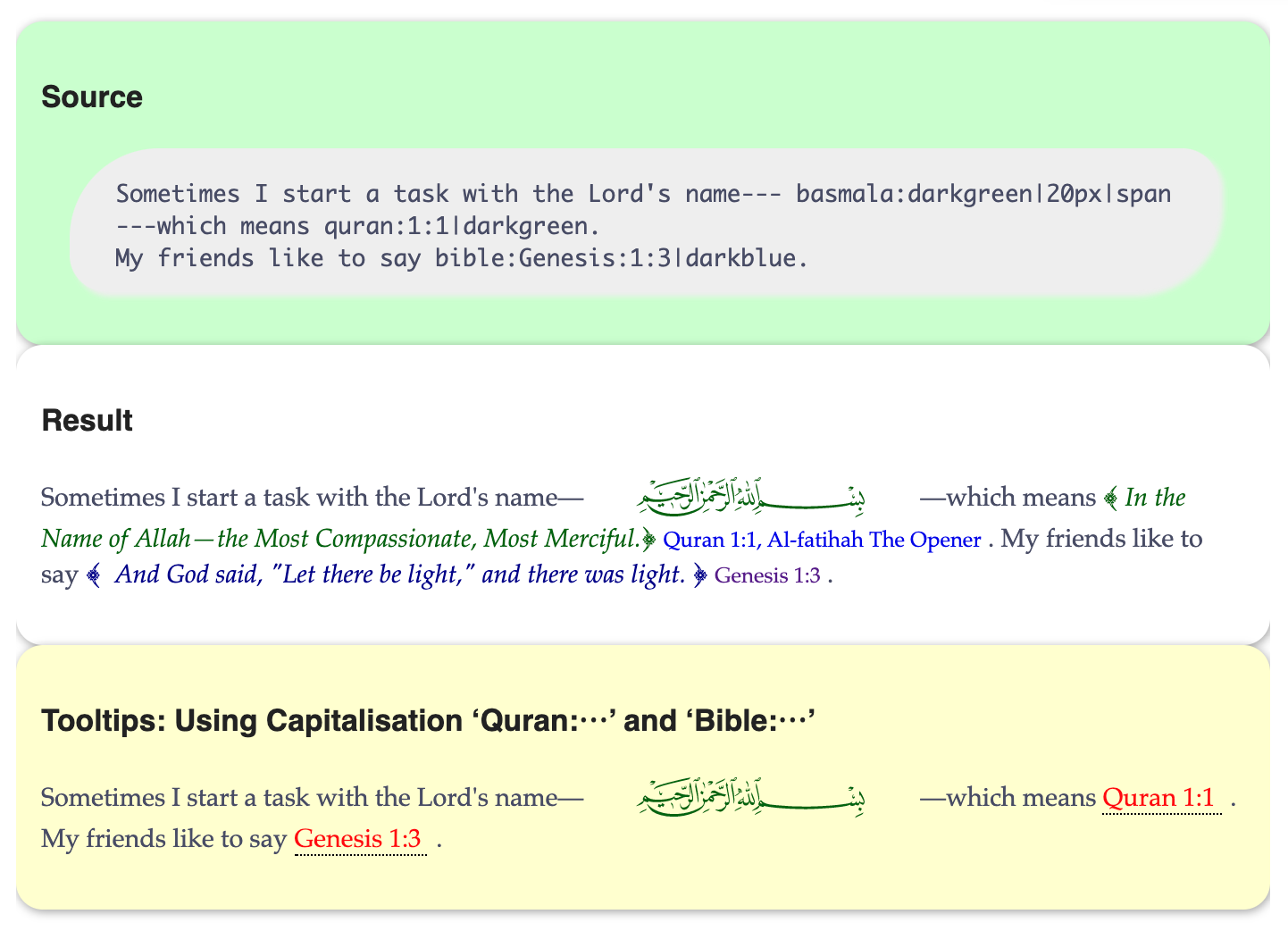
Org-mode links like quran:1:1 and bible:John:3:16 fetch and inline their verses upon export, with tooltips in Emacs and Lisp look-ups to boot.
AlBasmala:
Blogging with Emacs & Org-mode (•̀ᴗ•́)و



How my blog is setup (•̀ᴗ•́)و
Here are some notable features of my blog.
- Org-mode, a rich markup, to write articles ♥‿♥
- Tags and per-tag RSS feeds —§RSS feeds
- A nice blog banner —§https://alhassy.com/AlBasmala#blog-banner
- Dynamically highlighting code from references in prose —§https://alhassy.com/AlBasmala#blog-banner
- Tooltips, folded regions, and badges ---
- Overall nice looking HTML style ---org-notes-style
- Beautiful math using LaTeX notation, \(\forall \phi ⇒ \exists \phi\) —§https://alhassy.com/AlBasmala#MathJax-Support
- A floating, yet unobtrusive, table of contents —§https://alhassy.com/AlBasmala#floating-toc
- Articles have images and abstracts, shown as cards on the index —§https://alhassy.com/AlBasmala#Images, §https://alhassy.com/AlBasmala#Index
- Each article links its colourised Org source and its Github history, right under its image —§https://alhassy.com/AlBasmala#footers
- Article titles may contain arbitrary
@@html: ...@@yet still render nicely in both the frame tab and page title, thanks toblog--sanitise-title-js—§the header. - A reading-time clock that adjusts as you scroll —§https://alhassy.com/AlBasmala#footers
- Style inline code and tables —§https://alhassy.com/AlBasmala#curvy-blocks
- Unfurling links —§https://alhassy.com/AlBasmala#unfurling

💐 Repl Driven Development: /Editor Integrated REPLs for all languages/ 🔁



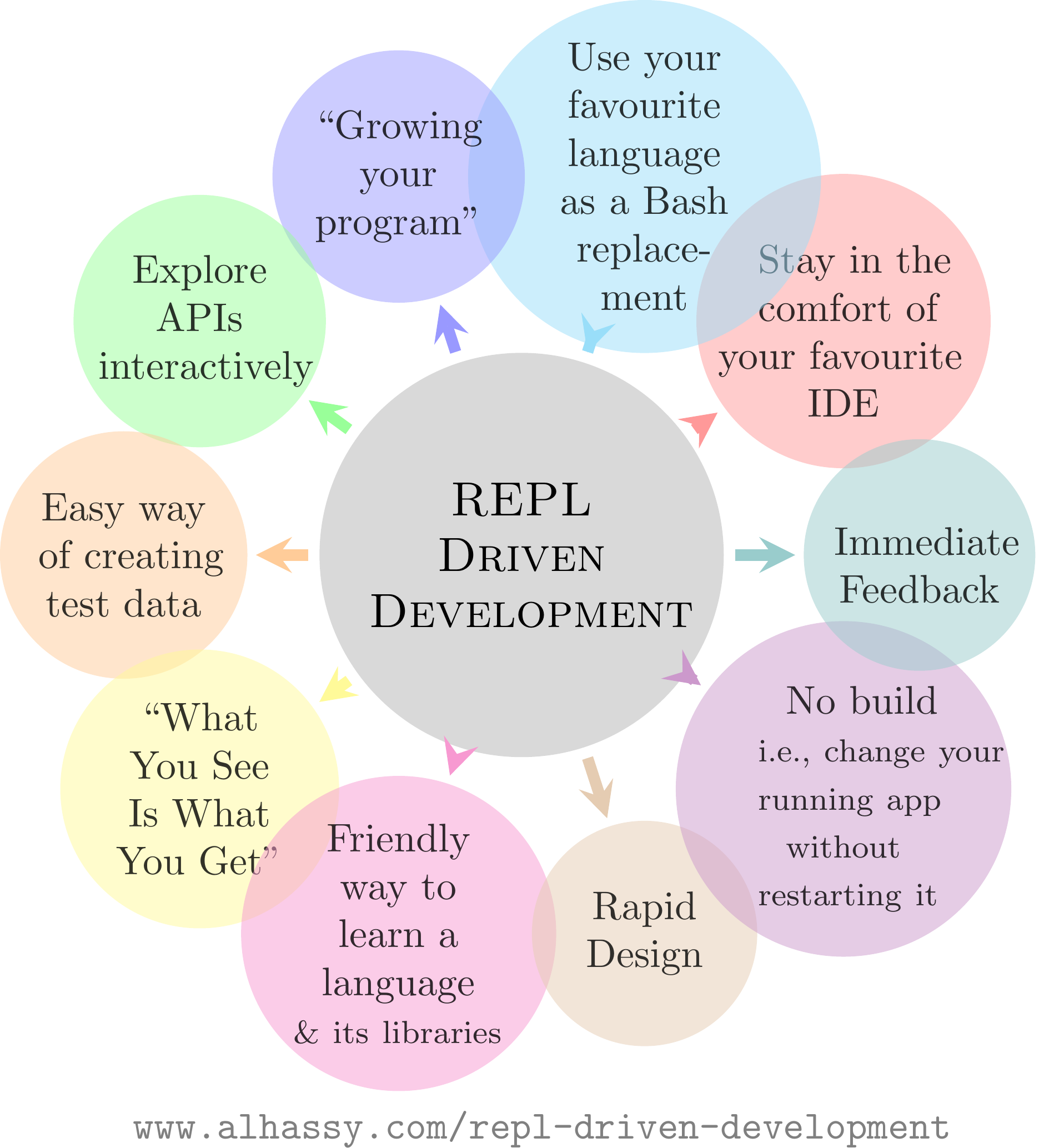
The 
That is, with Repl aided development, you make software by starting with an already working program (i.e., the repl) then incrementlly “teach it” to be the program you want, by defining & redefining things. Until satisfied, loop: Type/modify code in your editor, press some keys to evaluate what you wrote/modified in the currently running system, and explore/test the resulting runtime.
RDD is programming emphasising fast & rich feedback from a running system. RDD is fantastic for quickly teaching/exploring an idea; as such, the running example of this article will be on servers —no prior experience with servers is assumed. The main examples will be in JavaScript, Python, and Java. (Since JavaScript is just Lisp in C clothing, we will not discuss Lisp.) Since Java is verbose, the power of REPLs really pays off when exploring a new idea. We see how many imports and setup-code simply disappear in the RDD approach, letting you focus on the core idea you're exploring/teaching. For comparison, a traditional self-contained Java server program is ~30 lines long whereas the focused RDD approach is ~4 lines long.




tdlr: This library provides the Emacs built-in C-x C-eC-x C-e ∷ eval-last-sexp
Evaluate sexp before point; print value in the echo area.
Interactively, EVAL-LAST-SEXP-ARG-INTERNAL is the prefix argument.
With a non ‘-’ prefix argument, print output into current buffer.
This commands handles ‘defvar’, ‘defcustom’ and ‘defface’ the
same way that ‘eval-defun’ does. See the doc string of that
function for details.
Normally, this function truncates long output according to the
value of the variables ‘eval-expression-print-length’ and
‘eval-expression-print-level’. With a prefix argument of zero,
however, there is no such truncation.
Integer values are printed in several formats (decimal, octal,
and hexadecimal). When the prefix argument is -1 or the value
doesn’t exceed ‘eval-expression-print-maximum-character’, an
integer value is also printed as a character of that codepoint.
If ‘eval-expression-debug-on-error’ is non-nil, which is the default,
this command arranges for all errors to enter the debugger.
(fn EVAL-LAST-SEXP-ARG-INTERNAL)
behaviour for
arbitrary languages, provided they have a primitive cli REPL.
💐 Making VSCode itself a Java REPL 🔁


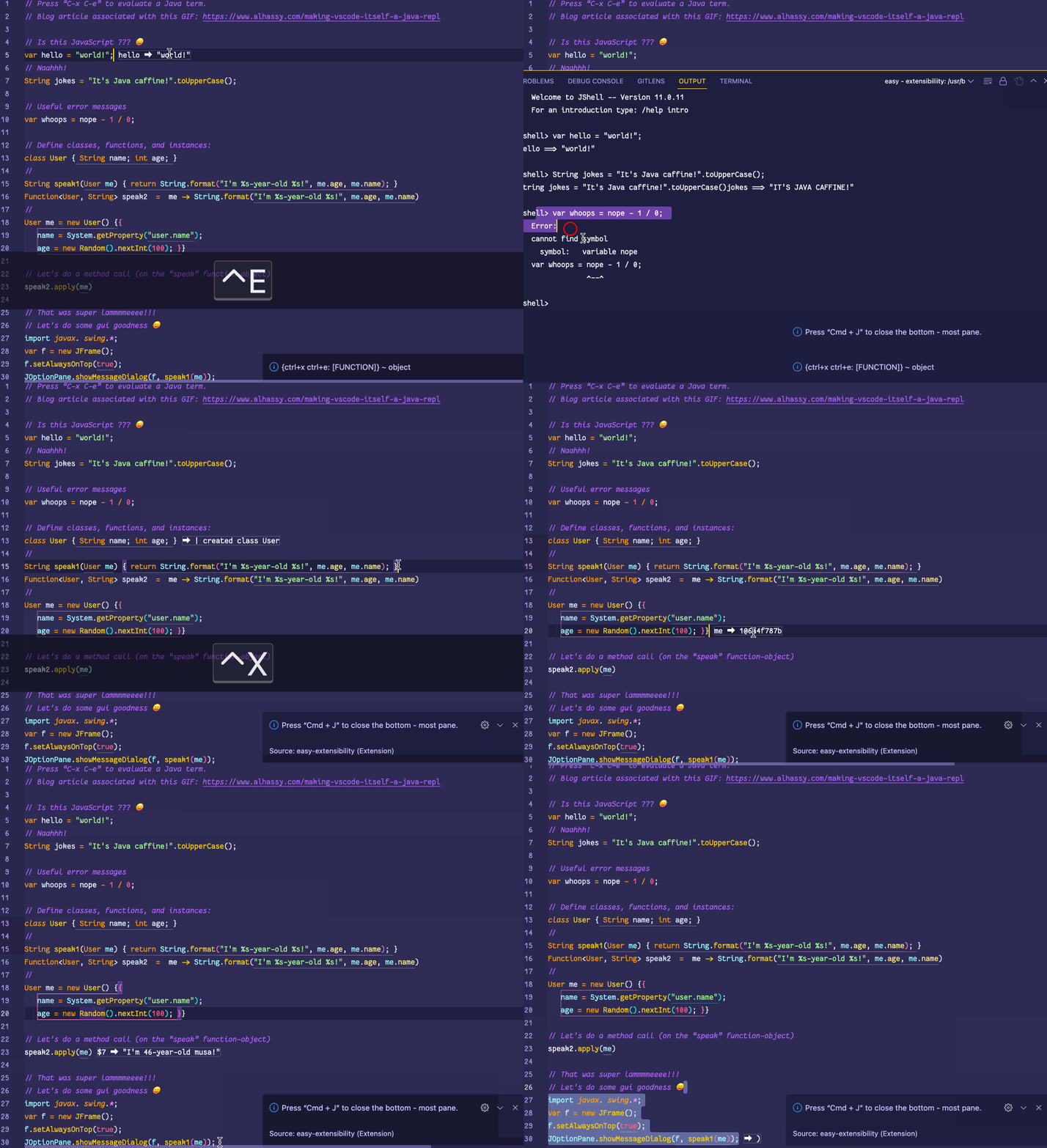
VSCode evaluates Java code wherever it sees it, by sending it to a JShell in the background, and echos the results in a friendly way!
This is achieved with a meta-extension for VSCode that makes VSCode into a living, breathing, JS interpreter: It can execute arbitrary JS that alters VSCode on-the-fly. (Inspired by using Emacs and Lisp!)
The relevant docs show how to make a similar REPL for Python, Ruby, Clojure, Common Lisp, JavaScript, Typescript, Haskell, and of-course Java.
Typed Lisp, A Primer



Let's explore Lisp's fine-grained type hierarchy!
We begin with a shallow comparison to Haskell, a rapid tour of type theory, try in vain to defend dynamic approaches, give a somewhat humorous account of history, note that you've been bamboozled —type's have always been there—, then go into technical details of some Lisp types, and finally conclude by showing how macros permit typing.
Goals for this article:
- Multiple examples of type constructions in Lisp.
- Comparing Lisp type systems with modern languages, such as Haskell.
- Show how algebraic polymorphic types like
PairandMaybecan be defined in Lisp. Including heterogeneously typed lists! - Convey a passion for an elegant language.
- Augment Lisp with functional Haskell-like type declarations ;-)
Unless suggested otherwise, the phrase “Lisp” refers to Common Lisp as supported by Emacs Lisp. As such, the resulting discussion is applicable to a number of Lisp dialects —I'm ignoring editing types such as buffers and keymaps, for now.

Life & Computing Science by Musa Al-hassy is licensed under a Creative Commons Attribution-ShareAlike 3.0 Unported License