
org-special-block-extras: Org lists, drawn as Graphviz graphs






Ξ
- 1. An outline is already a graph
- 2. Arcs that speak: description lists
- 3. Arcs that leave the tree: targets and links
- 4. Ids and labels
- 5. Styling: one key-value syntax
- 6. Saying it once: templates
- 7. Richer labels
- 8. Asides: footnotes, notes, and links
- 9. Layout: ranks, boxes, and records
- 10. Graphs in their document
- 11. Beyond Graphviz: smartdiagram
- 12. Comforts while editing
- 13. Reference
- 14. Gallery
⭐ The code lives at github.com/alhassy/org-special-block-extras —star it, or discuss it there! 
1. An outline is already a graph
Say we are showing a friend how 1 * 2 + 3 - 4 parses. On paper, we would draw a tree. In Org, we would
reach for Graphviz —and write that tree a second time, in a second language:
digraph { "-" -> "+"; "-" -> 4; "+" -> "*"; "+" -> 3; "*" -> 1; "*" -> 2; }
Every arc there restates what an outline's indentation already says. So we write the outline, and let the outline be the graph:
That is the whole idea. A #+begin_graph block compiles the Org we already write —nested lists,
two-column tables, links, tags, footnotes— into Graphviz dot. Nesting is an arc; the rest of this
README refines that one sentence, one gap at a time.
1.1. Setup
org-graph-block extends org-special-block-extras:
(require 'org-special-block-extras)
(require 'org-graph-block)
Graphviz must be on our PATH: dot -V should work in a terminal.
1.2. A REPL for pictures
The fun part is how quickly a picture grows. Start with the seven tokens as a flat list, one item each,
and press C-c C-c anywhere in the block: seven lonely nodes. Now M-S-<right> demotes an item,
children and all —Org's own list editing— and another C-c C-c shows the new arc. A minute later,
the flat list is the tree above. (Plain M-<right> demotes the item alone, leaving its children behind,
as anywhere in Org.)
C-c C-c renders a PNG and links it beneath the block, under #+RESULTS:. The file's name is made up,
unless :file picks one:
#+begin_graph :file parse-tree.png
…
#+end_graph
When the picture surprises us, C-u C-c C-c shows the generated dot instead; see Comforts while editing.
2. Arcs that speak: description lists
A bare arc says “related”, and little else. Explaining how Emacs starts up, we want each arc to say
how: Emacs reads its init file, which loads packages. Org's description list, - TERM :: DEFINITION,
already attaches a word to an item; in a graph, that word sits on the arc into the item. Read left to
right, the line is the arc —Emacs, then starts, then server:
Two arcs between the same nodes are just two items; a client that both requests and retries reaches one server twice:
+ client
  + request :: server
  + /retry/ :: server
client -> server [ label=request ];
client -> server [ label=<<I>retry</I>> ];
- The term may be marked up, as
/retry/is; it is then an HTML-like label. - It is the terse spelling of
| :edge.label | request |, met below; an explicit:edge.labelrow wins. - A top-level item has no arc into it, so a term there is an error —except for a legend entry, met later.
- As in Org, the
::needs whitespace on both sides:std::vectoris a name, not a description.
3. Arcs that leave the tree: targets and links
A tree gives each node one parent; history is not so tidy. Lisp descends from λ-calculus and from
Fortran, so some arcs must reach a node declared elsewhere. Org already names places and points at
them: <<lam>> is a place we can link to, and [[lam]] points there. In a graph, the target is the
node's id, and the link is an arc to it. Moreover, C-c C-o on the link jumps to its node:
+ <<lam>> λ-calculus
  + church
+ lisp inspired by church
lam [ label="λ-calculus" ];
lam -> church;
lisp -> lam [ label="inspired by" ];
lisp -> church;
- The target and links vanish from the label;
lispabove is labelled justlisp. [[T][L]]labels the arcL; an item may have any number of links. As in Org, an item's text is its whole first paragraph, so a long line of links may wrap onto the lines below it, before its table.- Inside a graph block, Org shows links in full: we see
[[lam][inspired by]], not justinspired by, since both parts matter here. Links elsewhere in the buffer keep Org's usual display. - Only links to nodes are arcs;
[[https://orgmode.org][Org]]makes its node clickable, and staysOrgin the label. See Web links.
3.1. A child that is just a link: references
An inline link is quick, but its arc has nowhere to keep a style of its own. So the arc graduates to a child item that is nothing but a link: a reference to its target. Nesting makes the arc, and a description term labels it, exactly as for any other child:
Lisp -> lam [ label=borrows ];
Lisp -> Fortran;
- A reference never declares its target: the target's own item names and labels it, even when that item comes later. Node attributes on a reference are an error; they belong on the target's item.
+ [[church][encodes]]is a reference too, its arc labelledencodes.- Two references to one target are two parallel arcs, each styled on its own.
- A reference may name a record's port,
[[struct1::mid]], or a cluster; both are met below.
3.2. Radio targets: arcs from every mention
When one node is mentioned everywhere, bracketing each mention is a chore. In Org, a radio target
<<<Church>>> stays visible, and every mention of “Church” elsewhere becomes a link to it, sans
brackets. In a graph, the radio target is a node, and every item mentioning it —in whatever case—
has an arc to it:
+ <<<Church>>> encodes numbers as Church numerals
+ Lisp, after Church
+ Haskell, after church and Lisp
Church [ label="Church encodes numbers as Church numerals" ];
"Lisp, after Church" -> Church;
"Haskell, after church and Lisp" -> Church;
The mention stays in the label, and the radio target's own item never arcs to itself. Mind that this is Org's semantics exactly: a casual “Church” draws an arc too.
4. Ids and labels
Links make us name things, and a name wants to be short where a label wants to be clear. So every node has an id, which arcs and links name, and a label, which is drawn. By default both are the item's text; these three items, spelling it out more and more, all declare one and the same node:
+ Lisp

+ <<Lisp>> Lisp

+ Lisp
  | :id   | Lisp |
  | label | Lisp |
Lisp [ label=Lisp ];
When the two should differ, we set either one apart: a <<target>> or an | :id | row gives the id,
and a | label | row gives the label:
+ <<lam>> λ-calculus
+ Combinatory Logic
  | :id | combinatory |
+ Church
  | label | Alonzo Church |
lam [ label="λ-calculus" ];
combinatory [ label="Combinatory Logic" ];
Church [ label="Alonzo Church" ];
- The id is the
:idrow, else the<<target>>, else the text —sans markup, links, footnotes, and tags. - The label is the
labelrow, else the text; markup makes it an HTML-like one. - Two items with one id are one node, so an item may appear twice to gain more children.
5. Styling: one key-value syntax
Out of the box, Graphviz draws black ellipses; soon we want a box here and a red arc there. Graphviz's attributes are key-value pairs, and Org's key-value syntax is the two-column table. So a table beneath an item styles that item: one syntax, from a single node up to the whole graph.
5.1. A node's table, and two kinds of keys
By way of example, this item has one row of each kind:
+ Alonzo
  | label | Alonzo Church |
  | :id   | church        |
church [ label="Alonzo Church" ];
A plain key, such as label, is a Graphviz attribute of the node, passed straight through. We quote
its value for you, so Alonzo Church, #00ff00, and x -> y all need no quotes; already-quoted values,
and <…> HTML labels, are left alone.
A key starting with a colon is reserved: it means something to the graph block itself, never to
Graphviz. A leading colon is never a Graphviz attribute, so the two kinds cannot clash. The reserved keys
are listed in org-graph-reserved-keys; each is met in due time:
| Key | Meaning |
|---|---|
:id |
the node's name for cross-references; else its <<target>>, else its text |
:edge.KEY |
attribute KEY of the arc from the parent |
:edge[T].KEY |
attribute KEY of this item's arc to T |
:inherit |
inherit the rows of #+name: templates; also :NAME: tags |
:children-rank |
{ rank=… } over this item's immediate children |
An unknown :key is an error, rather than a silently ignored attribute.
5.2. An arc's table: :edge.KEY
An arc is drawn from parent to child, so the child's table is where it is styled: an :edge.KEY row
there is attribute KEY of the arc into the item. Every attribute is its own row, exactly like a node's.
Our client's two arcs to one server now look different:
+ client
  + request :: server
    | :edge.color | blue |
  + retry :: server
    | :edge.style | dashed |
client -> server [ label=request color=blue ];
client -> server [ label=retry style=dashed ];
A reference is styled just the same; this is why an inline link graduates to one:
+ Lisp
  + borrows :: lam
    | :edge.style | dotted |
Lisp -> lam [ label=borrows style=dotted ];
- A parallel arc is simply a second child, styled on its own; a
KEYgiven twice is an error. - As in Org, an item's tables and directives may also follow its sub-items; they still belong to it.
5.3. The whole graph: the #+begingraph line
Small graphs deserve no preamble at all. So the header line takes the graph's title and any graph attribute:
#+begin_graph Lambda calculus :rankdir LR :node.shape box :edge.color grey
+ λ
  + Lisp
#+end_graph
graph [ label="Lambda calculus" rankdir=LR ]
node [ shape=box ]
edge [ color=grey ]
- The title, the words before the first
:key, is the graph'slabel;:directed nilmakes the graph undirected, with--arcs. :KEY Vis a graph attribute;:node.KEY Vand:edge.KEY Vare node and edge defaults —the sameKEY,node.KEY,edge.KEYspelling as table rows.- As on Org's own
#+attr_html:lines, values need no quotes::bgcolor #6c7086,:fontname Helvetica,Arial. A value with spaces does::fontname "Helvetica Neue". :file,:svg,:directed,:wrap,:notes,:unflatten,:unknown-tags,:smartdiagram,:dpi, and:C-c_C-cbelong to the block itself, never to Graphviz; each is met below. So do the Babel habits:exportsand:results, which the block ignores.
5.4. When the preamble outgrows the line
A real graph's settings outgrow one line. Then #+graph:, #+node:, and #+edge: name what the table
below them styles —the graph, every node, every arc— and they override the header. A drawer of any
name, :SETTINGS: or :PALETTE:, folds them away with TAB, along with #+rank: and #+name: lines:
#+begin_graph Lambda calculus
:SETTINGS:
#+graph:
| rankdir | LR |
#+node:
| shape | box |
:END:
+ λ
  + Lisp
#+end_graph
graph [ label="Lambda calculus" rankdir=LR ]
node [ shape=box ]
5.5. Subtrees inherit #+node:, #+edge:, and #+rank:
Sometimes a style belongs to one branch, not the whole graph. Org's properties are inherited: a
:PROPERTIES: drawer on a heading reaches its subheadings. So it is with an item's #+node: and
#+edge: tables: they style every node and arc beneath the item, while the item itself keeps its own
| key | value | rows; its #+rank: lines apply there too. Graphviz scopes such defaults by an anonymous
subgraph, which draws no box:
+ Weather
  #+node:
  | shape | box |
  #+edge:
  | style | dotted |
  + Rain
    + Umbrella
  + Sun
+ Climate
Weather [ label=Weather ];
subgraph {
  node [ shape=box ]
  edge [ style=dotted ]
  Weather -> Rain;
  Rain [ label=Rain ];
  Rain -> Umbrella;
  Umbrella [ label=Umbrella ];
  Weather -> Sun;
  Sun [ label=Sun ];
}
Climate [ label=Climate ];
A deeper item's tables override a shallower one's, as nested :PROPERTIES: do; a node first declared
elsewhere keeps the defaults of where it was declared.
6. Saying it once: templates
A family tree repeats itself: every marriage is the same pink, two-headed arc, and every wife the same
boxed node. Restating those rows each time is how styles drift apart. So we name them once: a #+name:
table is a reusable bundle of rows, and a tag applies it. On a headline, :work:urgent: classifies the
entry; on an item, tags classify the node. After an item, a tag styles its node; after a reference, its
arc:
#+name: married
| color | "#cc3399" |
| dir   | both      |
#+name: wife
| shape | box |

+ Muhammad
+ Khadija :wife:
  + Muhammad :married:
    | :edge.color | red |
Muhammad [ label=Muhammad ];
Khadija [ shape=box label=Khadija ];
Khadija -> Muhammad [ dir=both color=red ];
Explicit rows win over a template's, so the marriage above is red. A line may carry several tags,
:married:faint:, each a template, the earlier winning on a clash. The same rule reaches every other
line a template could apply to:
| Line | What its tags style |
|---|---|
+ Khadija :wife: |
the node |
+ [[Muhammad]] :married: |
the arc to the reference |
+ wed :married: :: Khadija :wife: |
the arc, by the description term's tags; the node, by its own |
#+node: :wife: |
every node; likewise #+edge: and #+graph: |
#+name: wife :base1:base2: |
the template wife, which inherits base1 and base2 |
6.3. Prototype first, name later
That strictness is right for a finished graph, and in the way of a sketch: while prototyping, we want
shapes before names. #+begin_graph :unknown-tags random-templates makes up a template for each unknown
tag —a colour, a shape, a font— the same at every use, so the tags read at a glance. A legend entry
gives each its meaning; when the design settles, #+name: tables replace the made-up templates, one tag
at a time:
The Nth unknown tag takes the Nth of org-graph-random-template-colours, -shapes, and -fonts, so
renders are stable, and the first eight tags differ in every way.
6.4. Legends are description lists
A reader meeting pink arcs asks what pink means. A legend answers: a glossary of templates. Org's
glossary is the description list, so a top-level - :T: :: MEANING —which has no parent to arc from—
is a legend entry: a sample styled by template T, captioned MEANING. Wrap the entries in a
#+begin_cluster to box them:
#+name: married
| color | pink |
| dir   | both |
#+name: wife
| shape | box |

+ Muhammad
+ Khadija :wife:
  + Muhammad :married:
#+begin_cluster Legend
- :married: :: marriage
- :wife: :: /wife/
#+end_cluster
subgraph cluster_Legend {
  label=Legend
  legend_1 [ shape=point style=invis ];
  legend_1_end [ shape=point style=invis ];
  legend_1 -> legend_1_end [ color=pink dir=both label=marriage ];
  legend_2 [ shape=box label=<<I>wife</I>> ];
}
- The legend can never drift from the graph: change
married, and its sample changes too. - A template that styles some arc in the graph —by a reference's or a term's tags, an
:edge.:inheritrow, or an#+edge:line— is sampled as an arc; any other, as a node. - The sample drops
constraint, which shapes the layout rather than the arc.
6.5. Checkboxes are templates
A checkbox says how far along a thing is; so a graph of tasks is just a checklist. [X], [-], and [ ]
apply the templates checked, partial, and unchecked, as a :checked: tag would; and C-c C-c on a
checkbox toggles it, as Org's own does, then renders the graph:
#+name: unchecked
| style | dashed |

+ [-] compile
  + [X] parse
  + [ ] typecheck
compile [ color=darkorange fontcolor=darkorange label=compile ];
parse [ color=forestgreen fontcolor=forestgreen label=parse ];
typecheck [ style=dashed label=typecheck ];
checked and partial default to green and orange, by org-graph-checkbox-templates; a graph's own
#+name: template wins. A checkbox whose template exists nowhere, such as unchecked by default, styles
nothing.
6.6. Macros name single values
Templates name whole bundles of rows; sometimes we want to name one value. A palette repeats itself,
and Org's #+macro: names a value once, so {{{name}}} uses it —in a table, an item, a cluster's
header, anywhere in the block:
#+macro: gold #f9e2af
#+begin_graph
+ Church
  + Turing
    | :edge.color     | {{{gold}}} |
    | :edge.fontcolor | {{{gold}}} |
#+end_graph
An undefined macro is an error. In similar spirit, inline src_LANG{…} blocks and call_NAME() calls
run at export, as anywhere in Org, their results landing in the label; C-c C-c shows them as written.
7. Richer labels
A label is more than a name: we want a word in bold, a type in monospace, a formula, a second line. Again, Org already has the syntax.
7.1. Markup makes rich labels
*bold*, /italic/, _underline_, +strike+, =code=, and ~pre~ in an item's text make its label an
HTML-like one, while its id stays the plain text:
+ *Church* encodes =Bool=
"Church encodes Bool" [ label=<<B>Church</B> encodes <FONT FACE="monospace">Bool</FONT>> ];
We escape &, <, >, and " for you. Graphviz has no way to tell =code= from ~pre~, so both are
monospace. A #+record: table's cells keep their markup too. Names such as a_b, C++, and
org-graph.el are not mistaken for markup.
7.2. Entities, scripts, and snippets
Org's entities are their characters, and braced sub- and superscripts are Graphviz's own; as under Org's
#+options: ^:{}, an unbraced a_b stays text, so snake_case ids are safe. For whatever Org has no
markup for, a @@dot:…@@ export snippet is raw label HTML; a snippet for any other backend vanishes:
+ \alpha \to \beta
+ x^{2} H_{2}O
+ @@dot:<FONT COLOR="red">@@Alert@@dot:</FONT>@@
"α → β" [ label="α → β" ];
"x2 H2O" [ label=<x<SUP>2</SUP> H<SUB>2</SUB>O> ];
Alert [ label=<<FONT COLOR="red">Alert</FONT>> ];
- Timestamps, statistics cookies, and citations show as written; LaTeX fragments too, since Graphviz has no math.
- Syntax that means nothing in a graph —a headline, a
#+begin_quote, an unknown#+key:— is an error, rather than silently dropped. Comments, and footnote definitions, are fine.
7.3. \\ breaks a line, :wrap fills
A long label makes a wide node, and a wide node a sprawling graph. In Org, a \\ ending a line is a hard
line break; in a graph, it breaks the node's label. Since a label seldom wants a literal \\, it may sit
mid-line too, so a two-line node stays one terse line:
+ Emacs
  + provides :: <<closures>> Closures \\ (lexical scope)
  + *Lisp* \\
    McCarthy, 1958
Emacs -> closures [ label=provides ];
closures [ label=<Closures<BR/>(lexical scope)> ];
Emacs -> "Lisp McCarthy, 1958";
"Lisp McCarthy, 1958" [ label=<<B>Lisp</B><BR/>McCarthy, 1958> ];
The label becomes an HTML-like one, as with markup; the id joins the lines with a space, so a node
reached by a link usually wants a <<target>>, as closures above.
It is the one line break wherever a label is written: a description term, a table value, a #+record:
cell. So an arc's label breaks just as its node's does:
+ Monad
  + every monad \\ is an adjunction :: Adjunction
  + Turing
    | :edge.label | Church– \\ Turing thesis |
Monad -> Adjunction [ label=<every monad<BR/>is an adjunction> ];
Monad -> Turing [ label="Church–\nTuring thesis" ];
Breaking every long label by hand is tedious, though. #+begin_graph :wrap N fills node and arc labels
to lines of N characters, so long item text needs no \\ at all; a label already broken by \\ stays as
written.
8. Asides: footnotes, notes, and links
A label should be short; the story behind it belongs somewhere we reach on demand. Org has three places for such asides —footnotes, paragraphs, links— and each keeps its meaning in a graph.
8.1. Footnotes are tooltips
A footnote is an aside we read when we want it; so is a tooltip. An inline footnote leaves the label and
becomes the node's tooltip —shown on hover in an :svg t HTML export, and in Emacs too:
+ Lisp [fn::McCarthy, 1958]
Lisp [ tooltip="McCarthy, 1958" label=Lisp ];
A named footnote serves too: [fn:NAME: NOTE] inline, or a bare [fn:NAME] whose [fn:NAME] NOTE
definition sits elsewhere in the buffer —say, below the graph. An explicit | tooltip | … | row wins.
8.2. Notes are longer tooltips
A footnote is awkward for more than a line. An item's text is its first paragraph, as in Org; every
paragraph after it is a note, the tooltip of whatever its item's line describes: a node, or —under a
reference— an arc. #+begin_note :edge, sitting in an item as a #+begin_cluster may, describes the
arc into the item instead; it is the one place we need the block:
+ Lisp [fn::1958]

  McCarthy's /list processor/:
  code is data.
  + Scheme
    #+begin_note :edge
    Steele and Sussman distilled it.
    #+end_note
Lisp [ tooltip="1958\nMcCarthy's list processor: code is data." label=Lisp ];
Lisp -> Scheme [ tooltip="Steele and Sussman distilled it." ];
The blank line matters: without it, McCarthy's list processor: continues the first paragraph, and so
the label. Likewise + <<lisp>> Lisp, the list processor names its node lisp and labels it with the
whole line; a <<target>> names, but only a new paragraph begins a note.
Tooltips need a hover, and a PNG pasted into an email has none. #+begin_graph :notes inline shows every
note beneath its label instead, in a smaller font, its markup kept and its lines filled to :wrap
—else 40— characters:
1958
- A note's lines join, and each paragraph —or
\\break— starts a new line. - A note follows the item's footnotes, which stay tooltips; an explicit
tooltip,:edge.tooltip, orlabelrow wins. - A note outside every item is the graph's: its tooltip, or —inline— the text beneath its title. One
directly in a
#+begin_clusteris the box's. - Within a graph,
#+begin_noteis never the callout of the same name, andC-c C-cin it renders the graph.
8.3. Web links are URLs, image links are images
A link to anything but a node keeps its Org meaning. A web or file link makes the node clickable in an
:svg t HTML export, its description staying in the label; a description-less link to an image draws
that image:
+ Org mode
+ <<emacs>> Emacs file:emacs.png
+ file:gnu.png


"Org mode" [ URL="https://orgmode.org" label="Org mode" ];
emacs [ image="emacs.png" label=Emacs ];
"gnu.png" [ image="gnu.png" label="" ];
A node has one URL, so an item with two web links is an error. Graphviz finds the image relative to the
Org file, as Org does; an explicit URL or image row wins.
So a graph of screenshots is a tour. A lone image is its own node, drawn sans text, so the arc into it
carries the words; imagescale fits each picture to its node's fixed size:
8.4. Section links make a map of the document
A link to a section, [[*Heading]], is a URL too —not an arc, since nodes are named without a star.
In an :svg t HTML export it leads to that section's anchor, which only Org knows; and in Emacs, a click
on the rendered node opens the section. So a graph may be a map of its own document:
#+begin_graph This section :svg t :rankdir LR
+ [[*Asides: footnotes, notes, and links][Asides]]
  + [[*Footnotes are tooltips][Footnotes]]
  + [[*Notes are longer tooltips][Notes]]
#+end_graph
A bare [[*Footnotes are tooltips]] labels its node with the heading's title; [[#custom-id]] and
[[id:…]] links work alike.
9. Layout: ranks, boxes, and records
Graphviz lays out the graph for us, and mostly well; but sometimes the layout says something the graph does not mean. Here is how we take the wheel back.
9.1. Ordered lists keep their order
Look again at our parse tree: 1 * 2 + 3 - 4 subtracts 4 from the rest, never the other way around, yet
nothing in an unordered list promises Graphviz will draw 4 on the right. Org's + - * bullets say
“these things”; 1. 2. 3. say “first, second, third”. So ordered children sit side by side, on one
rank, in the order written —Graphviz no longer reshuffles them to save a crossing:
+ -
  1. +
     1. *
        1. 1
        2. 2
     2. 3
  2. 4
"-" [ ordering=out label="-" ];
"-" -> "+";
"-" -> 4;
{ rank=same; "+"; 4 }
…
- An ordered top-level list, or one inside a cluster, shares a rank too.
- An explicit
| :children-rank | min |wins over therank=same; a lone ordered child gets no rank at all. - For one rank without the fixed order, use
| :children-rank | same |with+bullets.
Nodes with no common parent share a rank by #+rank:, which takes bare ids or links; a link spares a
multi-word id its quotes:
+ Logic
  + λ calculus
+ Lisp
#+rank: Lisp [[λ calculus]]
{ rank=same; "λ calculus"; Lisp }
Under splines=curved, Graphviz drops the label of an arc between two nodes on one rank; so there, such
an arc's label becomes an xlabel, which it still draws.
9.2. Clusters draw boxes
Some nodes belong together —Emacs's packages, say— and a box around them says so. A cluster is a
subgraph, so it gets the graph's own spelling: a #+begin_cluster block takes a title and :KEY V
attributes, :node.KEY and :edge.KEY defaults included, exactly as the #+begin_graph line does; and,
being a block, it folds with TAB:
+ Emacs
  #+begin_cluster Packages :bgcolor lightgrey :node.shape box
  + Org
    #+begin_cluster
    + agenda
    + babel
    #+end_cluster
  + Magit
  #+end_cluster
graph [ compound=true ]
subgraph cluster_Packages {
  label=Packages
  bgcolor=lightgrey
  node [ shape=box ]
  Org [ label=Org ];
  subgraph cluster_anonymous_1 { label="" agenda; babel; }
  Org -> agenda [ lhead=cluster_anonymous_1 ];
  Magit [ label=Magit ];
}
Emacs -> Org [ lhead=cluster_Packages ];
- A cluster block inside an item is that item's child: above,
Emacshas an arc toPackages. An arc to or from a cluster lands on the cluster's first node, clipped at its border, aslheadshows. - An untitled cluster is an anonymous box, with no label and no name to draw arcs to.
- The title runs up to the first
:KEY;#+begin_cluster Time 12:30is titledTime 12:30. When the attributes outgrow the line, a table opening the block styles the box, as an item's table styles its node;
#+node:and#+edge:tables set defaults inside it, as usual:#+begin_cluster Prophets | style | filled | | fillcolor | #ddeeff | #+node: | fillcolor | #aaccff | + Adam #+end_clusterC-c C-c,C-M-i, and eldoc work inside a cluster block just as anywhere else in the graph.
9.3. Records: a #+record: table
Some nodes have insides: a C struct has fields, a UML class has members, and an arc may want to leave
from one particular field. A record is a node drawn as a table, and Org already has tables: under
#+record:, an item's table is its label, laid out exactly as written —just as #+graph:, #+node:,
and #+edge: name what the table below them is. A cell's <<target>> is its port, a cell's [[link]]
is an arc from that port, and an arc reaches a port by record::port —just as Org's
[[file:notes.org::target]] reaches into a file:
+ struct1
  #+record:
  | left | <<mid>> middle struct2::one | right |
+ struct2
  #+record:
  | <<one>> one | two   |
  | ^           | three |
+ reader
  + struct1::mid
struct1 [ shape=plain label=<<TABLE …><TR><TD>left</TD><TD PORT="mid">middle</TD><TD>right</TD></TR></TABLE>> ];
struct1:mid -> struct2:one;
struct2 [ shape=plain label=<<TABLE …><TR><TD PORT="one" ROWSPAN="2">one</TD><TD>two</TD></TR><TR><TD>three</TD></TR></TABLE>> ];
reader -> struct1:mid;
Org tables have no merged cells, so two markers stand in for them: ^ continues the cell above, as one
does, and an empty cell continues the cell to its left —or, in the first column, the one above.
Together they draw any layout that Graphviz's old { } nesting could:
+ struct3
  #+record:
  | hello \\ world | b |            |   | g | h |
  | ^              | c | <<here>> d | e | ^ | ^ |
  | ^              | f |            |   | ^ | ^ |
Here b and f span three columns, hello, g, and h three rows; a \\ breaks a line, as in an item.
The gallery has both records live.
Hlines and column cookies mean what they mean to Org. An hline draws a rule between rows, and a table
with any hline draws one outer border rather than a box around every cell —so a UML class is just the
table we would write anyway. A row of <l>, <c>, and <r> cookies aligns its columns, and cells keep
their markup:
+ Person
  #+record:
  | <l>            |
  | *Person*       |
  |----------------|
  | name: =String= |
  | age: =Int=     |
  |----------------|
  | greet()        |
Person [ shape=plain label=<<TABLE BORDER="1" CELLBORDER="0" CELLSPACING="0"><TR><TD ALIGN="LEFT" BALIGN="LEFT"><B>Person</B></TD></TR><HR/>…</TABLE>> ];
- A record is otherwise an ordinary node: its children are nodes of their own, and its attributes,
tags, and templates apply as usual;
color,fillcolor, andfontcolorcolour the table. Its attribute table goes above#+record:, since rows right below the record table are part of it. - A record is
shape=plain, the table being its whole outline; an explicitshaperow wins. - A cell with a link but no target is ported by its text, spaces as underscores;
<<x marks the spot>>is likewise reached as[[struct3::x marks the spot]]. - Ports belong to their record, so two records may both have a
headport:r1::headandr2::head. - A cell's trailing tags style its arcs, as a reference's style its arc:
| <<mid>> middle [[struct2::one]] :dashed: |draws a dashed arc. A cell with tags but no link is an error; write=:x:=for literal text. a::bnames a port only whenanames a record; otherwise it is an ordinary node, such asstd::vector. Record and port names may contain dots:[[org.el::v1.2]].- Graphviz spells ports
record:port; that is the spelling in the generated dot.
9.4. Mind maps: :layout twopi
Every graph so far flows top to bottom; a mind map grows outward from its centre. Graphviz's layout
attribute picks its engine, so the header line turns a tree into a mind map: twopi places root in the
middle and each generation on a ring around it. With :wrap, long labels stay compact:
Sans :root, twopi picks a centre itself. neato, fdp, and circo suit graphs that are not trees.
9.5. Wide trees: :unflatten N
A node with many children lays them out in one wide row: a ribbon, too wide for the page.
:unflatten N passes the dot through Graphviz's own unflatten -l N, which staggers those leaves over
N ranks, so the graph is a block rather than a ribbon:
10. Graphs in their document
A graph rarely stands alone: prose refers to it, and an outline may already be one. Org's own document machinery reaches graphs too.
10.1. #+name: and #+caption: make a figure
We want to write “as Figure 1 shows”, and have the number stay right. In Org, #+name: is what
[[links]] reach, and #+caption: captions a table or an image. A graph is an image, so both mean what
they always do:
As lineage shows, Emacs is a Lisp.

#+name: lineage
#+caption: How Emacs came to be
#+begin_graph
+ λ-calculus
  + Lisp
    + Emacs Lisp
#+end_graph
- The graph renders to
lineage.png—both onC-c C-cand on export— and exports as that image, numbered and captioned:[[lineage]]reads “Figure 1” in HTML, and\refin LaTeX. - An explicit
:filestill wins:#+begin_graph :file elsewhere.pngrenders there, and the#+name:still labels it. With:svg t, the figure islineage.svg. - An unnamed graph exports as before: inlined into HTML, or as dot source elsewhere.
10.2. Sections are graphs: the :graph: tag
Sometimes a whole section is nothing but the outline we want drawn; wrapping it in a block is ceremony.
A #+begin_graph block is a function on a region; a :graph: tag is the same function on a section. The
section's text is the graph, and its :PROPERTIES: drawer —Org's own home for key-value settings— is
the #+begin_graph line: :RANKDIR: LR is :rankdir LR, :NODE.SHAPE: box is :node.shape box, and
:FILE: is :file. See the live example:
* Emacs's lineage :graph:
:PROPERTIES:
:RANKDIR: LR
:NODE.SHAPE: box
:END:
+ λ-calculus
  + inspired :: Lisp
    + Emacs Lisp
- The heading stays a heading; only its text becomes the graph, on export.
:graph_Some_Title:titles the graphSome Title, as the words before the first:keywould.- Org's own properties, such as
:CUSTOM_ID:and:CATEGORY:, stay Org's; they never reach Graphviz.
11. Beyond Graphviz: smartdiagram
Graphviz lays out a graph; but a README's opening often wants something more posed than a layout. LaTeX's
smartdiagram package typesets a handful of fixed pictures —a planet amid its satellites, a flow of
boxes, a column of terms and their descriptions— that suit it better than any graph.
:smartdiagram TYPE hands the very same list to smartdiagram instead; C-c C-c renders it with pdflatex, and LaTeX
export typesets it in place:

TYPEis one ofconstellation,connected-constellation,bubble,flow,flow:horizontal,circular,circular:clockwise,descriptive,priority-descriptive, orsequence.- A constellation or bubble has one top item, its centre; that item's children orbit it. A descriptive
diagram's items are
+ TERM :: DESCRIPTION. Every other type reads the top items, in order. - The
#+graph:rows are\smartdiagramset's, in smartdiagram's own words:| planet color | black!75 |. - An item's
| color |,| fontcolor |, and| fontsize |rows —Graphviz's names for them— colour its shape and its text, and size its text; its:tags:splice#+name:templates of those rows, as in any graph. An item's later paragraphs sit beneath its text. - The title sits above the diagram; prose before the list, between the two; prose after it, beneath.
:dpi Nsets the PNG's resolution, 300 by default.C-u C-c C-cshows the LaTeX.C-M-iand eldoc know which kind of graph they are in: under:smartdiagram, they offer smartdiagram's keys, with their defaults, rather than Graphviz's.- Graphviz's own syntax ---
#+node:,#+edge:,#+rank:, links between items, records— draws nothing here, so it is an error rather than silently dropped.
11.1. Org's markup in place of LaTeX's
Why bother, when LaTeX could draw it directly? The diagram above began life as a
#+begin_src latex-as-png block, via ob-latex-as-png. Every LaTeX incantation it needed has an Org
counterpart that we already write daily:
| LaTeX | Org |
|---|---|
\smartdiagram[constellation diagram]{…} |
:smartdiagram constellation, over a nested list |
\smartdiagramset{planet color=black!75, …} |
a #+graph: table, one row a key |
\newcommand{\old}[1]{\textcolor{black!70}{\texttt{#1}}} |
#+macro: old [[color:gray][=$1=]] |
\texttt{(:k plist)}, \textbf{…} |
=(:k plist)=, *…* |
\mbox{\texttt{…}}, lest code break mid-circle |
nothing: code never breaks |
\textcolor{black!70}{replaces} |
[[color:gray][replaces]] |
{\color{white}…} on the planet |
a fontcolor row of white |
\centering{One syntax … \\ …} above the diagram |
the block's title |
\vspace{1em}{\textcolor{black!44}\hrule}\vspace{1em} |
----- |
\hspace{7em} (map-elt :school), line by line |
a #+begin_src block, indented as we read it |
% \new{(N xs)} \replaces … |
# + =(N xs)= … |
\resizebox, \vspace, {\color{white} Bye!} padding |
nothing: the image is cropped to a small border |
The LaTeX column is a second language inside our Org file: its macros, its colour syntax, and hand-tuned
\hspace's that drift the moment a line changes. The Org column is the language the rest of the file is
already in; it folds, links, exports, and completes like everything around it. The only backslashes that
survive the move are \\ —which Org itself reads as a line break— and the font names, such as
\small, that smartdiagram's own settings take as values.
12. Comforts while editing
Graphviz has 177 attributes, and nobody remembers them. So the block helps as we type, wherever we type.
C-M-i(completion-at-point) and eldoc know about graph keys —in any Org buffer's graph blocks, and in theorg-graph-edit-modebuffer thatC-c 'opens on one, as for a source block:- In a key cell, completion offers the attributes valid there, plus the reserved keys; after
:edge.or:edge[T]., it offers only edge attributes, prefix and all. In a value cell, it offers the values of that row's attribute, such asveefor:edge.arrowhead. Each candidate is annotated with its description. - On the
#+begin_graphline,:r C-M-ioffers:rankdirand the other graph attributes, every:node.KEYand:edge.KEY, and the block's own:file,:svg,:directed, and:C-c_C-c;:rankdir L C-M-ithen offersLR. - Eldoc shows the description of the key on the current row, or at point on the
#+begin_graphline, ending with Graphviz's default; e.g.,| :edge.arrowhead | vee |shows “Style of arrowhead on the head node of an edge. Default: normal.”
- In a key cell, completion offers the attributes valid there, plus the reserved keys; after
When we would rather pick than type,
C-u RETon any table row inside a graph inserts a new| key | value |row interactively: a completion menu for the key, then one for the value —or a free-text prompt, when the attribute accepts arbitrary strings. PlainRETis unaffected. The menu shows only the attributes valid where the table sits:- Table under
#+graph:⟶ graph-level attributes (rankdir,splines,bgcolor, …) - Table under
#+node:⟶ default node attributes (shape,style,color, …) - Table under
#+edge:⟶ default edge attributes (arrowhead,dir,penwidth, …) - Table on a list item ⟶ node attributes, as above
For a colour ---
bgcolor,fillcolor,fontcolor, orcolor— the value is picked from Helm's colour list, when Helm is installed;RETinserts the colour's hex code, and its name as a comment. (This replaces our old ritual ofM-x helm-colors, thenC-z, thenC-c r.)C-u RETworks in theC-c 'buffer too.- Table under
Where do the descriptions come from?
org-graph-attributes, which lives on its own inorg-graph-attributes.el: every Graphviz attribute, scraped from Graphviz's attribute table. To add or adjust one, edit its entry there, orM-x customize-variable RET org-graph-attributes; each entry has the form:(:name "shape" :valid-on (nodes) :default "ellipse" :values ("box" "polygon" "ellipse" …) ;; nil → free-text prompt :description "Sets the shape of a node.")Reserved keys are described by
org-graph--reserved-key-docs, and the header's own keys byorg-graph--header-key-docs.- When the picture is wrong, we want to see what we built.
C-u C-c C-cshows the generated dot in a*org-graph dot*buffer instead of rendering a PNG, and inserts —or replaces— a#+RESULTS:holding it as a#+begin_src dotblock, so the source is preserved. For a block where we always want dot,:C-c_C-c dotin its header makes plainC-c C-cshow dot, andC-u C-c C-ctoggles back to PNG: the prefix always flips whatever the block's default is. - The image
C-c C-crenders is clickable. Hovering over a node or cluster shows its tooltip —its footnotes and notes— and a click follows it: to its link's target, when its item has a web, file, or[[*Heading]]link; else to the item itself, in the#+begin_graphblock. Graphviz writes an image map (-Tcmapx) beside the PNG, from the same layout, and its areas become the image's:map; it is scaled as the image is, say byorg-image-actual-width. The map lives only as long as the image does: an image Org redisplays itself, say on reopening the file, is clickable again after anotherC-c C-c. - Big graphs make big PNGs;
(setq org-image-actual-width 700)keeps them on screen.
13. Reference
Once the demo is over, this is the page we keep open.
13.1. Syntax at a glance
| Construct | Dot equivalent |
|---|---|
#+begin_graph TITLE |
graph [ label=TITLE ] |
#+begin_graph :KEY V |
graph [ KEY=V ]; also :node.KEY V and :edge.KEY V; V needs no quotes |
#+begin_graph :directed nil |
graph { … }, with -- arcs |
#+name: N above #+begin_graph |
renders to N.png: a figure that [[N]] reaches, and #+caption: captions |
* HEADING :graph:, with :PROPERTIES: |
the section's text is a graph; :RANKDIR: LR is :rankdir LR, and so on |
:NAME: … :END: drawer |
the directives inside, folded away |
#+graph: table |
graph [ … ] |
#+node: table |
node [ … ] |
#+edge: table |
edge [ … ] |
#+rank: n1 [[n 2]] |
{ rank=same; n1; "n 2" } |
#+name: T + table |
style template T, used via :T: tags or :inherit rows; in or out of graphs |
top-level - :T: :: MEANING |
a legend entry: a sample of template T, captioned MEANING |
#+begin_cluster TITLE :KEY V |
subgraph cluster_TITLE { label=TITLE KEY=V … } |
+ NAME list item |
node NAME declaration |
indent + CHILD under + PARENT |
edge PARENT → CHILD |
+ L :: CHILD under + PARENT |
edge PARENT → CHILD, labelled L |
1. A, 2. B under + PARENT |
edges PARENT → A, B; { rank=same; A; B }, in that order |
+ <<ID>> NAME |
node ID, labelled NAME |
+ <<<NAME>>> |
node NAME; every item mentioning NAME arcs to it |
+ NAME [[T]], + NAME [[T][L]] |
edge NAME → T, labelled L |
+ NAME :T₁:T₂: |
node NAME, with templates T₁ and T₂ spliced in |
+ NAME [fn::NOTE] |
node NAME, with tooltip=NOTE |
a later paragraph of + NAME |
a note: NAME's tooltip, or beneath its label under :notes inline |
+ NAME \\ MORE |
node NAME MORE, its label broken over two lines; likewise in table cells |
+ NAME [[https://…]], [[file:x.png]] |
node NAME, with URL="https://…", or image="x.png" |
+ [X] NAME, [-], [ ] |
node NAME, with template checked, partial, or unchecked, if defined |
{{{M}}}, after #+macro: M V |
V, anywhere in the block |
*b* /i/ _u_ +s+ =c= ~p~ |
an HTML-like label: <B>, <I>, <U>, <S>, monospace |
∣ key ∣ value ∣ |
node attribute; values are quoted for you |
∣ :id ∣ alias ∣ |
cross-reference name for this node |
∣ :edge.KEY ∣ value ∣ |
attribute of the arc from the parent; each KEY at most once |
+ [[T]] under + PARENT |
edge PARENT → T, a node declared elsewhere; record::port targets a port |
∣ :edge[T].KEY ∣ value ∣ |
attribute of this item's arc to T, from a [[T]] link; see Strictly tables |
∣ :inherit ∣ T ∣, ∣ :edge.:inherit ∣ T ∣ |
inherit template T's rows; explicit rows win |
∣ :children-rank ∣ same ∣ |
{ rank=same; <immediate children> } |
∣ shape ∣ cluster ∣ |
subgraph cluster_ID { … } around the children; see Strictly tables |
#+record: table under + NAME |
node NAME, labelled by that table; <<P>> in a cell is port P |
13.2. Strictly tables: :edge[T].KEY and | shape | cluster |
Some of us prefer every attribute in a key-value table, never in the list's shape. Two spellings serve that taste; the examples above avoid them, but they are fully supported.
An inline link's arc is styled by :edge[T].KEY, naming the arc by where it goes; :edge[T].:inherit
applies a template to it. A row with no [[T]] link in the item's text is an error:
+ <<lam>> λ-calculus
+ Lisp borrows
  | :edge[lam].style | dotted |
Lisp -> lam [ label=borrows style=dotted ];
A | shape | cluster | row makes an item a cluster, as #+begin_cluster does. Its children are then its
members rather than arc targets, so arcs out of them are inline links, styled as above:
+ Emacs
  + Packages
    | shape | cluster |
    + Org
    + Magit
graph [ compound=true ]
subgraph cluster_Packages { label=Packages Org; Magit; }
Emacs -> Org [ lhead=cluster_Packages ];
14. Gallery
The demo is done; here is what it adds up to. Each graph below is live: C-c C-c in it, and change
things.
14.1. A decision tree
A decision tree is a tree whose nodes come in kinds: decisions we make (boxes), chances we take
(circles), and outcomes (bare text), with each chance's arcs labelled by how likely it is. Templates name
the kinds, description terms label the arcs, and an item's #+edge: dashes every arc of chance beneath
it:
The chance node is all target: <<specials>> names it, and its template's empty label leaves a dot.
14.2. A mind map from a book: How to Take Smart Notes
A chapter of Sönke Ahrens' How to Take Smart Notes, as we would outline it while reading. Each
connective, such as “is an aid for”, sits on its arc, as a description term; ordered steps are numbered
arcs; :smart_kind: —a template named outside the graph— marks the three kinds of note; and
[[fleeting]] arcs back to a note met earlier:
| shape | note |
| fillcolor | "#fff5cc" |
14.3. Records, hands on
An item's #+record: table is its label, drawn as laid out; <<mid>> makes The Middle a port, whose
link is an arc from it:
Spans replace { } nesting: ^ continues the cell above, and an empty cell the one to its left. A
multi-word port is reached by its words, and a reference's :edge.KEY rows style the arc into it:
Next comes a section whose whole text is a graph, by its :graph_Lineage: tag; so it has no prose of
its own, lest the prose become part of the graph.
14.4. A section is a graph
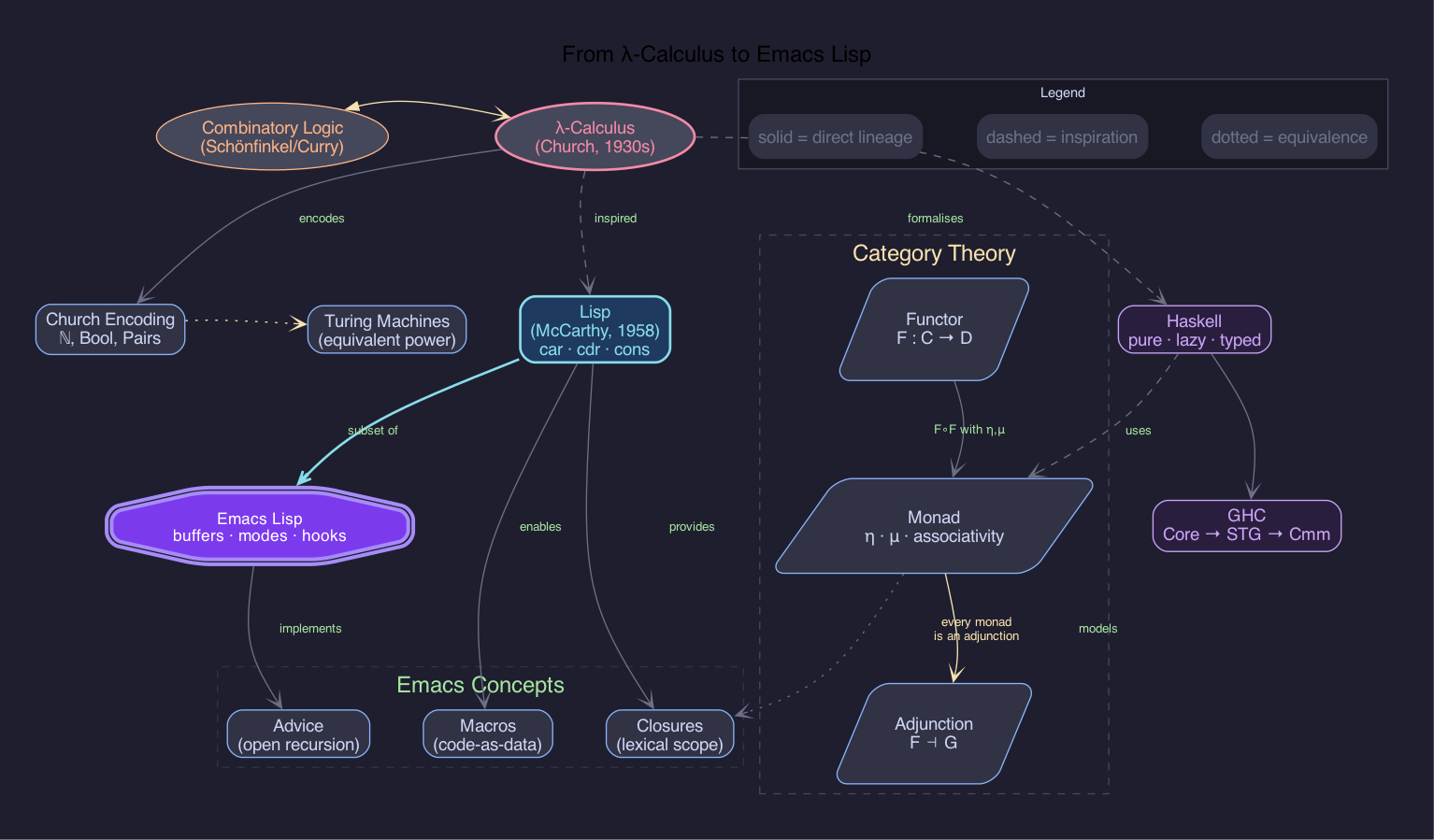
14.5. From λ-calculus to Emacs Lisp
Now everything at once: a header drawer's worth of #+graph:, #+node:, and #+edge: tables;
#+rank: lines; arc templates by tags, sampled in a legend; clusters; and labels broken by \\.
Its palette is Catppuccin's; the colours it repeats are named once, by Org's own macros:
14.6. The same, spelled long-hand
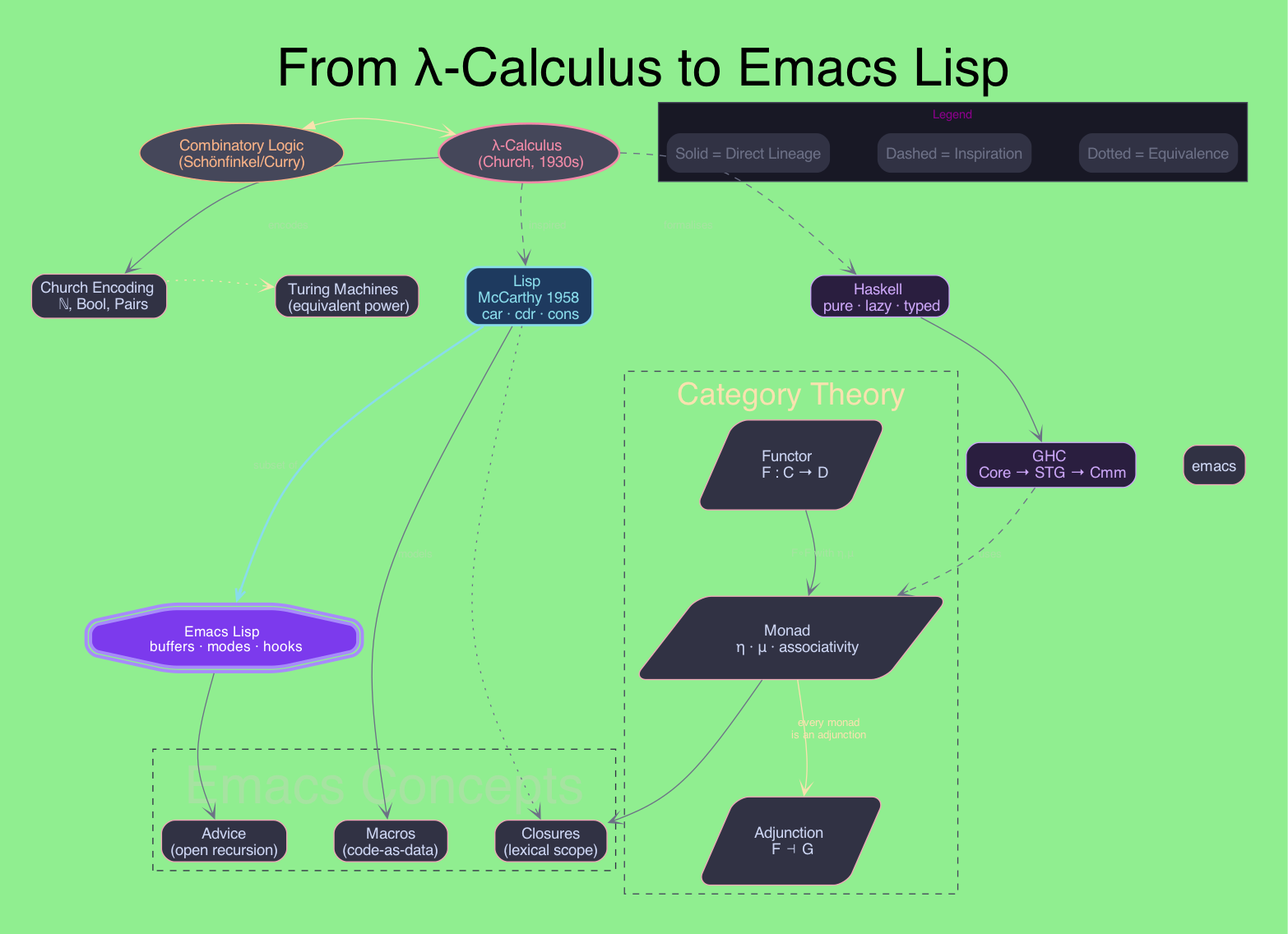
The graph above, as it was first written, before templates and legends existed: every arc styled by
its own :edge.KEY rows, every colour spelled out, its settings folded in a :SETTINGS: drawer, and a
legend of plain-text nodes. Comparing the two is demonstrative of what each feature saves.
14.7. Karbala —the family of the Prophet
A genealogy of the prophetic lineage (Adam → Noah → Ibrahim → … → Muhammad ﷺ) and the family of Imam
Hussain ibn Ali at Karbala: his wives, his children, the antagonists (Muawiya, Yazid, Ibn Ziyad, Shimr),
and a legend. It is demonstrative of most of this README at once: a :SETTINGS: drawer, #+begin_cluster
blocks with scoped #+node: overrides, #+rank: groupings, diamond shapes for key Karbala actors, \\
multi-line labels, footnote tooltips, and templates for the pink marriage arcs and red martyrdom arrows
—all without a single line of raw dot.
Idris — mentioned in Quran (19:56-57). Raised to a high station. Often identified with the biblical Enoch.
Hud — sent to the ʿĀd people (southern Arabia). They rejected him; destroyed by a violent wind.
Salih — sent to the Thamud people. Brought a she-camel as a divine sign; they killed it and were destroyed.
Adam — first human and first prophet. Created from clay; placed in Paradise then sent to Earth.
Noah (Nuh) — preached for 950 years. Built the Ark; the Flood destroyed those who rejected him.
Ibrahim (Abraham) — Friend of God (Khalilullah). Destroyed idols, survived fire. Father of Ismail and Ishaaq; built the Kaaba.
Lut (Lot) — nephew of Ibrahim. Sent to the people of Sodom; they were destroyed for their transgressions.
Ismail (Ishmael) — eldest son of Ibrahim; ancestor of the Arab peoples and of Muhammad ﷺ. He and Ibrahim built the Kaaba in Mecca.
Ishaaq (Isaac) — son of Ibrahim and Sarah. Father of Yaqub; ancestor of the Israelite prophets.
Yaqub (Jacob / Israel) — son of Ishaaq. Father of the twelve tribes of Israel, including Yusuf.
Yusuf (Joseph) — son of Yaqub. Sold into slavery by brothers; rose to power in Egypt. His beauty is legendary — Layla invoked it at Karbala.
Ayyub (Job) — prophet of patience. Afflicted with severe trials for years; restored after steadfast faith.
Shuayb (Jethro) — sent to the people of Midian; warned against dishonest trade. Some traditions identify him as father-in-law of Moses.
Yunus (Jonah) — swallowed by a whale after leaving his people without permission. Remembered for his repentance (Dhul-Nun).
Moses (Musa) — the prophet most mentioned in the Quran. Led the Exodus; received the Torah on Mount Sinai. Lineage traced through Ismail's descendants.
Aaron (Harun) — brother of Moses; assisted him in the mission to Pharaoh.
Dawood (David) — king and prophet of Israel. Slew Goliath; given the Psalms (Zabur). Father of Sulayman.
Sulayman (Solomon) — son of Dawood; given extraordinary wisdom, control over jinn and wind, and speech with animals.
Ilyas (Elias) — prophet of Israel; called his people to abandon the idol Baal.
Al-Yasa (Elisha) — successor of Ilyas; praised in the Quran among the best.
Zakariya (Zechariah) — prayed for a son in old age; miraculously given Yahya as a gift from God.
Yahya (John the Baptist) — son of Zakariya; forerunner to Jesus. Praised in the Quran as wise from childhood.
Jesus (Isa) — born miraculously to Maryam; given the Gospel (Injil). Performed miracles; raised to heaven; will return before the Day of Judgment.
Dhul-Kifl — mentioned twice in the Quran among the patient and righteous. Identity debated; some identify with Ezekiel or another prophet.
Khadija bint Khuwaylid — the first Muslim and the Prophet's most beloved wife. A wealthy merchant; she proposed to Muhammad ﷺ. He took no other wife while she lived.
Fatimah al-Zahra ('the Radiant') — daughter of Muhammad ﷺ and Khadija; wife of Ali; mother of Hasan, Hussain, and Zaynab. The Prophet said: 'Fatimah is a part of me — whoever angers her angers me.' In Shia tradition: after Abu Bakr's succession, Umar led a party to her house to force Ali's pledge of allegiance; the door was set alight or forced open, Fatimah was struck, and she miscarried her unborn son Muhsin (the fifth child of Ali and Fatimah). She died ~75–95 days after the Prophet — at most 18 years old — and was buried secretly at night, her grave kept hidden from the new government. Fadak (a fertile estate the Prophet had gifted her) was confiscated by Abu Bakr on the grounds that prophets leave no inheritance, a hadith Shia scholars hold as fabricated. She never spoke to Abu Bakr again until her death.
Maryam (Mary) — the only woman named directly in the Quran, with a full chapter (Sura 19) devoted to her. Gave birth to Jesus without a father; a virgin chosen above all women.
Asiya bint Muzahim — wife of Pharaoh who adopted Moses as an infant. Believed in God and was tortured to death by Pharaoh; her prayer for a house in Paradise is in Quran 66:11.
Hashim ibn Abd Manaf — great-grandfather of Muhammad ﷺ; ancestor of the Hashimite clan of Quraysh. Known for feeding pilgrims in Mecca.
Abd al-Muttalib — grandfather of Muhammad ﷺ and guardian after Abdullah's death. He discovered the Zamzam well and led the Quraysh against Abraha's elephant army.
Abdullah ibn Abd al-Muttalib — father of Muhammad ﷺ. Died before Muhammad's birth; his death and that of Aminah left Muhammad an orphan in infancy.
Abu Talib ibn Abd al-Muttalib — paternal uncle and guardian of Muhammad ﷺ after age 8; father of Ali. Protected the Prophet for decades though he did not publicly accept Islam.
Aqil ibn Abi Talib — elder brother of Ali; son of Abu Talib. Renowned for his genealogical knowledge. Father of Muslim ibn Aqil, Hussain's envoy to Kufa. Initially supported Muawiya after the arbitration, though this is a contested point in Shia sources.
Ja'far ibn Abi Talib — brother of Ali; led the early Muslim emigration to Abyssinia and presented Islam to the Negus. Died at the Battle of Mu'ta (629 CE) fighting Byzantine forces; called 'Dhu'l-Janahayn' (the one with two wings) for his bravery.
Aminah bint Wahb — mother of Muhammad ﷺ. Died when Muhammad was ~6 years old; he was left in the care of his grandfather Abd al-Muttalib. Her grave is in al-Abwa' on the road between Mecca and Medina.
Muhammad ibn Abdullah ﷺ — the Seal of the Prophets. Born ~570 CE in Mecca; received the Quran over 23 years. United the Arabian peninsula through both preaching and key battles: Badr (624 CE), Uhud (625 CE), Khandaq (627 CE), and the Conquest of Mecca (630 CE). His family (Ahl al-Bayt) are central to both Sunni and Shia Islam.
Ghadir Khumm — 18 Dhul-Hijja 10 AH (March 632 CE), three months before the Prophet's death. Returning from the Farewell Pilgrimage, Muhammad ﷺ halted 100,000+ pilgrims at a pond (ghadir) near Khumm and declared: 'Whoever takes me as their mawla (master/guardian), Ali is also their mawla.' In Shia Islam this is the unambiguous designation of Ali as successor — the foundational event of the Imamate. Sunni tradition interprets 'mawla' as 'friend/ally' rather than 'leader.' The Saqifa assembly two months later — while Ali was preparing the Prophet's body for burial — is viewed in Shia tradition as a deliberate circumvention of this declaration.
Shahr Banu — Persian princess, daughter of Yazdegerd III (last Sasanid emperor). Married Hussain after her father's defeat; mother of Ali al-Sajjad (4th Imam). Her lineage connects the Imam line to Persian royalty.
Rabab bint Imru al-Qays — wife of Hussain; mother of Ali Asghar (the infant martyr) and Sukaynah. She was present at Karbala and held her son as he was martyred by an arrow.
Layla bint Abi Murra — mother of Ali al-Akbar. At Karbala, pleading for her son's life, she invoked Prophet Yusuf's legendary beauty to describe Ali al-Akbar — 'there is no youth more like the Prophet.'
Umm Salamah (Hind bint Abi Umayyah) — one of Muhammad's wives; survived him by decades. Deeply close to Ahl al-Bayt; transmitted many hadith about Fatimah and the Imams. When Hussain departed for Karbala she wept, recalling a prophecy of his martyrdom.
Umm al-Banin (Fatimah bint Hizam) — second wife of Ali; mother of Abbas and three other sons, all martyred at Karbala alongside Hussain. Renowned for her elegies mourning them.
Ali ibn Abi Talib — cousin and son-in-law of Muhammad ﷺ; 1st Imam (Shia) and 4th Caliph (Sunni). Renowned for justice, bravery, and wisdom. Assassinated in the mosque of Kufa, 661 CE.
Hussain ibn Ali — 3rd Imam; grandson of Muhammad ﷺ. Refused to pledge allegiance to Yazid. Martyred with 72 companions at Karbala (10 Muharram 61 AH / 680 CE). His stand is the axis of Shia commemoration.
Ali ibn Hussain al-Sajjad (Zayn al-Abidin) — 4th Imam; survived Karbala as he was too ill to fight. His Sahifa al-Sajjadiyya (the Psalms of the Ahl al-Bayt) is a landmark of Islamic spirituality.
Sukaynah bint Hussain — known for her piety and eloquence. Witnessed Karbala as a child; taken captive to Kufa and Damascus. She famously mourned her father's severed head.
Ruqayyah bint Hussain — the young daughter of Hussain taken captive after Karbala. Tradition holds she died in the dungeon of Damascus from grief after seeing her father's head.
Abbas ibn Ali (Abu al-Fadl) — half-brother of Hussain; son of Umm al-Banin. Standard-bearer at Karbala. Martyred at the Euphrates trying to fetch water for the children; his shrine in Karbala stands beside Hussain's.
Ali al-Akbar ibn Hussain — eldest son of Hussain; son of Layla. The Prophet's companions said no youth resembled the Prophet more in appearance and character. Martyred at Karbala aged ~18.
Qasim ibn Hasan — son of Hasan; nephew of Hussain. Betrothed to Hussain's daughter before Karbala; martyred in battle there. His marriage and martyrdom on the same day is a poignant motif in Shia lamentation.
Ali Asghar ibn Hussain — the infant son of Hussain and Rabab; only months old at Karbala. Hussain held him up to the enemy army asking for water; he was killed by a three-pronged arrow. The youngest martyr of Karbala.
Hasan ibn Ali — 2nd Imam; grandson of Muhammad ﷺ. Abdicated the caliphate to Muawiya to prevent civil war, under a treaty. Died 670 CE, reportedly poisoned; buried in Medina.
Zaynab bint Ali — sister of Hussain; survived Karbala and became its voice. Her speech before Yazid in Damascus is celebrated as one of the most defiant addresses in Islamic history. Called 'the heroine of Karbala.'
Umm Kulthum bint Ali — sister of Hussain and Zaynab; also taken captive after Karbala. She delivered passionate elegies in Kufa and Damascus alongside Zaynab.
Muslim ibn Aqil — cousin of Hussain (son of Aqil ibn Abi Talib); sent as envoy to Kufa to assess support before Karbala. Initially received pledges from thousands; abandoned when Ibn Ziyad arrived and crushed the uprising. Executed on Ibn Ziyad's orders in 680 CE.
Hurr ibn Yazid al-Riyahi — Umayyad cavalry commander sent to intercept Hussain. On the morning of Ashura, he defected to Hussain's side, knowing it meant death. His repentance is one of the most celebrated acts in Shia literature; he was martyred in the battle.
Zayd ibn Ali — son of Imam Sajjad (4th Imam); brother of Imam Baqir. Led an armed uprising against Umayyad Caliph Hisham in Kufa, 740 CE. Was killed in battle, but his followers became Zaydi ('Fiver') Shia — the branch that holds Imams must be active, just rulers willing to fight for their rights.
Ismail ibn Jafar — eldest son of Imam Sadiq (6th Imam). Died before his father, yet a group held the Imamate passed through him to his son Muhammad ibn Ismail. This became Ismaili ('Sevener') Shia Islam — the branch behind the Fatimid Caliphate, and today the Nizari (Aga Khanis), Dawoodi Bohoras, and others.
Muhammad ibn Abdullah al-Mahd al-Nafs al-Zakiyya ('the Pure Soul') — grandson of Imam Hasan (2nd Imam). Led an armed uprising in Medina, 762 CE, against Abbasid Caliph al-Mansur, who had his family imprisoned. Many believed him to be the awaited Mahdi. Killed in battle; his brother Ibrahim's simultaneous revolt in Basra was also crushed. Venerated as a martyr; pivotal in Zaydi tradition.
Muhammad al-Baqir ('the one who opens up knowledge') — son of Sajjad; 5th Imam. Renowned for expansive religious scholarship; established the foundations of Shia jurisprudence in Medina.
Jafar al-Sadiq ('the truthful') — son of Baqir; 6th Imam. The most prolific scholarly Imam; his students included Abu Hanifa and Malik ibn Anas. Shia fiqh is called the Ja'fari school in his honor.
Musa al-Kadhim ('the forbearing') — son of Sadiq; 7th Imam. Imprisoned repeatedly by the Abbasid caliphs Mahdi and Harun al-Rashid; died in prison in Baghdad, 799 CE.
Ali al-Ridha ('the pleased one') — son of Kadhim; 8th Imam. Appointed heir-apparent by Abbasid Caliph al-Ma'mun (a political move). His shrine in Mashhad, Iran is one of the largest mosques in the world.
Muhammad al-Taqi ('the pious') — son of Ridha; 9th Imam. Became Imam at age 8 after his father's death. Married a daughter of the Abbasid caliph al-Ma'mun. Died aged ~25, reportedly poisoned.
Ali al-Hadi ('the guide') — son of Taqi; 10th Imam. Placed under house arrest in Samarra by Abbasid authorities for most of his life. Father of Hasan al-Askari.
Hasan al-Askari — son of Hadi; 11th Imam. Named 'al-Askari' for the military garrison city of Samarra where he was confined. Father of the 12th Imam. Died 874 CE, reportedly poisoned.
Muhammad al-Mahdi — son of Askari; 12th and final Imam. Believed to be in 'occultation' (ghayba) since 874 CE — hidden from sight but alive, to return at the end of times as the Mahdi who establishes justice.
Narjis Khatun — wife of Imam Hasan al-Askari (11th Imam); mother of Imam Muhammad al-Mahdi (12th Imam). Of Byzantine/Roman origin; the tradition holds she was a princess who converted to Islam and was brought to Samarra. Her role as mother of the hidden Imam makes her a figure of profound theological significance in Twelver Shia eschatology.
Salman al-Farisi — Persian companion of the Prophet; converted from Zoroastrianism after a long spiritual quest. The Prophet declared: 'Salman is from us, Ahl al-Bayt.' Became a close companion of Ali and later Governor of Ctesiphon (al-Madain) under him. Considered the first Persian Muslim of note.
Ammar ibn Yasir — one of the earliest Muslims; his mother Sumayyah was the first martyr of Islam. The Prophet foretold: 'Ammar will be killed by the transgressing group.' Fought for Ali at the Battle of Siffin (657 CE) and was killed by Muawiya's forces — fulfilling the prophecy and cementing Ali's legitimacy in Shia eyes.
Malik ibn al-Harith al-Ashtar — Ali's most trusted and capable general; appointed Governor of Egypt by Ali. Reportedly poisoned by Muawiya's agents (via honey laced with poison) before he could take up his Egyptian post. Ali mourned him: 'Malik was to me as I was to the Prophet.' An unrivalled figure in Shia military and moral tradition.
Abu Bakr al-Siddiq — 1st Caliph (632–634 CE). Sunni tradition venerates him as the Prophet's closest companion and first successor. In Shia tradition: the Saqifa assembly that chose him convened while Ali was still washing and shrouding Muhammad ﷺ for burial — bypassing the Prophet's explicit designation of Ali at Ghadir Khumm (18 Dhul-Hijja 10 AH). He confiscated Fadak from Fatimah, citing a solitary hadith ('prophets leave no inheritance') that Shia scholars hold as fabricated. Fatimah never reconciled with him; she died unreconciled and was buried secretly.
Umar ibn al-Khattab — 2nd Caliph (634–644 CE). Sunni tradition credits him with vast Islamic expansion into Persia, Syria, and Egypt, and with administrative reform. In Shia tradition: Umar was the driving force behind the Saqifa succession that sidelined Ali. He led the party to Fatimah's house to compel Ali's pledge of allegiance — in Shia narrations, the door was forced or set alight, Fatimah was struck by the door or directly, and she miscarried Muhsin. He also enforced the confiscation of Fadak. These events are among the deepest grievances in Shia historical memory.
Uthman ibn Affan — 3rd Caliph (644–656 CE). Compiled the standard Quran text (Uthmanic codex). His favoritism toward Umayyad relatives bred rebellion; he was assassinated in his home in Medina.
Aisha bint Abi Bakr — youngest and most prominent wife of Muhammad ﷺ; 'Mother of the Believers.' The primary transmitter of thousands of hadith. Led the Battle of the Camel (656 CE) against Ali — a defining Sunni-Shia fault line.
Abd al-Malik ibn Marwan — 5th Umayyad Caliph (685–705 CE). The dominant caliph during Imam Sajjad's era; sent al-Hajjaj ibn Yusuf to crush Iraqi uprisings. Centralised power and Arabised the administration.
al-Walid ibn Abd al-Malik — 6th Umayyad Caliph (705–715 CE). Son of Abd al-Malik; continued his father's oppressive policies. Imam Sajjad died during his reign, reportedly at his instigation.
Hisham ibn Abd al-Malik — 10th Umayyad Caliph (724–743 CE). The main political oppressor of Imams Baqir and Sadiq; summoned both Imams to Damascus and subjected them to interrogation. Reportedly had Imam Baqir poisoned.
Abu Ja'far al-Mansur — 2nd Abbasid Caliph (754–775 CE). Founded Baghdad. Repeatedly summoned and interrogated Imam Sadiq; according to most Shia sources, had him poisoned in 765 CE.
Harun al-Rashid — 5th Abbasid Caliph (786–809 CE). Famous for the tales of 1001 Nights. Imprisoned Imam Kadhim repeatedly in Baghdad; the Imam died in prison in 799 CE, most likely by Harun's order.
al-Ma'mun — 7th Abbasid Caliph (813–833 CE). Son of Harun. Appointed Imam Ridha as heir-apparent (a political manoeuvre to co-opt Shia support), then likely had him poisoned in 818 CE in Khurasan.
al-Mu'tasim — 8th Abbasid Caliph (833–842 CE). Brother of al-Ma'mun. Summoned Imam Taqi to Baghdad and reportedly had him poisoned; Imam Taqi died aged ~25 in 835 CE.
al-Mutawakkil — 10th Abbasid Caliph (847–861 CE). Notorious for anti-Shia policies: demolished the Karbala shrine, forbade pilgrimage, and forcibly relocated Imam Hadi to the garrison city of Samarra under house arrest.
al-Mu'tamid — 15th Abbasid Caliph (870–892 CE). Kept Imam Askari under strict house arrest in Samarra; the Imam died under suspicious circumstances in 874 CE during his reign, triggering the Major Occultation of the 12th Imam.
Hamza ibn Abd al-Muttalib — uncle of Muhammad ﷺ; among the earliest and fiercest converts to Islam. Called 'Asad Allah' (Lion of God) and 'Sayyid al-Shuhada' (Master of Martyrs). Martyred at Uhud (625 CE) by Wahshi ibn Harb, a spear-thrower hired by Hind bint Utbah for personal revenge (her father was killed at Badr). Hind then mutilated his body. His martyrdom is mourned alongside Hussain in Shia tradition.
Khalid ibn al-Walid — 'Sayf Allah al-Maslul' (the Drawn Sword of God). Fought against Muslims at Uhud (his flanking maneuver broke the Muslim line). Converted to Islam in 629 CE; became Islam's greatest military commander. Conquered much of Persia and Syria under Abu Bakr and Umar. Complex figure in Shia tradition: celebrated for military genius, yet his loyal service to the caliphs who sidelined Ali colours his legacy.
Battle of Badr — first major battle of Islam (17 Ramadan 2 AH / 624 CE). ~313 Muslims vs. ~1,000 Quraysh; decisive Muslim victory. Abu Jahl killed here. The Quran calls it 'the Day of Distinction' (يوم الفرقان). This victory established the Muslim community as a political and military force.
Battle of Uhud — Quraysh retaliation for Badr (7 Shawwal 3 AH / 625 CE). Initial Muslim advantage reversed when archers abandoned their post for plunder. Hamza martyred; Muhammad ﷺ wounded. Khalid ibn al-Walid's flanking maneuver decided the day. A Quranic lesson in discipline and the cost of disobedience.
Battle of Khandaq ('the Trench', also Ahzab) — Quraysh-led coalition of ~10,000 besieged Medina (5 AH / 627 CE). Salman al-Farisi proposed the Persian tactic of digging a defensive trench. The siege collapsed after ~20 days; a turning point that ended Quraysh's ability to threaten Medina.
Conquest of Mecca (فتح مكة) — 20 Ramadan 8 AH / January 630 CE. 10,000-strong Muslim force entered Mecca with near-zero bloodshed. Muhammad ﷺ granted general amnesty; Abu Sufyan converted at the last moment. The Kaaba was purified of idols. Khalid ibn al-Walid commanded the right flank.
Abu Sufyan ibn Harb — leader of the Quraysh and chief opponent of Muhammad ﷺ for two decades. Accepted Islam only at the conquest of Mecca (630 CE). Father of Muawiya; progenitor of the Umayyad dynasty.
Muawiya ibn Abi Sufyan — 1st Umayyad Caliph (661–680 CE). Fought Ali at the Battle of Siffin; gained control through the arbitration. His decision to appoint his son Yazid as successor broke the principle of the Shura and set up the Karbala tragedy.
Yazid ibn Muawiya — 2nd Umayyad Caliph. His demand that Hussain pledge allegiance triggered the march to Karbala. His forces massacred Hussain and his companions on Ashura, 680 CE — an act condemned even by many Sunni scholars.
Ziyad ibn Abih ('son of his father' — his paternity disputed) — powerful governor under Muawiya; claimed as a half-brother by Muawiya's decree. Father of Ibn Ziyad; notorious for harsh governance of Iraq.
Ubayd Allah ibn Ziyad — Governor of Kufa at the time of Karbala; the logistical architect of the massacre. He sent Muslim ibn Aqil (Hussain's envoy) to execution, then dispatched the army that surrounded Karbala.
Amr ibn Sa'd ibn Abi Waqqas — field commander of the Umayyad army at Karbala; son of a revered companion. He wavered before obeying Ibn Ziyad's orders; his complicity haunted him. He was later killed by Mukhtar al-Thaqafi in revenge.
Shimr ibn Dhi al-Jawshan — the man who delivered the killing blow to Hussain at Karbala, severing his head. Reviled across Islamic traditions; killed in revenge by Mukhtar al-Thaqafi shortly after.
Abd al-Rahman ibn Muljam al-Muradi — Kharijite assassin who struck Ali with a poisoned sword in the mosque of Kufa on 19 Ramadan 40 AH (661 CE). Ali died two days later. His act split the caliphate and deepened the Sunni-Shia divide permanently.
Abu Jahl ibn Hisham al-Makhzumi — chief persecutor of early Muslims in Mecca; Muhammad ﷺ called him 'the Pharaoh of this nation.' Led Quraysh forces at Badr; killed there (624 CE) — his death was a pivotal blow to Qurayshi leadership. Of the rival Makhzum clan, not the Umayyad line.
Hind bint Utbah — wife of Abu Sufyan; mother of Muawiya. Her father was killed at Badr, fuelling her hatred. At Uhud she hired Wahshi ibn Harb to kill Hamza (personal revenge), then mutilated his body and bit into his liver. Accepted Islam at the Conquest of Mecca. Her conversion, and Muawiya's parentage through her, are a recurrent irony in Shia historical memory.
Mukhtar ibn Abi Ubaid al-Thaqafi — led the uprising of 685–687 CE to avenge Hussain. He captured and killed Ubaydullah ibn Ziyad (the architect of Karbala) in 686 CE, and hunted down Shimr and other perpetrators. His forces were eventually defeated by Abd al-Malik. A complex figure: celebrated avenger in popular Shia piety, yet theologically controversial in some Shia scholarly circles for his messianic claims on behalf of Muhammad ibn al-Hanafiyya.


Life & Computing Science by Musa Al-hassy is licensed under a Creative Commons Attribution-ShareAlike 3.0 Unported License