
org-special-block-extras: The block and link types






Ξ
- 1. Boxed Text —Calling out super duper info
- 2. Folded Details —Let the user see stuff only if they're interested
- 3. Nice Keystroke Renditions: kbd:C-h_t
- 4. Remark —Inline footnotes, viz HTML tooltips and LaTeX notes in the margin
- 5. Glossaries —Define a term once, cite it with
doc:𝒳 - 6. Parallel ---Place ideas side-by-side, possibly with a separator
- 7. Display maths ---
#+begin_math, whereinred:𝒳colours a symbol - 8. Aligned equations ---
&in a math block, cited by[[𝒳]] - 9. Calculational proofs ---
REL{ HINT }in a math block, folded byTAB - 10. Graphs ---Org lists, drawn by Graphviz
- 11. Switches for every block:
:when,:let,:folded, … - 12. Demos —a block, then what it exports to, and a test that it still does
- 13. Callouts —Note, tip, important, warning, caution
- 14. Colours ---
red:𝒳,[[color:#ff0066][𝒳]], and#+begin_red - 15. Quotations, cited ---
#+begin_quote KEY - 16. Highlights —Colour the background, not the text
- 17. Markdown export —What survives GitHub, and how to change it
- 18. PDF export —The LaTeX packages our blocks need, loaded for us
⭐ The code lives at github.com/alhassy/org-special-block-extras —star it, or discuss it there! 
1. Boxed Text —Calling out super duper info
﴾What You Write﴿
It can be useful to draw attention to some important text by
enclosing it in a [[doc:org-block/box][box]].

#+begin_box Uses of callout boxes
Such boxes often callout tips, warnings, cautionary info or
emphasises core information.
#+end_box
﴾What You Get﴿
It can be useful to draw attention to some important text by
enclosing it in a boxEnclose text in a box, possibly with a TITLE.
By default, the box’s BACKGROUND-COLOR is green for HTML and red for LaTeX;
for LaTeX, there are also FRAME-COLOR and TITLE-BACKGROUND-COLOR.
SHADOW is an alternate style of boxing: It shows the contents in a centred
box with a shadow colour being the given non-nil value of SHADOW.
If SHADOW is a hexadecimal colour, it should be a string enclosed in double quotes.
More accurately, the following are all valid uses:
#+begin_box title :shadow t
#+begin_box title :shadow inset
#+begin_box title :shadow "pink"
#+begin_box title :shadow pink
#+begin_box title :shadow (cyan pink orange yellow)
#+begin_box title :shadow (cyan "inset pink" orange)
#+begin_box title :shadow (:left cyan :right pink :deep-right orange :deep-left yellow)
Notice that prefixing colours with ‘inset’ causes the colour to be within the box,
rather than spread, with blur, around the box. The use of ‘inset’ swaps left and right.
The HTML export uses a padded div, whereas the LaTeX export
requires the tcolorbox package; Markdown, sans colours, gets a quote opening with TITLE in bold.
Regarding the Lisp function:
+ BACKEND refers to the current export backend.
+ RAW-CONTENTS refers to the text as the user wrote it, sans its least indentation.
⇒ Its body asks, by &context, for CONTENTS: the ‘org parsed’ version of user text.
⇒ CONTENTS and RAW-CONTENTS are identical for the description of a link; whence the LINK? of &context is non-nil.
For example, upon LaTeX export, the Org special block
#+begin_box
Hello, world
#+end_box
is rewritten to the result of the call
(org-block/box ‘latex "Hello, world").
Uses of callout boxes
Such boxes often callout tips, warnings, cautionary info or emphasises core information.
﴾How It’s Implemented﴿
(org-defblock box (&optional (title "") &key background-color shadow frame-color title-background-color
                  &allow-other-keys :latex-head ("xcolor" "tcolorbox") :manual "#Boxed-Text"
                  &context backend raw-contents contents)
              "Enclose text in a box, possibly with a TITLE.

By default, the box's BACKGROUND-COLOR is green for HTML and red for LaTeX;
for LaTeX, there are also FRAME-COLOR and TITLE-BACKGROUND-COLOR.

SHADOW is an alternate style of boxing: It shows the contents in a centred
box with a shadow colour being the given non-nil value of SHADOW.
If SHADOW is a hexadecimal colour, it should be a string enclosed in double quotes.
More accurately, the following are all valid uses:

    #+begin_box title :shadow t
    #+begin_box title :shadow inset

    #+begin_box title :shadow \"pink\"
    #+begin_box title :shadow pink

    #+begin_box title :shadow (cyan pink orange yellow)
    #+begin_box title :shadow (cyan \"inset pink\" orange)
    #+begin_box title :shadow (:left cyan :right pink :deep-right orange :deep-left yellow)

Notice that prefixing colours with ‘inset’ causes the colour to be within the box,
rather than spread, with blur, around the box. The use of ‘inset’ swaps left and right.

The HTML export uses a padded div, whereas the LaTeX export
requires the tcolorbox package; Markdown, sans colours, gets a quote opening with TITLE in bold."
              (pcase (if (org-export-markdown-p) 'md backend)
                ('md (org-parse (format "#+begin_quote\n%s%s\n#+end_quote"
                                        (if (org-string-nw-p (format "%s" title)) (format "*%s*\n\n" title) "")
                                        raw-contents)))
                ;; Colours are named first, since tcolorbox options cannot take hex codes such as #CCFFCC.
                ('latex
                 (concat (org--latex-define-color "osbe-box-back" (or background-color "red!5!white"))
                         (org--latex-define-color "osbe-box-frame" (or frame-color "red!75!black"))
                         (org--latex-define-color "osbe-box-title" (or title-background-color "yellow!50!red"))
                         (format (concat "\\begin{tcolorbox}[title={%s},colback=osbe-box-back,colframe=osbe-box-frame,"
                                         "colbacktitle=osbe-box-title,coltitle=red!25!black, fonttitle=\\bfseries,"
                                         "subtitle style={boxrule=0.4pt, colback=yellow!50!red!25!white}]"
                                         "%s\\end{tcolorbox}")
                                 title contents)))
                (_ (format "<div style=\"%s\"> <h3>%s</h3> %s </div>"
                           (s-join ";" (list "padding: 1em"
                                             (format "background-color: %s" (org-subtle-colors (format "%s" (or background-color "green"))))
                                             "border-radius: 15px"
                                             "font-size: 0.9em"
                                             (org--box-shadow shadow)))
                           title contents))))
2. Folded Details —Let the user see stuff only if they're interested
﴾What You Write﴿
Sometimes there is a remark or a code snippet that is useful to
have, but not relevant to the discussion at hand and so we want to
/fold away such [[doc:org-block/details][details]]/.

#+begin_details Example use cases
+ ‘Conversation-style’ articles, where the author asks the reader questions
  whose answers are “folded away” so the reader can think about the exercise
  before seeing the answer.

+ Hiding boring but important code snippets, such as a list of import
  declarations or a tedious implementation.
#+end_details

Full syntax ~#+begin_details "title" :background-color "cyan" :title-color "green"~.
﴾What You Get﴿
Sometimes there is a remark or a code snippet that is useful to
have, but not relevant to the discussion at hand and so we want to
fold away such detailsEnclose contents in a folded up box, for HTML.
For LaTeX, this is just a boring, but centered, box.
By default, the TITLE of such blocks is “Details”,
its TITLE-COLOR is green, and BACKGROUND-COLOR is “#e5f5e5”.
In HTML, we show folded, details, regions with a nice greenish colour.
Regarding the Lisp function:
+ BACKEND refers to the current export backend.
+ RAW-CONTENTS refers to the text as the user wrote it, sans its least indentation.
⇒ Its body asks, by &context, for CONTENTS: the ‘org parsed’ version of user text.
⇒ CONTENTS and RAW-CONTENTS are identical for the description of a link; whence the LINK? of &context is non-nil.
For example, upon LaTeX export, the Org special block
#+begin_details
Hello, world
#+end_details
is rewritten to the result of the call
(org-block/details ‘latex "Hello, world").
Example use cases
- ‘Conversation-style’ articles, where the author asks the reader questions whose answers are “folded away” so the reader can think about the exercise before seeing the answer.
- Hiding boring but important code snippets, such as a list of import declarations or a tedious implementation.
Full syntax #+begin_details "title" :background-color "cyan" :title-color "green".
﴾How It’s Implemented﴿
(org-defblock details (&optional (title "Details") &key (background-color "#e5f5e5") (title-color "green")
                      &allow-other-keys :latex-head ("xcolor" "tcolorbox") :manual "#Folded-Details"
                      &context backend contents)
              "Enclose contents in a folded up box, for HTML.

For LaTeX, this is just a boring, but centered, box.

By default, the TITLE of such blocks is “Details”,
its TITLE-COLOR is green, and BACKGROUND-COLOR is “#e5f5e5”.

In HTML, we show folded, details, regions with a nice greenish colour."
              (pcase backend
                ('latex (concat (org--latex-define-color "osbe-bg" background-color)
                                (org--latex-define-color "osbe-fg" title-color)
                                (format (concat "\\begin{quote}\n"
                                                "\\begin{tcolorbox}[colback=osbe-bg,colframe=osbe-fg,title={%s},sharp corners,boxrule=0.4pt]\n"
                                                "%s\n"
                                                "\\end{tcolorbox}\n"
                                                "\\end{quote}")
                                        title contents)))
                (_ (format (concat "<details class=\"code-details\" style=\"padding: 1em; background-color: %s; "
                                   "border-radius: 15px; color: hsl(157 75%% 20%%); font-size: 0.9em; "
                                   "box-shadow: 0.05em 0.1em 5px 0.01em #00000057;\">\n"
                                   "<summary><strong><font face=\"Courier\" size=\"3\" color=\"%s\">%s</font></strong></summary>\n"
                                   "%s\n"
                                   "</details>")
                           background-color title-color title contents))))
Src blocks fold too: the header argument :folded t exports a src block, exactly as Org
otherwise would, inside a details block titled by its language; :folded "TITLE" picks
the title.
#+begin_src emacs-lisp :folded "How is it done?"
(org-defblock details …)
#+end_src
A page with many folded blocks may offer a button to unfold them all at once:
[[toggle-details:][Show me everything]] is that button; pressed again, it folds them
all. Without a description, it reads “Unfold all details”.
3. Nice Keystroke Renditions: C-h t
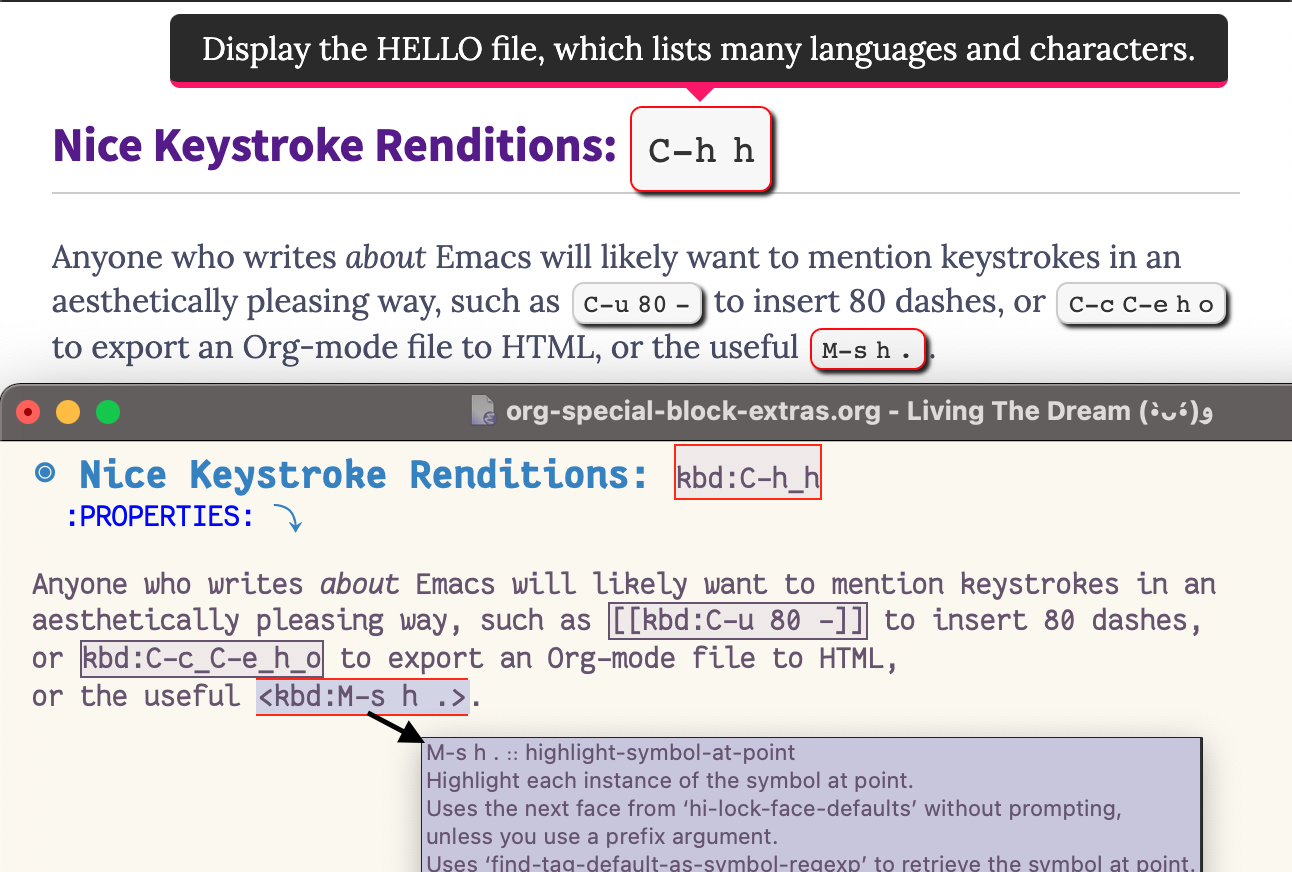
Anyone who writes about Emacs will likely want to mention keystrokes in an
aesthetically pleasing way, such as C-u 80 - to insert 80 dashes,
or C-c C-e h o to export an Org-mode file to HTML,
or the useful M-s h .M-s h . ∷ highlight-symbol-at-point
Highlight each instance of the symbol at point.
Uses the next face from ‘hi-lock-face-defaults’ without prompting,
unless you use a prefix argument.
Uses ‘find-tag-default-as-symbol-regexp’ to retrieve the symbol at point.
If REGEXP contains upper case characters (excluding those preceded by ‘\’)
and ‘search-upper-case’ is non-nil, the matching is case-sensitive.
This uses Font lock mode if it is enabled; otherwise it uses overlays,
in which case the highlighting will not update as you type. The Font
Lock mode is considered "enabled" in a buffer if its ‘major-mode’
causes ‘font-lock-specified-p’ to return non-nil, which means
the major mode specifies support for Font Lock.
.
kbd:𝒳will show a tooltip defining 𝒳, as an Emacs Lisp function, if possible. For example,kbd:C-h_tis C-h t; and likewise<kbd:M-s h .>is M-s h.M-s h. ∷ highlight-symbol-at-point Highlight each instance of the symbol at point. Uses the next face from ‘hi-lock-face-defaults’ without prompting, unless you use a prefix argument. Uses ‘find-tag-default-as-symbol-regexp’ to retrieve the symbol at point. If REGEXP contains upper case characters (excluding those preceded by ‘\’) and ‘search-upper-case’ is non-nil, the matching is case-sensitive. This uses Font lock mode if it is enabled; otherwise it uses overlays, in which case the highlighting will not update as you type. The Font Lock mode is considered "enabled" in a buffer if its ‘major-mode’ causes ‘font-lock-specified-p’ to return non-nil, which means the major mode specifies support for Font Lock.
(we need to use<...>since punctuation is not picked up as part of link labels). In contrast,kbd:noperenders as nope without a tooltip (nor a red border).You can also supply explicit tooltip description:
[[kbd:key
  sequence][description]]
will show as key sequencekey sequence ∷ description
; i.e., the key sequence in nice key font along with a tooltip explaining it.- In Emacs itself, each of these displays as 〔C-x C-s〕: the
kbd:markup becomes the brackets and each_a space. Only the markup is displayed differently, so the keys stay editable as ever. Moreover, clicking one runs its keys —after asking, aselisp:links do— so readers may try them on the spot.
4. Remark —Inline footnotes, viz HTML tooltips and LaTeX notes in the margin
Sometimes you want to remark on detailsEnclose contents in a folded up box, for HTML.
For LaTeX, this is just a boring, but centered, box.
By default, the TITLE of such blocks is “Details”,
its TITLE-COLOR is green, and BACKGROUND-COLOR is “#e5f5e5”.
In HTML, we show folded, details, regions with a nice greenish colour.
Regarding the Lisp function:
+ BACKEND refers to the current export backend.
+ RAW-CONTENTS refers to the text as the user wrote it, sans its least indentation.
⇒ Its body asks, by &context, for CONTENTS: the ‘org parsed’ version of user text.
⇒ CONTENTS and RAW-CONTENTS are identical for the description of a link; whence the LINK? of &context is non-nil.
For example, upon LaTeX export, the Org special block
#+begin_details
Hello, world
#+end_details
is rewritten to the result of the call
(org-block/details ‘latex "Hello, world") without drawing too much
attention, and so a tooltip via remarkFormat CONTENTS as a first-class editor comment according to BACKEND.
The CONTENTS string has an optional switch: If it contains a line
with having only ‘#+replacewith:’, then the text preceding this
clause should be replaced by the text after it; i.e., this is
what the EDITOR (the person editing) intends and so we format the
replacement instruction (to the author) as such.
In Emacs, as links, editor remarks are shown with a bold red; but
the exported COLOR of a remark is black by default and it is not
STRONG ---i.e., bold---. There is an optional SIGNOFF message
that is appended to the remark.
Remarks are hidden from the export when ‘org-hide-editor-comments’ is
non-nil. For just one file, write “#+bind: org-hide-editor-comments t”
in it; that needs ‘org-export-allow-bind-keywords’ set to t, which we
leave to you, since #+bind lets a document set any variable.
In Markdown, a remark block is GitHub’s “> [!NOTE]” alert, titled EDITOR; as a link, it stays HTML.
Regarding the Lisp function:
+ BACKEND refers to the current export backend.
+ RAW-CONTENTS refers to the text as the user wrote it, sans its least indentation.
⇒ Its body asks, by &context, for CONTENTS: the ‘org parsed’ version of user text.
⇒ CONTENTS and RAW-CONTENTS are identical for the description of a link; whence the LINK? of &context is non-nil.
For example, upon LaTeX export, the Org special block
#+begin_remark
Hello, world
#+end_remark
is rewritten to the result of the call
(org-block/remark ‘latex "Hello, world") suffices.
﴾What You Write﴿
It can be annoying to make readers jump to the bottom of the page to
read a footnote.  Instead, I prefer to write an /inline [[doc:org-block/tooltip][remark]]/
containing, say, references or additional explanation.

   /[[tooltip:Allah][The God of Abraham; known as Elohim in the Bible]] does not burden a
       soul beyond what it can bear./ --- Quran 2:286

Or, without specifying an explicit label:

   /Allah[[tooltip:][The God of Abraham; known as Elohim in the Bible]] does not
       burden a soul beyond what it can bear./ --- Quran 2:286
﴾What You Get﴿
It can be annoying to make readers jump to the bottom of the page to
read a footnote. Instead, I prefer to write an inline remarkA remark, CONTENTS, on MARKER in the text: in HTML, a tooltip on MARKER, hovered on a desktop, tapped on a
phone; in LaTeX, MARKER followed by CONTENTS as a margin note, numbered by COUNTER, as footnotes are; in beamer, whose
slides have no margins, a footnote. Sans MARKER, the note’s number alone in LaTeX, and “°” in HTML.
It’s a /Allah[[margin:][The God of Abraham]] does not burden a soul …/
#+begin_tooltip simple
Squint, and Maybe ℕ is ℕ.
#+end_tooltip
exercise.
The block is one-off, “inline footnotes”; Org’s own [fn::…] are such remarks too. For a note used repeatedly, consider
declaring it with ‘documentation’ and citing it with ‘doc’.
WIDTH, COUNTER, and COLOR are LaTeX’s: the note is WIDTH wide, coloured COLOR, its number in black. Since verbatim
environments fail as arguments to \marginpar, CONTENTS is saved in a minipage within a LaTeX box, then unfolded in the
margin; hence, src blocks may appear within margin notes (•̀ᴗ•́)و For LaTeX, a ‘#+resize:’ line has the rest of the
note resized, to 1.3 the margin’s width ---requiring \usepackage{adjustbox}.
‘tooltip’ is an alias, for when we think in HTML rather than LaTeX.
An alias of ‘org-block/margin’.
Regarding the Lisp function:
+ BACKEND refers to the current export backend.
+ RAW-CONTENTS refers to the text as the user wrote it, sans its least indentation.
⇒ Its body asks, by &context, for CONTENTS: the ‘org parsed’ version of user text.
⇒ CONTENTS and RAW-CONTENTS are identical for the description of a link; whence the LINK? of &context is non-nil.
For example, upon LaTeX export, the Org special block
#+begin_tooltip
Hello, world
#+end_tooltip
is rewritten to the result of the call
(org-block/tooltip ‘latex "Hello, world")
containing, say, references or additional explanation.
Allah
The God of Abraham; known as Elohim in the Bible
Or, without specifying an explicit label:
Allah°
The God of Abraham; known as Elohim in the Bible
A tooltip opens when its word is hovered with a mouse, or tapped on a phone; it closes when we
leave both, tap elsewhere, or press Escape. Its text is Org, exported as Org, so it may hold
links —clickable, since moving into the tooltip keeps it open— and any other markup; an
Elisp docstring is shown just as it is written. The machinery is tooltips.js, about eighty
lines with no dependencies, in the look of tooltips.css; both are inlined into each exported
page, which so fetches nothing for them.
Org's own footnotes are such remarks too: in HTML, each footnote's number is a tooltip of its
definition, the footnotes section staying below, for print; in LaTeX, each is a margin note, as
the marginA remark, CONTENTS, on MARKER in the text: in HTML, a tooltip on MARKER, hovered on a desktop, tapped on a
phone; in LaTeX, MARKER followed by CONTENTS as a margin note, numbered by COUNTER, as footnotes are; in beamer, whose
slides have no margins, a footnote. Sans MARKER, the note’s number alone in LaTeX, and “°” in HTML.
It’s a /Allah[[margin:][The God of Abraham]] does not burden a soul …/
#+begin_tooltip simple
Squint, and Maybe ℕ is ℕ.
#+end_tooltip
exercise.
The block is one-off, “inline footnotes”; Org’s own [fn::…] are such remarks too. For a note used repeatedly, consider
declaring it with ‘documentation’ and citing it with ‘doc’.
WIDTH, COUNTER, and COLOR are LaTeX’s: the note is WIDTH wide, coloured COLOR, its number in black. Since verbatim
environments fail as arguments to \marginpar, CONTENTS is saved in a minipage within a LaTeX box, then unfolded in the
margin; hence, src blocks may appear within margin notes (•̀ᴗ•́)و For LaTeX, a ‘#+resize:’ line has the rest of the
note resized, to 1.3 the margin’s width ---requiring \usepackage{adjustbox}.
‘tooltip’ is an alias, for when we think in HTML rather than LaTeX.
Regarding the Lisp function:
+ BACKEND refers to the current export backend.
+ RAW-CONTENTS refers to the text as the user wrote it, sans its least indentation.
⇒ Its body asks, by &context, for CONTENTS: the ‘org parsed’ version of user text.
⇒ CONTENTS and RAW-CONTENTS are identical for the description of a link; whence the LINK? of &context is non-nil.
For example, upon LaTeX export, the Org special block
#+begin_margin
Hello, world
#+end_margin
is rewritten to the result of the call
(org-block/margin ‘latex "Hello, world") block's are, numbered as footnotes are. All three of Org's spellings serve: an
anonymous [fn::…], a named [fn:NAME] defined elsewhere, and a named inline [fn:NAME: …], which
later [fn:NAME] references share.
﴾What You Write﴿
The Quran was revealed over 23 years[fn::From 610 to 632 CE, in Mecca then Medina.], and the
Torah[fn:-0-torah] and the Gospel[fn:-0-injil: /Injil/, given to Jesus.] are honoured in it as earlier
scriptures; the Gospel[fn:-0-injil] is named in it a dozen times.

[fn:-0-torah] /Tawrat/, given to Moses; see [[https://en.wikipedia.org/wiki/Tawrat][Tawrat]].
﴾What You Get﴿
The Quran was revealed over 23 years1From 610 to 632 CE, in Mecca then Medina., and the
Torah2
Tawrat, given to Moses; see Tawrat.
5. Glossaries —Define a term once, cite it with doc:𝒳
A doc:𝒳 link shows the documentation of 𝒳 as a tooltip in HTML, and as a glossary
reference in LaTeX. Here 𝒳 is an Emacs Lisp function or variable, a word in the English
dictionary —via WordNet's wn, should we have it— or, best of all, a term of our own.
﴾What You Write﴿
The ~doc~ link type can be used to show tooltips for Emacs Lisp commands such as

                         doc:thread-last

However, it can also be used for your own definitions/glossary.
First define a term as follows, which does not render anything in the resulting HTML.

                 #+begin_documentation Category Theory :label cat
                 A theory of typed composition; e.g., typed monoids.
                 #+end_documentation

Then you can refer to it using the given :label, if any:

                             doc:cat

Or else refer to it with underscores in lieu of spaces:

                       doc:Category_Theory

Either approach renders the name of the term, not the way its referenced.
If you want to change what's rendered, provide a description:

                  [[doc:cat][abstract nonsense]]

Finally, if ~doc~ gets a label that is not an Emacs Lisp command, variable, nor a user-defined
definition via #+begin_documentation, then we try to look up its definition via the dictionary:

                          doc:happiness
﴾What You Get﴿
The doc link type can be used to show tooltips for Emacs Lisp commands such as
thread-lastThread FORMS elements as the last argument of their successor.
Example:
(thread-last
5
(+ 20)
(/ 25)
-
(+ 40))
Is equivalent to:
(+ 40 (- (/ 25 (+ 20 5))))
Note how the single ‘-’ got converted into a list before
threading.
(fn &rest FORMS)
However, it can also be used for your own definitions/glossary. First define a term as follows, which does not render anything in the resulting HTML.
Then you can refer to it using the given :label, if any:
Category Theory
A theory of typed composition; e.g., typed monoids.
Or else refer to it with underscores in lieu of spaces:
Category Theory
A theory of typed composition; e.g., typed monoids.
Either approach renders the name of the term, not the way its referenced. If you want to change what's rendered, provide a description:
abstract nonsense
A theory of typed composition; e.g., typed monoids.
Finally, if doc gets a label that is not an Emacs Lisp command, variable, nor a user-defined
definition via #+begindocumentation, then we try to look up its definition via the dictionary:
happinessOverview of noun happiness
The noun happiness has 2 senses (first 2 from tagged texts)
1. (4) happiness, felicity -- (state of well-being characterized by emotions ranging from contentment to intense joy)
2. (2) happiness -- (emotions experienced when in a state of well-being)
Synonyms/Hypernyms (Ordered by Estimated Frequency) of noun happiness
2 senses of happiness
Sense 1
happiness, felicity
=> emotional state, spirit
Sense 2
happiness
=> feeling
﴾How It’s Implemented﴿
(org-deflink doc (label &optional description backend)
  "Export LABEL as itself, or as the provided DESCRIPTION,
 along with a tooltip that shows the user's
 documentation-glossary for LABEL and using that entry's name
 when no DESCRIPTION is provided."
  :let (entry (org-docs-get label)
        name (cl-first entry)
        docs (cl-second entry)
        display-name (or description name))
  :help-echo (format "[%s] %s :: %s" label name docs)
  :face '(custom-button)
  :manual "#Glossaries"
  :export (progn
            (add-to-list 'org--docs-actually-used (list label name docs))
            (pcase backend
              ('html (org--html-tooltip docs display-name (org--docs-plain-p label)))
              ;; Make the current word refer to its glossary entry, and declare the location
              ;; that the glossary should refer back to; see `org--docs-glossary'.
              ('latex (format "\\hyperref[o-glossary-%s]{%s}\\label{o-glossary-declaration-site-%s}"
                              label display-name label))
              (_ display-name))))
Our own terms are data in an Org file: an entry is either a documentation block, which
exports nothing, or a heading tagged :documentation:, which exports as an ordinary
section. The heading's title is the term's name, its :DOC_KEYS: property lists the labels
by which we cite it, and its own text is the definition. Either way, the name with
underscores in lieu of spaces is a label too; e.g., doc:Category_Theory. Moreover, as
#+print_bibliography: lists the works a page cites, #+print_glossary: lists every term
the page cites, wherever it sits.
Org's own radio targets are entries too, with no markup of ours at all: in “A
<<<monoid>>> is a unital semigroup”, Org already links each later “monoid” to its
definition; in HTML, each such mention is also a tooltip of the defining paragraph.
﴾What You Write﴿
Our glossary, listing every term this page cites ---even those cited further below:

#+print_glossary:

* Category Theory                                                   :documentation:
:PROPERTIES:
:DOC_KEYS: cat
:END:
A theory of typed composition; e.g., typed monoids.

* Using our terms

A glossary entry may instead be a block, which exports nothing:

#+begin_documentation Monoid :label mon
A set with an associative binary operation that has a unit.
#+end_documentation

Then, doc:cat studies [[doc:mon][monoids]] and their kin.
﴾What You Get﴿
Our glossary, listing every term this page cites —even those cited further below:
MonoidA set with an associative binary operation that has a unit.
Category TheoryA theory of typed composition; e.g., typed monoids.
Category Theory documentation
A theory of typed composition; e.g., typed monoids.
Using our terms
A glossary entry may instead be a block, which exports nothing:
Then, Category Theory
A theory of typed composition; e.g., typed monoids.
A set with an associative binary operation that has a unit.
﴾How It’s Implemented﴿
(org-defblock documentation
              (&optional (name (error "Documentation block: Name must be provided")) &key label show (color "green")
               &allow-other-keys
               ;; A heading tagged :documentation: is an entry in its own right; see `org--docs-read-buffer'.
               :tag nil :manual "#Glossaries" &context raw-contents)
              "A glossary entry: CONTENTS defines NAME, cited as doc:LABEL; a heading tagged :documentation: is one too.

The entries live in ‘org--docs’.

A documentation entry may have its LABEL, its primary identifier,
be:
1. Omitted
2. Given as a single symbol
3. Given as a many aliases '(lbl₀ lbl₁ … lblₙ)

The third case is for when there is no canonical label to refer to
an entry, or it is convenient to use multiple labels for the same
entry.

In all of the above cases, two additional labels are included:
The entry name with spaces replaced by underscores, and again but
all lower case.

Documentation blocks are not shown upon export;
unless SHOW is non-nil, in which case they are shown
using the ‘box’ block, with the provided COLOR passed to it.

Alternatively, a heading tagged :documentation: is an entry, which
exports as an ordinary section: its title is the NAME, its :DOC_KEYS:
property holds the labels, and its own text is the entry.

  * Category Theory                                  :documentation:
    :PROPERTIES:
    :DOC_KEYS: cat cats
    :END:
    A theory of typed composition; e.g., typed monoids.

Entries are read afresh before each export, so they may be cited before
they are defined; see `org--docs-prepare'."
              (dolist (entry (org--docs-entries name label (substring-no-properties raw-contents)))
                (add-to-list 'org--docs entry))
              ;; Should the special block show something upon export?
              (if show (org--blockcall box name :background-color color raw-contents) ""))
Terms we cite across many files go in a library: a list of Org files in
org-docs-libraries, whose entries —blocks and headings alike— every doc:𝒳 link may
cite. The files are read, not exported, so loading them is quick; M-x
org-docs-load-libraries reloads them after an edit, and M-x org-docs-insert inserts a
doc:𝒳 link by searching all the terms we have.
A radio target is a term too: in A <<<monoid>>> is a set with an associative operation
and a unit., the target names the term and its paragraph defines it; so doc:monoid
cites it, in the same file or, from a library, in any other.
6. Parallel ---Place ideas side-by-side, possibly with a separator
﴾What You Write﴿
Reduce the amount of whitespace noise in your articles by using the
[[doc:org-block/parallel][parallel]] block to place ideas
side-by-side ---with up to 𝓃-many columns.

----------------------------------------------------------------------

#+begin_parallel 2
*“Soft Columns”:* Writing ~#+begin_parallel 𝓃 :bar BAR~ will produce
𝒏-many parallel columns, possibly separated by solid rules, or a
“bar”. /This style allows text to freely move between columns,
depending on the size of the browser, which may dynamically shrink
and grow./ The value ~BAR~ can either be ~t~, ~nil~, or any
(backend)-valid colour specification; such as ~red~ or ~green~.
#+end_parallel

----------------------------------------------------------------------

#+begin_parallel 25% 50% 25% :bar green

*“Hard Columns”:* Alternatively, /for non-uniform column widths, 𝓃 may
instead be a specification of the widths of the columns./

#+columnbreak:
However, this extra flexibility comes at an additional cost: The
contents of the block must now contain /𝓃-1/ lines consisting of
~#+columnbreak:~, when the specification determines 𝓃-many columns.

#+columnbreak:
Goodbye (“God-be-with-ye”) to the right!

#+end_parallel

# In the Soft Columns style above, any ‘#+columnbreak:’ are merely ignored.

In summary, articles can get lengthy when vertical whitespace is
wasted on thin lines; instead, one could save space by using
/[[doc:org-block/parallel][parallel]] columns of text/.
﴾What You Get﴿
Reduce the amount of whitespace noise in your articles by using the
parallelPlace ideas side-by-side, possibly with a separator.
There are COLS many columns, and they may be separated by solid
vertical rules if BAR is a non-nil (colour) value.
+ COLS is either a number or a sequence of the shape: 10% 20% 30%.
+ BAR is either ‘t’, ‘nil’, or a colour such as ‘red’ or ‘blue’.
----------------------------------------------------------------------
“Soft Columns”: Writing “#+begin_parallel 𝓃 :bar t” will produce
𝒏-many parallel columns, possibly separated by solid rules, or a
“bar”. This style allows text to freely move between columns,
depending on the size of the browser, which may dynamically
shrink and grow. BAR can either be ‘t’, ‘nil’, or
any (backend)-valid colour specification; such as ‘red’ or
‘green’.
“Hard Columns”: Alternatively, for non-uniform column widths,
COLS may instead be a specification of the widths of the
columns. However, this extra flexibility comes at an additional
cost: The contents of the block must now contain 𝒏-1 lines
consisting of ‘#+columnbreak:’, when the specification determines
𝒏 columns, as shown in the following example.
#+begin_parallel 20% 60% 20% :bar green
Hello, to the left!
#+columnbreak:
A super duper wide middle margin!
#+columnbreak:
Goodbye (“God-be-with-ye”) to the right!
#+end_parallel
The specification is 𝒏 measurements denoting widths; which may be
in any HTML recognisable units; e.g., “5em 20px 30%” is valid.
I personally advise only the use of percentage measurements.
In the Soft Columns style above, any ‘#+columnbreak:’ are merely ignored.
With LaTeX export, the use of ‘#+columnbreak:’ is used to request a column break.
Regarding the Lisp function:
+ BACKEND refers to the current export backend.
+ RAW-CONTENTS refers to the text as the user wrote it, sans its least indentation.
⇒ Its body asks, by &context, for CONTENTS: the ‘org parsed’ version of user text.
⇒ CONTENTS and RAW-CONTENTS are identical for the description of a link; whence the LINK? of &context is non-nil.
For example, upon LaTeX export, the Org special block
#+begin_parallel
Hello, world
#+end_parallel
is rewritten to the result of the call
(org-block/parallel ‘latex "Hello, world") block to place ideas
side-by-side —with up to 𝓃-many columns.
“Soft Columns”: Writing #+begin_parallel 𝓃 :bar BAR will produce
𝒏-many parallel columns, possibly separated by solid rules, or a
“bar”. This style allows text to freely move between columns,
depending on the size of the browser, which may dynamically shrink
and grow. The value BAR can either be t, nil, or any
(backend)-valid colour specification; such as red or green.
“Hard Columns”: Alternatively, for non-uniform column widths, 𝓃 may instead be a specification of the widths of the columns.
#+columnbreak:, when the specification determines 𝓃-many columns.
In summary, articles can get lengthy when vertical whitespace is
wasted on thin lines; instead, one could save space by using
parallelPlace ideas side-by-side, possibly with a separator.
There are COLS many columns, and they may be separated by solid
vertical rules if BAR is a non-nil (colour) value.
+ COLS is either a number or a sequence of the shape: 10% 20% 30%.
+ BAR is either ‘t’, ‘nil’, or a colour such as ‘red’ or ‘blue’.
----------------------------------------------------------------------
“Soft Columns”: Writing “#+begin_parallel 𝓃 :bar t” will produce
𝒏-many parallel columns, possibly separated by solid rules, or a
“bar”. This style allows text to freely move between columns,
depending on the size of the browser, which may dynamically
shrink and grow. BAR can either be ‘t’, ‘nil’, or
any (backend)-valid colour specification; such as ‘red’ or
‘green’.
“Hard Columns”: Alternatively, for non-uniform column widths,
COLS may instead be a specification of the widths of the
columns. However, this extra flexibility comes at an additional
cost: The contents of the block must now contain 𝒏-1 lines
consisting of ‘#+columnbreak:’, when the specification determines
𝒏 columns, as shown in the following example.
#+begin_parallel 20% 60% 20% :bar green
Hello, to the left!
#+columnbreak:
A super duper wide middle margin!
#+columnbreak:
Goodbye (“God-be-with-ye”) to the right!
#+end_parallel
The specification is 𝒏 measurements denoting widths; which may be
in any HTML recognisable units; e.g., “5em 20px 30%” is valid.
I personally advise only the use of percentage measurements.
In the Soft Columns style above, any ‘#+columnbreak:’ are merely ignored.
With LaTeX export, the use of ‘#+columnbreak:’ is used to request a column break.
Regarding the Lisp function:
+ BACKEND refers to the current export backend.
+ RAW-CONTENTS refers to the text as the user wrote it, sans its least indentation.
⇒ Its body asks, by &context, for CONTENTS: the ‘org parsed’ version of user text.
⇒ CONTENTS and RAW-CONTENTS are identical for the description of a link; whence the LINK? of &context is non-nil.
For example, upon LaTeX export, the Org special block
#+begin_parallel
Hello, world
#+end_parallel
is rewritten to the result of the call
(org-block/parallel ‘latex "Hello, world") columns of text.
﴾How It’s Implemented﴿
(org-defblock parallel (&optional (cols "2") &key bar &allow-other-keys :latex-head ("multicol") :manual "#Parallel"
                       &context backend contents)
              "Place ideas side-by-side, possibly with a separator.

There are COLS many columns, and they may be separated by solid
vertical rules if BAR is a non-nil (colour) value.

+ COLS is either a number or a sequence of the shape: 10% 20% 30%.
+ BAR is either `t', `nil', or a colour such as `red' or `blue'.

----------------------------------------------------------------------

“Soft Columns”: Writing “#+begin_parallel 𝓃 :bar t” will produce
𝒏-many parallel columns, possibly separated by solid rules, or a
“bar”. This style allows text to freely move between columns,
depending on the size of the browser, which may dynamically
shrink and grow.  BAR can either be `t', `nil', or
any (backend)-valid colour specification; such as `red' or
`green'.

“Hard Columns”: Alternatively, for non-uniform column widths,
COLS may instead be a specification of the widths of the
columns. However, this extra flexibility comes at an additional
cost: The contents of the block must now contain 𝒏-1 lines
consisting of ‘#+columnbreak:’, when the specification determines
𝒏 columns, as shown in the following example.

   #+begin_parallel 20% 60% 20% :bar green
   Hello, to the left!

   #+columnbreak:
   A super duper wide middle margin!

   #+columnbreak:
   Goodbye (“God-be-with-ye”) to the right!
   #+end_parallel

The specification is 𝒏 measurements denoting widths; which may be
in any HTML recognisable units; e.g., “5em 20px 30%” is valid.
I personally advise only the use of percentage measurements.

In the Soft Columns style above, any ‘#+columnbreak:’ are merely ignored.
With LaTeX export, the use of ‘#+columnbreak:’ is used to request a column break."
              (let* ((widths (split-string cols))
                     ;; Hard columns have their widths given; e.g., 20% 60% 20%, or 5em 20px.
                     (hard? (--any? (not (string-match-p "\\`[0-9]+\\'" it)) widths))
                     (colour (if (equal (format "%s" bar) "t") "black" bar))
                     ;; A line of its own, so that mentions such as ~#+columnbreak:~ are left alone.
                     (column-break "^[ \t]*#\\+columnbreak:[ \t]*$"))
                (pcase backend
                  ('latex (format (concat "\\par \\setlength{\\columnseprule}{%s pt}\n"
                                          "\\begin{minipage}[t]{\\linewidth}\n"
                                          "\\begin{multicols}{%s}\n%s\n"
                                          "\\end{multicols}\\end{minipage}")
                                  (if bar 2 0)
                                  (if hard? (length widths) cols)
                                  (replace-regexp-in-string column-break "\\\\columnbreak" contents)))
                  ((guard (not hard?))
                   (format "<div style=\"column-count: %s;%s\">%s</div>"
                           cols (if bar (format " column-rule: 1px solid %s;" colour) "") contents))
                  ;; Each width begins a column, separated by a bar unless it is the last; CONTENTS is Org
                  ;; between export fences, so the columns after the first begin within @@html:…@@.
                  (_ (let ((columns (cl-loop for (width . more) on widths
                                             collect (format "<div style=\"width: %s; margin: 10px; border-right: %s;\">"
                                                             width (if (and bar more) (format "4px solid %s" colour) "none"))))
                           (chunks (split-string contents column-break)))
                       (format "<div style=\"display: flex; justify-content: space-between; align-items: flex-start;\">%s</div>"
                               (concat (car columns)
                                       (car chunks)
                                       (cl-loop for column in (cdr columns)
                                                for chunk in (cdr chunks)
                                                concat (format "@@html:</div>%s@@%s" column chunk))
                                       "</div>")))))))
7. Display maths ---#+begin_math, wherein red:𝒳 colours a symbol
To colour a formula, LaTeX —and MathJax, which typesets it in HTML— would have us write
{\color{red} x}; yet our prose colours by red:x. A mathDisplay maths, wherein our links ---e.g., red:x, [[doc:fold][f]]--- and Org’s *markup* are LaTeX’s.
#+begin_math
# The bounds, declared once; this line is a comment.
\def\xstart{red:a}
teal:\bigoplus_{violet:x[fn::the current element] = \xstart}^{cyan:b} brown:f(violet:x) teal:<<Fold>>
#+end_math
Then [[Fold]] cites the equation, as (Fold) in teal; [[Fold][these words]] link to it.
+ red:ATOM colours an ATOM: a {group}; \left(…\right); a \command{with}{arguments}, or a sizer with its
delimiter, \big(; a word; else one character. [[red:][a + b]] colours a + b. So too for any colour,
[[color:#ff0066][…]], highlight:, web links, and tooltip: and doc:, which hover in HTML; see ‘org-math-links’.
+ ATOM[fn::TIP], or ATOM[[tooltip:TIP]], is a tooltip, as [[tooltip:ATOM][TIP]] is, and as in prose: in HTML, TIP hovers over ATOM, by
tooltips.js; in LaTeX, TIP is a margin note, its number on ATOM. ATOM[fn:NAME]’s TIP is its “[fn:NAME] TIP”
definition, elsewhere in the buffer; so one long tip may serve many atoms.
+ A section link, [[*Heading][f]], [[#custom-id][f]], or [[id:ID][f]], links f to that section, as a graph’s node does.
+ *bold* /italic/ _underline_ +cancel+ =texttt= ~mathtt~, when the markers hug their text, as in Org’s prose.
+ An Org table is a MATRIX, pmatrix by default; as in Org, a line that begins | is a table, so write \lvert x \rvert.
+ A description list, “- VALUE :: CONDITION” lines, is a cases environment; a CONDITION of mere words, such as
otherwise, is prose.
+ A line ending “COLOUR:<<NAME>>”, Org’s own target, is tagged NAME, in COLOUR, which [[NAME]] cites, as Org cites
a target, and C-c C-o on it visits; sans COLOUR, “<<NAME>>” is plain. NAME may hold maths, as \meet, ⊑, or a
subscript, as <<Base Case_1>>. A hint’s M-x … \ may be tagged too: “M-x 0 + n = n teal:<<Base Case>> \”.
NUMBERED numbers the rest. A block’s “#+name: NAME” labels its last line, so [[NAME]] cites it too; it is
tagged NAME when unnumbered.
+ Lines with an & are aligned at it, as in LaTeX’s align; else, lines that end in \\ are gathered, each centred on
a line of its own. Only the block’s own & and \\ count, not those in a {group} or a \begin{cases}…\end{cases}.
+ “X ={ HINT } Y” states why the step holds, as in a calculational proof; so too for any relation, ≤{ … }, \equiv{ … },
… The { hugs the relation, and a space or newline follows it, so x ={a} is no hint; in Emacs, a hint shows as a
comment does, so we see which {…} is one. A step runs from its hint to the next, wherever the newlines fall, sans
our writing \\. A hint may span lines, and shows on those lines, a blank one a gap; within it, M-x … \ is a nested
calculation. TAB on a hint folds it, as a click does in HTML; M-q within it fills it alone, as prose, whereas M-q
elsewhere in the block leaves the maths be.
+ HINTS sets each hint between the expressions it relates, maroon, after a bracket that opens it, lest it be mistaken
for maths; beside, at its step’s end, plain, as its column sets it apart; none, hidden from the export; or as a list,
LAYOUT then FORMAT, LaTeX whose %s is the hint, or folded, or both ---e.g., (beside "{\color{teal} %s}" folded).
Folded hints start as [⋯] in HTML, so a reader clicks to see each, as a puzzle; LaTeX, sans clicks, shows them.
To set hints beside throughout a file: #+property: header-args:math :hints beside.
+ ENVIRONMENT overrules the environment the lines imply, for a layout we infer not: e.g., multline* for one long
equation, or alignat*{2} for columns of a set width. Sans star, it is numbered; its #+name: labels it.
+ NUMBERED is t, to number each line; or once, to number the lines as one equation, split at their &s; its one tag,
else its #+name:, labels it.
+ Inline maths, $red:x$ or \(red:x\), reads our links and Org’s markup too.
+ Unicode, such as ∀ x ∈ ℕ, typesets in HTML, but in LaTeX only with #+latex_compiler: lualatex and
#+latex_header: \usepackage{unicode-math}; else, its symbols are dropped, silently.
+ A line “# …” is a comment. A line that begins \def, \let, \newcommand, \renewcommand, or \DeclareMathOperator
begins a definition, through the line that closes its braces: declared, but not shown. In LaTeX, it goes to the
preamble; in HTML, MathJax reads it hidden, and then knows it page-wide.
+ In Markdown, the block is a fenced math block, its definitions within, since GitHub forgets them between blocks.
+ In Emacs, C-c C-c shows the maths as an image atop the block, until C-c C-c again, or an edit; C-c ’ edits the
block in ‘latex-mode’, its hints, tags, and colours shown as in the Org buffer. C-c C-x C-l, which shows Org’s own maths as images, shows math blocks too.
Regarding the Lisp function:
+ BACKEND refers to the current export backend.
+ RAW-CONTENTS refers to the text as the user wrote it, sans its least indentation.
⇒ Its body asks, by &context, for CONTENTS: the ‘org parsed’ version of user text.
⇒ CONTENTS and RAW-CONTENTS are identical for the description of a link; whence the LINK? of &context is non-nil.
For example, upon LaTeX export, the Org special block
#+begin_math
Hello, world
#+end_math
is rewritten to the result of the call
(org-block/math ‘latex "Hello, world") block is display maths
wherein our links are LaTeX's: red:ATOM colours a {group}, \left(…\right), a
\command{with}{arguments}, a word, else one character; [[red:][a + b]] colours a + b. So too
for color:#ff0066, highlight:, web links, and tooltip: and doc:, which hover in
HTML; as does a footnote, x[fn::the current element], or x[fn:elt], whose [fn:elt] … definition
sits elsewhere, as in prose —so one long tip serves many atoms. A tooltip in maths is as one in prose: the
same box in HTML, and in LaTeX, a margin note, its number on x. Org's emphasis is read when its markers
hug their text, as in prose: *f(a)* is bold, whereas a*b*c and a = b are left be.
A line that begins \def, \newcommand, …, begins a definition, through the line that closes
its braces: declared, but not shown —in LaTeX, in the preamble; in HTML, hidden, whence MathJax
knows it page-wide. A line # … is a comment. Below, the first block is only definitions, and so
shows nothing.
﴾What You Write﴿
Hello, in this blog post I'd like to talk about quantifiers.

# First, I'll define some helpers that I use multiple times; they are declared, not shown.
#+begin_math
\def\Plus{teal:\bigoplus}
\def\plus{\;teal:\oplus\;}
\def\f#1{brown:f violet:{(#1)}}
\def\xstart{red:a}
\def\xend{cyan:b}
#+end_math

Anyhow, let's talk about quantifiers...
#+begin_math
\Plus_{violet:x = \xstart}^{\xend} \f{x} \; = \; \f{\xstart} \plus \f{a+1} \plus \f{a+2} \plus \cdots \plus \f{\xend}
#+end_math

The above “quantification” means [[teal:Loop sequentially with]]
[[brown:loop-bodies f(x)]] [[teal:fused using ⊕]], using [[violet:x as the
name of the current element]], [[red:starting at a]] and [[cyan:ending at b]].
﴾What You Get﴿
Hello, in this blog post I'd like to talk about quantifiers.
Anyhow, let's talk about quantifiers…
\[ \Plus_{{\color{violet}x} = \xstart}^{\xend} \f{x} \; = \; \f{\xstart} \plus \f{a+1} \plus \f{a+2} \plus \cdots \plus \f{\xend} \]The above “quantification” means Loop sequentially with loop-bodies f(x) fused using ⊕, using x as the name of the current element, starting at a and ending at b.
﴾How It’s Implemented﴿
(org-defblock math (&key numbered (matrix "pmatrix") (hints 'between) environment
                         :link nil :latex-head ("amsmath" "xcolor" "cancel") :html-head (mathjax)
                         :edit-indirect-mode latex-mode :manual "#math"
                         :fontify [:language "latex" :keywords org--math-fontify-keywords]
                         &context backend raw-contents anchor)
  "Display maths, wherein our links ---e.g., red:x, [[doc:fold][f]]--- and Org's *markup* are LaTeX's.

  #+begin_math
  # The bounds, declared once; this line is a comment.
  \\def\\xstart{red:a}
  teal:\\bigoplus_{violet:x[fn::the current element] = \\xstart}^{cyan:b} brown:f(violet:x)   teal:<<Fold>>
  #+end_math

Then [[Fold]] cites the equation, as (Fold) in teal; [[Fold][these words]] link to it.

+ red:ATOM colours an ATOM: a {group}; \\left(…\\right); a \\command{with}{arguments}, or a sizer with its
  delimiter, \\big(; a word; else one character.  [[red:][a + b]] colours a + b.  So too for any colour,
  [[color:#ff0066][…]], highlight:, web links, and tooltip: and doc:, which hover in HTML; see `org-math-links'.
+ ATOM[fn::TIP], or ATOM[[tooltip:TIP]], is a tooltip, as [[tooltip:ATOM][TIP]] is, and as in prose: in HTML, TIP hovers over ATOM, by
  tooltips.js; in LaTeX, TIP is a margin note, its number on ATOM.  ATOM[fn:NAME]'s TIP is its “[fn:NAME] TIP”
  definition, elsewhere in the buffer; so one long tip may serve many atoms.
+ A section link, [[*Heading][f]], [[#custom-id][f]], or [[id:ID][f]], links f to that section, as a graph's node does.
+ *bold* /italic/ _underline_ +cancel+ =texttt= ~mathtt~, when the markers hug their text, as in Org's prose.
+ An Org table is a MATRIX, pmatrix by default; as in Org, a line that begins | is a table, so write \\lvert x \\rvert.
+ A description list, “- VALUE :: CONDITION” lines, is a cases environment; a CONDITION of mere words, such as
  otherwise, is prose.
+ A line ending “COLOUR:<<NAME>>”, Org's own target, is tagged NAME, in COLOUR, which [[NAME]] cites, as Org cites
  a target, and C-c C-o on it visits; sans COLOUR, “<<NAME>>” is plain.  NAME may hold maths, as \\meet, ⊑, or a
  subscript, as <<Base Case_1>>.  A hint's \\[ … \\] may be tagged too: “\\[ 0 + n = n teal:<<Base Case>> \\]”.
  NUMBERED numbers the rest.  A block's “#+name: NAME” labels its last line, so [[NAME]] cites it too; it is
  tagged NAME when unnumbered.
+ Lines with an & are aligned at it, as in LaTeX's align; else, lines that end in \\\\ are gathered, each centred on
  a line of its own.  Only the block's own & and \\\\ count, not those in a {group} or a \\begin{cases}…\\end{cases}.
+ “X ={ HINT } Y” states why the step holds, as in a calculational proof; so too for any relation, ≤{ … }, \\equiv{ … },
  … The { hugs the relation, and a space or newline follows it, so x ={a} is no hint; in Emacs, a hint shows as a
  comment does, so we see which {…} is one.  A step runs from its hint to the next, wherever the newlines fall, sans
  our writing \\\\.  A hint may span lines, and shows on those lines, a blank one a gap; within it, \\[ … \\] is a nested
  calculation.  TAB on a hint folds it, as a click does in HTML; M-q within it fills it alone, as prose, whereas M-q
  elsewhere in the block leaves the maths be.
+ HINTS sets each hint between the expressions it relates, maroon, after a bracket that opens it, lest it be mistaken
  for maths; beside, at its step's end, plain, as its column sets it apart; none, hidden from the export; or as a list,
  LAYOUT then FORMAT, LaTeX whose %s is the hint, or folded, or both ---e.g., (beside \"{\\color{teal} %s}\" folded).
  Folded hints start as [⋯] in HTML, so a reader clicks to see each, as a puzzle; LaTeX, sans clicks, shows them.
  To set hints beside throughout a file: #+property: header-args:math :hints beside.
+ ENVIRONMENT overrules the environment the lines imply, for a layout we infer not: e.g., multline* for one long
  equation, or alignat*{2} for columns of a set width.  Sans star, it is numbered; its #+name: labels it.
+ NUMBERED is t, to number each line; or once, to number the lines as one equation, split at their &s; its one tag,
  else its #+name:, labels it.
+ Inline maths, $red:x$ or \\(red:x\\), reads our links and Org's markup too.
+ Unicode, such as ∀ x ∈ ℕ, typesets in HTML, but in LaTeX only with #+latex_compiler: lualatex and
  #+latex_header: \\usepackage{unicode-math}; else, its symbols are dropped, silently.
+ A line “# …” is a comment.  A line that begins \\def, \\let, \\newcommand, \\renewcommand, or \\DeclareMathOperator
  begins a definition, through the line that closes its braces: declared, but not shown.  In LaTeX, it goes to the
  preamble; in HTML, MathJax reads it hidden, and then knows it page-wide.
+ In Markdown, the block is a fenced math block, its definitions within, since GitHub forgets them between blocks.
+ In Emacs, C-c C-c shows the maths as an image atop the block, until C-c C-c again, or an edit; C-c ' edits the
  block in `latex-mode', its hints, tags, and colours shown as in the Org buffer.  C-c C-x C-l, which shows Org's own maths as images, shows math blocks too."
  (pcase-let ((`(,layout ,format ,folded) (org--math-hints-switch hints)))
    (let ((org--math-tips nil) (org--math-hint-format format) (org--math-hint-folded folded))
      (pcase-let ((`(,definitions . ,shown)
                   (org--math-render raw-contents backend numbered matrix anchor layout environment)))
        (cond ((org-export-markdown-p)
               ;; A fenced math block is displayed already, so \[…\] would be one display too many.
               (let ((shown (and shown (string-remove-suffix "\n\\]" (string-remove-prefix "\\[\n" shown)))))
                 (format "```math\n%s\n```" (string-join (append definitions (and shown (list shown))) "\n"))))
              ((equal backend 'latex)
               (concat (when definitions
                         (org-parse (mapconcat (lambda (d) (replace-regexp-in-string "^" "#+latex_header: " d))
                                               definitions "\n")))
                       shown
                       ;; The margin notes of the maths' tooltips, after it, as maths holds no \marginpar.
                       (string-join (reverse org--math-tips))))
              ;; MathJax reads the page's text, wherein a < would begin an HTML tag.
              (t (when org--math-tips (org-html-head-require 'org--tooltip-html-head))
                 ;; Hints fold on a click, by their tip and script; see `org--math-hint-styled'.
                 (when (and shown (string-match-p "osbe-hint" shown))
                   (org-html-head-require 'org--tooltip-html-head)
                   (org-html-head-require 'org--math-hint-html-head))
                 (concat (when definitions
                           (format "<p style=\"display:none\">\\[%s\\]</p>\n"
                                   (org-html-encode-plain-text (string-join definitions "\n"))))
                         (and shown (org-html-encode-plain-text shown))
                         ;; The tips of the maths' tooltips, beside it, since MathJax keeps no <template>.
                         (mapconcat (lambda (tip) (concat "\n" tip)) (reverse org--math-tips) ""))))))))
The rest of Org's markup is read as one would hope:
- An Org table is a matrix —a
pmatrix, or whichever environment:matrixnames— whose columnsTABaligns for us. As in Org, a line that begins|is a table; so we write\lvert x \rvertfor an absolute value. - A line ending
COLOUR:<<NAME>>, Org's own target, is tagged —see aligned equations— and[[NAME]]cites it;:numbered tnumbers the rest. Org's own#+name: NAMElabels the block's last line, so[[NAME]]cites a single equation sans a tag; unnumbered, it is taggedNAME. A description list is a
casesenvironment, each term a value and each description its condition —one of mere words, such asotherwise, is prose:#+begin_math n! = - 1 :: n = 0 - n · (n-1)! :: otherwise #+end_math
A line that begins
- x, sans a::, stays maths.- A section link ---
[[*Heading][f]],[[#custom-id][f]], or[[id:ID][f]]— links its description to that section, as a graph's node does; sans description, the heading shows. - Lines with an
&are aligned at it; else, lines that end in\\are gathered, each centred on a line of its own. With:numbered once, the lines are one equation, with one number: split at their&, else gathered. :environmentnames the environment ourselves, for a layout the lines don't imply:multline*for one long equation, broken over lines;alignat*{2}for columns of a set width. Sans star, it is numbered, and its#+name:labels it.- Inline maths,
$red:x$or\(red:x\), reads our links and Org's markup just as the block does. - In Emacs, the block looks as a
#+begin_src latexblock does, with eachred:ATOMin red, as the maths reads it;C-c C-cshows the maths as an image atop the block, untilC-c C-cagain, or an edit; andC-c 'edits it inlatex-mode, its hints, tags, and colours shown as in the Org buffer. Org's ownC-c C-x C-l, and#+startup: latexpreview, show math blocks as images too. - With
org-cdlatex-mode, a math block reads as maths, as$…$does:_and^open braces,`ais\alpha, andTABexpands cdlatex's templates; a hint's prose is prose, save its own$…$. - Unicode, such as
∀ x ∈ ℕ, typesets in HTML as is; in LaTeX, it needs#+latex_compiler: lualatexand#+latex_header: \usepackage{unicode-math}, else its symbols are dropped —silently, with only a “Missing character” in the log.
#+begin_math :numbered t :matrix bmatrix
R_{teal:\theta} =
| \cos teal:\theta | -\sin teal:\theta |
| \sin teal:\theta | \cos teal:\theta  |
#+end_math
8. Aligned equations ---& in a math block, cited by [[𝒳]]
A math block whose lines have an & is LaTeX's align: its lines line up at each &. As
in LaTeX, a line ends in \\, unless it ends in a tag COLOUR:<<NAME>>, which is NAME in that
colour, as red:x colours maths; <<NAME>> is plain. It is Org's own target, so NAME may hold
spaces, and a _ is a subscript: <<Base Case_1>> is tagged “Base Case₁”. Its brackets delimit it, so
a hint's nested calculation, \[ … \], may hold one too. We cite it as Org cites any
named thing: [[NAME]] is its number, or name, as LaTeX's \eqref
shows it; and [[NAME][these words]] links the words to it. C-c C-o on the link, in Emacs, visits
the line; failing that, any \tag{…NAME…}. A NAME may hold maths, such as ⊑-Definition or
Distributivity of \meet, which shows as maths in the tag, and is cited by the very same name. With
:numbered t, the untagged lines are numbered too. Only the block's
own & counts: one within a {group} or a \begin{cases}…\end{cases} belongs to it, so a
piecewise definition is one equation, unless its line aligns at an & of its own. A hint,
X ={ HINT } Y, aligns its line too —see calculational proofs. Shorthands
are welcome too: the :let switch gives them, as below.
﴾What You Write﴿
A ~math~ block aligns its lines at each =&=; a line may end in a coloured tag,
which a link, =[[Golden Rule]]=, cites. Shorthands, such as =->= below, come from the =:let= switch every block has.

#+begin_math :let (-> "\\Rightarrow" == "\\equiv")
p -> q &== \neg p \lor q          blue:<<Implication>>
p \land q &== p == q == p \lor q  orange:<<Golden Rule>>
#+end_math

By [[Golden Rule]], conjunction is defined by equivalence and disjunction.
﴾What You Get﴿
A math block aligns its lines at each &; a line may end in a coloured tag,
which a link, [[Golden Rule]], cites. Shorthands, such as -> below, come from the :let switch every block has.
By \eqref{Golden Rule}, conjunction is defined by equivalence and disjunction.
To share shorthands among many blocks, name them once, in a table that need not itself export:
#+begin_math :let logic
p -> q &== \neg p \lor q
#+end_math

* Shorthands :noexport:
#+name: logic
| Variable | Value       |
|----------+-------------|
| ->       | \Rightarrow |
| ==       | \equiv      |
The rows above the rule are a header, and are skipped. A Lisp variable serves too, across
documents: (setq logic '(-> "\\Rightarrow")) and then :let logic.
9. Calculational proofs ---REL{ HINT } in a math block, folded by TAB
A calculational proof states why each step holds. We write the hint right after the relation,
X ={ HINT } Y, and it shows on a row of its own, between the two expressions it relates —as
Feijen and Dijkstra set a calculation— in maroon, after a bracket that opens it, lest it be
mistaken for maths. So too for any relation ---≤{ … }, \equiv{ … }, or a :let shorthand's. The { hugs the relation and a space or newline follows it, so LaTeX's own x ={a}
and \frac{ a }{ b } are left be. So that we need not recall the rule, Emacs shows each hint as a
comment, by the very reading the export makes; any other {…} is LaTeX's own.
A step runs from its hint to the next, wherever the newlines fall —we need not write \\, and may
give each expression and hint a line of its own, in Dijkstra's style, or not.
#+begin_math :let (== "\\equiv")
p \land q =={ Golden Rule } p == q == p \lor q
           =={ by symmetry } q \land p
#+end_math
A hint may span lines, as a long reason does, and shows on those very lines —a blank one a gap
between paragraphs. Within a hint, \[ … \] is a nested calculation, whose own hints are read
alike, so they may nest in turn; one sans hints is a mere displayed formula.
TABon a hint folds it away to{…}, andTABagain unfolds it —the proof's outline at a glance; so too in the block'sC-c 'buffer.C-TABwithin a block folds all its hints, unless all are folded, whence it unfolds them. In HTML, a click on a hint folds it, and a shift-click all hints of its proof, as its tooltip says. With point on a hint, the echo area says what it is, how to write it, and how to fold it.M-qwithin a hint fills the paragraph at point alone, as prose, and so sets its lines;M-qelsewhere in the block, or within a nested calculation, leaves the maths be.- A line
# …is a comment, even within a hint: say, an alternative reason, kept in the source yet absent from the export. :hintssays how hints show::hints betweenOn a row of their own, maroon and bracketed: the default. :hints besideAt their step's end, plain, as their column sets them apart. :hints noneHidden from the export; the steps remain, a compact chain. :hints (beside "{\color{teal} \langle %s \rangle}")A layout, then a format of our own, LaTeX whose %sis the hint.:hints (between folded)Folded, so a page's reader clicks to see each —a puzzle! A format may join
folded, as in(between "{\color{teal} %s}" folded). LaTeX, sans clicks, shows folded hints in full. Hints beside read well when the expressions are narrow; to have them so throughout a file, we say it once, as for any block's header arguments:#+property: header-args:math :hints beside
“Programming Comments ≈ Proof Hints”
Let's prove that \(x ≤ z\)…
Source:
#+begin_math
  x
={ Explanation of why $x \;=\; y$.
   Actually, let me explain:
   \[   x
      ={ hint 1 } x′
      ={ hint 2 } y \]
   Words may follow a nested calculation.
 }
  y
≤{ Explanation of why $y \;\leq\; z$
   # Explain it more; this comment is absent from the export ;-)
 }
  z
#+end_math
Result:
\begin{align*} & x \\ = & \quad \class{tooltip osbe-tip-hint osbe-hint}{\class{osbe-hint-body}{{\color[RGB]{128,0,0} \left[ \begin{array}{@{}l@{}} \text{Explanation of why $x \;=\; y$.} \\ \text{Actually, let me explain:} \\ \begin{aligned}[t] & x \\ = & \quad \class{tooltip osbe-tip-hint osbe-hint}{\class{osbe-hint-body}{{\color[RGB]{128,0,0} \left[ \text{hint 1} \right.}}\class{osbe-hint-fold}{{\color[RGB]{128,0,0} [\,\cdots\,]}}} \\ & x′ \\ = & \quad \class{tooltip osbe-tip-hint osbe-hint}{\class{osbe-hint-body}{{\color[RGB]{128,0,0} \left[ \text{hint 2} \right.}}\class{osbe-hint-fold}{{\color[RGB]{128,0,0} [\,\cdots\,]}}} \\ & y \end{aligned} \\ \text{Words may follow a nested calculation.} \end{array} \right.}}\class{osbe-hint-fold}{{\color[RGB]{128,0,0} [\,\cdots\,]}}} \notag \\ & y \\ ≤ & \quad \class{tooltip osbe-tip-hint osbe-hint}{\class{osbe-hint-body}{{\color[RGB]{128,0,0} \left[ \text{Explanation of why $y \;\leq\; z$} \right.}}\class{osbe-hint-fold}{{\color[RGB]{128,0,0} [\,\cdots\,]}}} \notag \\ & z \end{align*}Let's calculate that \(a ⊆ e\)…
Source:
#+begin_math
  a
={ reason for the equality }
  b
⊆{ reason for the inclusion }
  c
={ reason for the equality }
  d
={ final justification }
  e
#+end_math
Result:
\begin{align*} & a \\ = & \quad \class{tooltip osbe-tip-hint osbe-hint}{\class{osbe-hint-body}{{\color[RGB]{128,0,0} \left[ \text{reason for the equality} \right.}}\class{osbe-hint-fold}{{\color[RGB]{128,0,0} [\,\cdots\,]}}} \notag \\ & b \\ ⊆ & \quad \class{tooltip osbe-tip-hint osbe-hint}{\class{osbe-hint-body}{{\color[RGB]{128,0,0} \left[ \text{reason for the inclusion} \right.}}\class{osbe-hint-fold}{{\color[RGB]{128,0,0} [\,\cdots\,]}}} \notag \\ & c \\ = & \quad \class{tooltip osbe-tip-hint osbe-hint}{\class{osbe-hint-body}{{\color[RGB]{128,0,0} \left[ \text{reason for the equality} \right.}}\class{osbe-hint-fold}{{\color[RGB]{128,0,0} [\,\cdots\,]}}} \notag \\ & d \\ = & \quad \class{tooltip osbe-tip-hint osbe-hint}{\class{osbe-hint-body}{{\color[RGB]{128,0,0} \left[ \text{final justification} \right.}}\class{osbe-hint-fold}{{\color[RGB]{128,0,0} [\,\cdots\,]}}} \notag \\ & e \end{align*}Examples below: “1 + 1 = 2”, calculating a train's length, Euler's Handshaking Lemma, and rational root equivales perfect power.
★ Proof of “1 + 1 = 2” with source
\begin{align*} & 1 + 1 \\ = & \quad \class{tooltip osbe-tip-hint osbe-hint}{\class{osbe-hint-body}{{\color[RGB]{128,0,0} \left[ \text{“1” abbreviates “$\suc \zero$”} \right.}}\class{osbe-hint-fold}{{\color[RGB]{128,0,0} [\,\cdots\,]}}} \notag \\ & \suc \zero + \suc \zero \\ = & \quad \class{tooltip osbe-tip-hint osbe-hint}{\class{osbe-hint-body}{{\color[RGB]{128,0,0} \left[ \begin{array}{@{}l@{}} \text{Addition is defined by moving the} \\ \text{$\suc$-s from the left argument to the} \\ \text{right.} \\ \\ \text{That is, we define $x + y$ by considering} \\ \text{the possible $shape$ of $x$, which could} \\ \text{only be a $\zero$ or a $\suc$-cessor.} \\ \\ \text{When $x$ is zero, there are no $\suc$-s} \\ \text{to move to the right, so we yield the} \\ \text{right:} \\ \begin{aligned}[t] \zero + n = n \qquad \cssId{mjx-eqn:Base_Case}{{\color{teal}\text{(Base Case)}}} \end{aligned} \\ \text{When $x$ is a $\suc$, we move the $\suc$} \\ \text{to the right, and continue to try adding:} \\ \begin{aligned}[t] \suc m + n = m + \suc n \qquad \cssId{mjx-eqn:Inductive_Step}{{\color{teal}\text{(Inductive Step)}}} \end{aligned} \\ \text{Since we're moving a $\suc$ at each step,} \\ \text{eventually we'll hit the $\href{#mjx-eqn%3ABase_Case}{\text{(Base Case)}}$ and be} \\ \text{done adding.} \\ \\ \text{For now, we apply the $\href{#mjx-eqn%3AInductive_Step}{\text{(Inductive Step)}}$.} \end{array} \right.}}\class{osbe-hint-fold}{{\color[RGB]{128,0,0} [\,\cdots\,]}}} \notag \\ & \zero + \suc (\suc \zero) \\ = & \quad \class{tooltip osbe-tip-hint osbe-hint}{\class{osbe-hint-body}{{\color[RGB]{128,0,0} \left[ \text{Using the $\href{#mjx-eqn%3ABase_Case}{\text{(Base Case)}}$ of addition} \right.}}\class{osbe-hint-fold}{{\color[RGB]{128,0,0} [\,\cdots\,]}}} \notag \\ & \suc (\suc \zero) \\ = & \quad \class{tooltip osbe-tip-hint osbe-hint}{\class{osbe-hint-body}{{\color[RGB]{128,0,0} \left[ \text{Switching to ‘conventional’ notation} \right.}}\class{osbe-hint-fold}{{\color[RGB]{128,0,0} [\,\cdots\,]}}} \notag \\ & 2 \end{align*}Source:
#+begin_math
\def\suc{\mathsf{suc}\,}
\def\zero{\mathsf{zero}}
  1 + 1
={ “1” abbreviates “$\suc \zero$” }
  \suc \zero + \suc \zero
={ Addition is defined by moving the
   $\suc$-s from the left argument to the
   right.

   That is, we define $x + y$ by considering
   the possible $shape$ of $x$, which could
   only be a $\zero$ or a $\suc$-cessor.

   When $x$ is zero, there are no $\suc$-s
   to move to the right, so we yield the
   right:
   \[ \zero + n = n   teal:<<Base Case>> \]
   When $x$ is a $\suc$, we move the $\suc$
   to the right, and continue to try adding:
   \[ \suc m + n = m + \suc n   teal:<<Inductive Step>> \]
   Since we're moving a $\suc$ at each step,
   eventually we'll hit the Base Case and be
   done adding.

   For now, we apply the Inductive Step.
 }
  \zero + \suc (\suc \zero)
={ Using the Base Case of addition }
  \suc (\suc \zero)
={ Switching to ‘conventional’ notation }
  2
#+end_math
“Calculating” the length of a train
Let us calculate the length of a train, that is travelling at a speed of 60 km/hr and, on its way, it crosses a pole in 9 seconds.
\begin{align*} & \text{the length of the train} \\ = & \quad \class{tooltip osbe-tip-hint osbe-hint}{\class{osbe-hint-body}{{\color[RGB]{128,0,0} \left[ \text{Express length as a difference of distance} \right.}}\class{osbe-hint-fold}{{\color[RGB]{128,0,0} [\,\cdots\,]}}} \notag \\ & \text{the distance from the end of the train to its front} \\ = & \quad \class{tooltip osbe-tip-hint osbe-hint}{\class{osbe-hint-body}{{\color[RGB]{128,0,0} \left[ \text{distance = time × speed} \right.}}\class{osbe-hint-fold}{{\color[RGB]{128,0,0} [\,\cdots\,]}}} \notag \\ & \left(\begin{aligned} &\text{difference in time from when the train's front} \\ &\text{crosses the pole until its back crosses the pole} \end{aligned}\right) \times \text{speed of the train} \\ = & \quad \class{tooltip osbe-tip-hint osbe-hint}{\class{osbe-hint-body}{{\color[RGB]{128,0,0} \left[ \text{Rephrase} \right.}}\class{osbe-hint-fold}{{\color[RGB]{128,0,0} [\,\cdots\,]}}} \notag \\ & \text{how long it takes the train to cross the pole} \times \text{speed of the train} \\ = & \quad \class{tooltip osbe-tip-hint osbe-hint}{\class{osbe-hint-body}{{\color[RGB]{128,0,0} \left[ \begin{array}{@{}l@{}} \text{The train crosses the pole in 9 seconds;} \\ \text{and the train is travelling at the speed of 60km/hr.} \end{array} \right.}}\class{osbe-hint-fold}{{\color[RGB]{128,0,0} [\,\cdots\,]}}} \notag \\ & 9 \text{ seconds } \times 60 \text{ km / hr} \\ = & \quad \class{tooltip osbe-tip-hint osbe-hint}{\class{osbe-hint-body}{{\color[RGB]{128,0,0} \left[ \begin{array}{@{}l@{}} \text{Express things in common units, such as seconds; i.e.,} \\ \begin{aligned}[t] & 1 \text{ km / hr} \\ = & \quad \class{tooltip osbe-tip-hint osbe-hint}{\class{osbe-hint-body}{{\color[RGB]{128,0,0} \left[ \text{Be more explicit} \right.}}\class{osbe-hint-fold}{{\color[RGB]{128,0,0} [\,\cdots\,]}}} \\ & 1 \text{ km } /\; 1 \text{ hr } \\ = & \quad \class{tooltip osbe-tip-hint osbe-hint}{\class{osbe-hint-body}{{\color[RGB]{128,0,0} \left[ \text{A kilometre is 1000 meters} \right.}}\class{osbe-hint-fold}{{\color[RGB]{128,0,0} [\,\cdots\,]}}} \\ & 1000 \meters /\, 1 \text{ hr } \\ = & \quad \class{tooltip osbe-tip-hint osbe-hint}{\class{osbe-hint-body}{{\color[RGB]{128,0,0} \left[ \begin{array}{@{}l@{}} \text{Express hours in terms of seconds:} \\ \begin{aligned}[t] & 1 \text{ hr } \\ = & \quad \class{tooltip osbe-tip-hint osbe-hint}{\class{osbe-hint-body}{{\color[RGB]{128,0,0} \left[ \text{Express in minutes} \right.}}\class{osbe-hint-fold}{{\color[RGB]{128,0,0} [\,\cdots\,]}}} \\ & 60 \,\mathsf{minutes} \\ = & \quad \class{tooltip osbe-tip-hint osbe-hint}{\class{osbe-hint-body}{{\color[RGB]{128,0,0} \left[ \text{Be more explicit} \right.}}\class{osbe-hint-fold}{{\color[RGB]{128,0,0} [\,\cdots\,]}}} \\ & 60 \,\times\, 1 \,\mathsf{minutes} \\ = & \quad \class{tooltip osbe-tip-hint osbe-hint}{\class{osbe-hint-body}{{\color[RGB]{128,0,0} \left[ \text{A minute has 60 seconds} \right.}}\class{osbe-hint-fold}{{\color[RGB]{128,0,0} [\,\cdots\,]}}} \\ & 60 \,\times\, 60 \,\seconds \end{aligned} \end{array} \right.}}\class{osbe-hint-fold}{{\color[RGB]{128,0,0} [\,\cdots\,]}}} \\ & 1000 \meters /\, (60 × 60) \seconds \\ = & \quad \class{tooltip osbe-tip-hint osbe-hint}{\class{osbe-hint-body}{{\color[RGB]{128,0,0} \left[ \text{Collecting like-terms} \right.}}\class{osbe-hint-fold}{{\color[RGB]{128,0,0} [\,\cdots\,]}}} \\ & (1000 / 60 × 60) \meters / \seconds \end{aligned} \end{array} \right.}}\class{osbe-hint-fold}{{\color[RGB]{128,0,0} [\,\cdots\,]}}} \notag \\ & 9 \seconds \times 60 × (1000 / 60 × 60) \meters / \seconds \\ = & \quad \class{tooltip osbe-tip-hint osbe-hint}{\class{osbe-hint-body}{{\color[RGB]{128,0,0} \left[ \text{Division cancels multiplication: $b × (a / b) = a$} \right.}}\class{osbe-hint-fold}{{\color[RGB]{128,0,0} [\,\cdots\,]}}} \notag \\ & 9 \seconds \times (1000 / 60) \meters / \seconds \\ = & \quad \class{tooltip osbe-tip-hint osbe-hint}{\class{osbe-hint-body}{{\color[RGB]{128,0,0} \left[ \text{Collect like-terms; i.e., commutativity of ×} \right.}}\class{osbe-hint-fold}{{\color[RGB]{128,0,0} [\,\cdots\,]}}} \notag \\ & (1000 / 60) × 9 \seconds × (\meters / \seconds) \\ = & \quad \class{tooltip osbe-tip-hint osbe-hint}{\class{osbe-hint-body}{{\color[RGB]{128,0,0} \left[ \text{Division cancels multiplication: $b × (a / b) = a$} \right.}}\class{osbe-hint-fold}{{\color[RGB]{128,0,0} [\,\cdots\,]}}} \notag \\ & (1000 / 60) × 9 \meters \\ = & \quad \class{tooltip osbe-tip-hint osbe-hint}{\class{osbe-hint-body}{{\color[RGB]{128,0,0} \left[ \text{Arithmetic} \right.}}\class{osbe-hint-fold}{{\color[RGB]{128,0,0} [\,\cdots\,]}}} \notag \\ & 150 \meters \end{align*}Euler's Handshaking Lemma
At a party of 7 people, is it possible that everybody knows exactly 3 other people?
We could consider all possible cases, which is not particularly enlightening; or we could calculate…
\begin{align*} & \begin{array}{l} \text{“Obviously”, the sum of everyone's friendship count} \\ \text{is twice the total number of friendships} \end{array} \\ = & \quad \class{tooltip osbe-tip-hint osbe-hint}{\class{osbe-hint-body}{{\color[RGB]{128,0,0} \left[ \begin{array}{@{}l@{}} \text{Formalise...} \\ \\ \text{Let $f(p)$ denote the number of friends that person $p$} \\ \text{has, which is 0 if $p$ has no friends.} \\ \\ \text{Let $F$ be the total number of friendships (between any 2 people).} \\ \\ \text{Since friendships are always between two people, we have} \\ \text{that $\sum_p f(p) = 2 × F$: Counting-up the number of} \\ \text{friends that everyone has will always be twice the total} \\ \text{number of relationships ---which is always an even number.} \\ \\ \text{Formally,} \\ \begin{aligned}[t] & \text{sum of everyone's friendship count} \\ = & \quad \class{tooltip osbe-tip-hint osbe-hint}{\class{osbe-hint-body}{{\color[RGB]{128,0,0} \left[ \text{Formalise, where $p$ ranges over people} \right.}}\class{osbe-hint-fold}{{\color[RGB]{128,0,0} [\,\cdots\,]}}} \\ & \sum_p f(p) \\ = & \quad \class{tooltip osbe-tip-hint osbe-hint}{\class{osbe-hint-body}{{\color[RGB]{128,0,0} \left[ \begin{array}{@{}l@{}} \text{Definition of $f$: Let $𝑭𝒓_{p, r}$ be 1 exactly when $p$} \\ \text{participates in friendship/relationship $r$, and 0} \\ \text{otherwise, then $f(p) = \sum_r 𝑭𝒓_{p, r}$.} \end{array} \right.}}\class{osbe-hint-fold}{{\color[RGB]{128,0,0} [\,\cdots\,]}}} \\ & \sum_p \sum_r 𝑭𝒓_{p, r} \\ = & \quad \class{tooltip osbe-tip-hint osbe-hint}{\class{osbe-hint-body}{{\color[RGB]{128,0,0} \left[ \text{Quantifier interchange; i.e., Fubini's Principle} \right.}}\class{osbe-hint-fold}{{\color[RGB]{128,0,0} [\,\cdots\,]}}} \\ & \sum_r \sum_p 𝑭𝒓_{p, r} \\ = & \quad \class{tooltip osbe-tip-hint osbe-hint}{\class{osbe-hint-body}{{\color[RGB]{128,0,0} \left[ \begin{array}{@{}l@{}} \text{Every relationship $r$ is between 2 people;} \\ \text{i.e., $\sum_p 𝑭𝒓_{p, r} = 2$} \end{array} \right.}}\class{osbe-hint-fold}{{\color[RGB]{128,0,0} [\,\cdots\,]}}} \\ & \sum_r 2 \\ = & \quad \class{tooltip osbe-tip-hint osbe-hint}{\class{osbe-hint-body}{{\color[RGB]{128,0,0} \left[ \text{Factoring} \right.}}\class{osbe-hint-fold}{{\color[RGB]{128,0,0} [\,\cdots\,]}}} \\ & 2 × \sum_r 1 \\ = & \quad \class{tooltip osbe-tip-hint osbe-hint}{\class{osbe-hint-body}{{\color[RGB]{128,0,0} \left[ \text{The total number of friendships is $F$} \right.}}\class{osbe-hint-fold}{{\color[RGB]{128,0,0} [\,\cdots\,]}}} \\ & 2 × F \end{aligned} \end{array} \right.}}\class{osbe-hint-fold}{{\color[RGB]{128,0,0} [\,\cdots\,]}}} \notag \\ & ∑_p f(p) = 2×F \\ ⇒ & \quad \class{tooltip osbe-tip-hint osbe-hint}{\class{osbe-hint-body}{{\color[RGB]{128,0,0} \left[ \begin{array}{@{}l@{}} \text{Equals for equals; i.e., $if$ those numbers are equal} \\ \text{$then$ their parities are equal} \end{array} \right.}}\class{osbe-hint-fold}{{\color[RGB]{128,0,0} [\,\cdots\,]}}} \notag \\ & \even{∑_p f(p)} ≡ \even{2 × F} \\ = & \quad \class{tooltip osbe-tip-hint osbe-hint}{\class{osbe-hint-body}{{\color[RGB]{128,0,0} \left[ \text{The right side is clearly true; (‘true’ is the identity of ‘$≡$’)} \right.}}\class{osbe-hint-fold}{{\color[RGB]{128,0,0} [\,\cdots\,]}}} \notag \\ & \even{∑_p f(p)} \\ = & \quad \class{tooltip osbe-tip-hint osbe-hint}{\class{osbe-hint-body}{{\color[RGB]{128,0,0} \left[ \text{$\even{-}$ distributes over sums turning them into equivalences ‘$≡$’} \right.}}\class{osbe-hint-fold}{{\color[RGB]{128,0,0} [\,\cdots\,]}}} \notag \\ & {\LARGE ≡}_p \;\even{f(p)} \\ = & \quad \class{tooltip osbe-tip-hint osbe-hint}{\class{osbe-hint-body}{{\color[RGB]{128,0,0} \left[ \begin{array}{@{}l@{}} \text{By definition, a chain of equivalences is true exactly when} \\ \text{it has an even number of false values} \end{array} \right.}}\class{osbe-hint-fold}{{\color[RGB]{128,0,0} [\,\cdots\,]}}} \notag \\ & \even{ ♯\{p ∣ ¬ \even{f(p)}\} } \\ = & \quad \class{tooltip osbe-tip-hint osbe-hint}{\class{osbe-hint-body}{{\color[RGB]{128,0,0} \left[ \text{A non-even number is precisely an odd number} \right.}}\class{osbe-hint-fold}{{\color[RGB]{128,0,0} [\,\cdots\,]}}} \notag \\ & \even{ ♯\{p ∣ \odd{f(p)} \} } \\ = & \quad \class{tooltip osbe-tip-hint osbe-hint}{\class{osbe-hint-body}{{\color[RGB]{128,0,0} \left[ \text{Un-formalise} \right.}}\class{osbe-hint-fold}{{\color[RGB]{128,0,0} [\,\cdots\,]}}} \notag \\ & \text{an even number of people have an odd number of friends} \end{align*}Back to the problem: At a party of 7 people, is it possible that everybody knows exactly 3 other people?
If such a party were possible, the number of people with an odd friend count must be even, but 7 is not even, and so no such party is possible. ( Alternatively, if such a party were possible, then by the Handshaking Lemma, \(F = {∑_p f(p) \over 2} = {7 × 3 \over 2} = 10.5\): This is absurd since there cannot be a ‘.5’ relationship! Hence, no such party is possible. )
- Likewise, if exactly 5 people in a room each claim to have shaken 3 hands, then someone is lying.
( Rephrased: The sum of the degrees of the vertices of a (total) graph/bin/bash: line 1: wn: command not found
is
twice the number of edges of the graph; moreover, an even number of vertices
have an odd degree.
The party problem is then: Is there a graph of 7 nodes with each node being connected to exactly 3 other nodes? Apparently not, and we didn't need to draw any graphs at all to prove it.
For more on Graph Theory, here are some lecture notes. )
- The power of shaking hands has a few non-trivial applications of this lemma.
★ Rational root equivales perfect power
\begin{align*} & \sqrt[n]{k} \text{ is a rational number } \\ ⇔ & \quad \class{tooltip osbe-tip-hint osbe-hint}{\class{osbe-hint-body}{{\color[RGB]{128,0,0} \left[ \begin{array}{@{}l@{}} \text{A rational number is the fraction of two integers.} \\ \text{Let variables $a,\, b$ range over integer numbers.} \end{array} \right.}}\class{osbe-hint-fold}{{\color[RGB]{128,0,0} [\,\cdots\,]}}} \notag \\ & ∃\, a, b •\; \sqrt[n]{k} = {a \over b} \\ ⇔ & \quad \class{tooltip osbe-tip-hint osbe-hint}{\class{osbe-hint-body}{{\color[RGB]{128,0,0} \left[ \text{Use arithmetic to eliminate the $n$-th root operator.} \right.}}\class{osbe-hint-fold}{{\color[RGB]{128,0,0} [\,\cdots\,]}}} \notag \\ & ∃\, a, b •\; k · b ^n = a ^n \\ ⇔ & \quad \class{tooltip osbe-tip-hint osbe-hint}{\class{osbe-hint-body}{{\color[RGB]{128,0,0} \left[ \begin{array}{@{}l@{}} \text{Let $\exp{m} x$ be the number of times that $m$ divides $x$.} \\ \text{For example, $\exp{2} 48 \eq 4$ and $\exp{2} 49 \eq 0$.} \\ \\ \text{The numbers $p$ with $∀ m : ℤ⁺ \;•\; \exp{m}p \,≠\, 0 \,≡\, m \,=\, p$} \\ \text{are called $prime$ numbers. Let variable $p$ range over prime numbers.} \\ \\ \text{Fundamental theorem of arithmetic: Numbers are determined by} \\ \text{their prime powers. That is, for any $f$,} \\ \begin{aligned}[t] \big(∀ \,p\, •\;\; \exp{p} x \eq f(p)\big) \;\;≡\;\; x \eq \big(Π\, p\, •\; p^{f(p)}\big) \end{aligned} \\ \text{As such, every number is the product of its prime powers:} \\ \begin{aligned}[t] x \eq \big(Π \,p\, •\; p^{\exp{p} x}\big) \end{aligned} \\ \text{And so, any two numbers are the same precisely when they} \\ \text{have the same primes:} \\ \begin{aligned}[t] x \eq y \;\;≡\;\; \big(∀ p \,•\, \exp{p} x \eq \exp{p} y\big) \end{aligned} \end{array} \right.}}\class{osbe-hint-fold}{{\color[RGB]{128,0,0} [\,\cdots\,]}}} \notag \\ & ∃\, a, b •\; ∀\, p •\; \exp{p}(k · b ^n) \eq \exp{p}(a ^n ) \\ ⇔ & \quad \class{tooltip osbe-tip-hint osbe-hint}{\class{osbe-hint-body}{{\color[RGB]{128,0,0} \left[ \begin{array}{@{}l@{}} \text{When $p$ is prime, $\exp{p}(x · y) \eq \exp{p} x \,+\, \exp{p} y$.} \\ \text{Aside: In general, $\exp{p}(Π \,i\, \,•\, x_i) \eq (Σ \,i\, \,•\, \exp{p} x_i)$.} \end{array} \right.}}\class{osbe-hint-fold}{{\color[RGB]{128,0,0} [\,\cdots\,]}}} \notag \\ & ∃\, a, b •\; ∀\, p •\; \exp{p} k + n · \exp{p} b \eq n · \exp{p} a \\ ⇔ & \quad \class{tooltip osbe-tip-hint osbe-hint}{\class{osbe-hint-body}{{\color[RGB]{128,0,0} \left[ \text{Use arithmetic to collect similar terms.} \right.}}\class{osbe-hint-fold}{{\color[RGB]{128,0,0} [\,\cdots\,]}}} \notag \\ & ∃\, a, b •\; ∀\, p •\; \exp{p} k \eq n · \Big(\exp{p} a - \exp{p} b\Big) \\ ⇔ & \quad \class{tooltip osbe-tip-hint osbe-hint}{\class{osbe-hint-body}{{\color[RGB]{128,0,0} \left[ \begin{array}{@{}l@{}} \text{($⇒$) is the definition of multiplicity;} \\ \text{($⇐$) take $b \,≔\, 1$ and define $a$ by its prime powers:} \\ \begin{aligned}[t] ∀\, p \,•\, \exp{p} a \,≔\, {\exp{p} k \,/\, n} \end{aligned} \end{array} \right.}}\class{osbe-hint-fold}{{\color[RGB]{128,0,0} [\,\cdots\,]}}} \notag \\ & ∀\, p •\; \exp{p} k \text{ is a multiple of } n \\ ⇔ & \quad \class{tooltip osbe-tip-hint osbe-hint}{\class{osbe-hint-body}{{\color[RGB]{128,0,0} \left[ \text{Fundamental theorem of arithmetic and definition of ‘perfect’} \right.}}\class{osbe-hint-fold}{{\color[RGB]{128,0,0} [\,\cdots\,]}}} \notag \\ & k \text{ is a perfect $n$-th power; i.e., of the shape } x^n \end{align*}Possibly Useful links:
★ What if I want to do this in LaTeX (e.g., for math.stackexchange.com)?
$
% set up \step command
\def\BEGINstep{ \left\langle }
\def\ENDstep{ \right\rangle }
\newcommand{\step}[2][=]{ \\ #1 \;\; & \qquad \color{maroon}{\BEGINstep\text{ #2 } \ENDstep} \\ & }
% multi-line step with many lines of text
\newcommand{\line}[1]{ \text{#1}\hfill\\ }
\newcommand{\stepmany}[2][=]{ \\ #1 \;\; & \qquad \color{maroon}{\BEGINstep \large\substack{ #2 } \ENDstep} \\ & }
% multi-line step with 4 lines of text
\newcommand{\stepfour}[5][=]{ \stepmany[#1]{\line{#2} \line{#3} \line{#4}
\line{#5}} }
\newenvironment{calc}{\begin{align*} & }{\end{align*}}
$
Then, use it as follows…
\begin{calc}
x
\step{reason for equality}
y
\step[\leq]{reason for inclusion}
z
\end{calc}
9.1. ★ Everything at once: the geometric series
A calculation enjoys all of a math block's maths. Below, we sum the first \(n\) powers of
\(r\); read the key beneath, then hover, click, and TAB away.
the first \(n\) powers of \(r\), summed
Hence, by \eqref{Geometric}, \(\Sn = {1 - r^n \over 1 - r}\) whenever \({\color{red}r} ≠ 1\).
- Colour tells where to look: red, the factor a step distributes; teal, the sum it reindexes; violet, the two terms that survive. Inline maths is coloured alike: \({\color{red}r} ≠ 1\).
- Org's
+strike+is LaTeX's\cancel, so the telescoping cancellation is drawn as one. \Sn[fn::…]is a tooltip: hover over \(\mathcal{S}_n\) in the first line.\def\Snnames it once.:let (Σ "\\sum_{i=0}^{n-1}")is a shorthand, so each line writesΣ r^i; it reaches the nested calculation too.- The index shift is a nested calculation,
\[ … \], within its hint. teal:<<Geometric>>tags the result, which[[Geometric]]then cites, as Org cites any named thing.- A line
# …is a comment, kept in the source yet absent from the export. - For a puzzle, try
:hints (between folded): the reader clicks each hint to see it —or shift-clicks, for all of them.
Source:
#+begin_math :let (Σ "\\sum_{i=0}^{n-1}")
# A comment, absent from the export: 𝒮ₙ is defined once.
\def\Sn{\mathcal{S}_n}
  red:{(1 - r)} · \Sn[fn::the first $n$ powers of $r$, summed]
={ Definition of $\Sn$ }
  red:{(1 - r)} · Σ r^i
={ Distribute $red:{(1 - r)}$ over the sum }
  Σ r^i - {Σ r^{i+1}}
={ Shift the second sum's index:
   \[   Σ r^{i+1}
      ={ Let $j = i + 1$, from $1$ to $n$ } \sum_{j=1}^{n} r^j
      ={ Rename $j$ back to $i$ } \sum_{i=1}^{n} r^i \] }
  Σ r^i - {\sum_{i=1}^{n} r^i}
={ Expand both sums: each of $r^1, …, r^{n-1}$ appears in
   both, once added and once subtracted, and so cancels }
  r^0 + +r^1+ + ⋯ + +r^{n-1}+ - +r^1+ - ⋯ - +r^{n-1}+ - r^n
={ Only the first and the last terms survive }
  {r^0} - {r^n}
={ $r^0 = 1$ }
  1 - r^n   teal:<<Geometric>>
#+end_math
10. Graphs ---Org lists, drawn by Graphviz
﴾What You Write﴿
Org lists are already trees, so the ~graph~ block draws them with Graphviz:
nesting makes an edge, and a two-column table styles the item above it.

#+begin_graph :file lambda-calculus.png
#+graph:
| rankdir | LR |

#+node:
| shape | box |

+ λ-calculus
  | shape | ellipse |
  + encodes :: Church encodings
  + <<combinators>> Combinators
    + S K I
+ Lisp
  + borrows :: [[combinators]]
    | :edge.style | dotted |
#+end_graph

Press =C-c C-c= inside the block to render it to a PNG; =C-u C-c C-c= shows the dot source instead.
﴾What You Get﴿
Org lists are already trees, so the graph block draws them with Graphviz:
nesting makes an edge, and a two-column table styles the item above it.
Press C-c C-c inside the block to render it to a PNG; C-u C-c C-c shows the dot source instead.
﴾How It’s Implemented﴿
(org-defblock graph (&optional title &key file svg &allow-other-keys :edit-indirect-mode org-graph-edit-mode
:manual "#Graphs" &context backend raw-contents args anchor)
"Render an Org list + tables as a Graphviz dot graph.
TITLE is the graph's label.
The header's other keys are graph attributes, such as :rankdir LR; :node.KEY and :edge.KEY set node and edge defaults;
:directed nil makes an undirected graph; :wrap N fills labels to N characters a line; :unflatten N staggers
wide rows of leaves over N ranks; and :unknown-tags random-templates gives an unknown tag a made-up template,
rather than erring. Pass :file foo.png on the
#+begin_graph line to fix the output filename; else a #+name: foo line above the block makes it foo.png, and the graph
a figure that [[foo]] reaches and #+caption: captions; otherwise the name is graph-HASH.png, HASH being that of the
dot source, so re-exporting an unchanged graph rewrites one file rather than adding another.
For HTML export: embeds an inline <svg> element, whose nodes' and arcs' tooltips hover as prose's do, by tooltips.js;
under :svg nil, an inline base64 PNG, sans tooltips. Either fits the page's width, a click toggling its full size.
For Markdown, it writes the image file and links it, as for a named graph.
For other backends it emits a #+begin_src dot block. In HTML, a node's [[*Section]] link leads to that section.
With :smartdiagram TYPE ---constellation, flow:horizontal, descriptive, and so on--- LaTeX's smartdiagram package
typesets the list instead, as `org--smartdiagram' says: the #+graph: rows are \\smartdiagramset's, and prose after the
list sits beneath the diagram. It renders by pdflatex, at :dpi dots per inch, 300 by default; LaTeX export typesets it
in place, adding smartdiagram to the preamble.
Within the block body:
#+graph: table ↦ global graph[ ] attributes
#+node: table ↦ default node[ ] attributes
#+edge: table ↦ default edge[ ] attributes
#+rank: n1 n2 ↦ { rank=same; n1; n2 } for nodes without a common parent; ids may be [[links]]
Under an item, #+graph:, #+node:, #+edge:, and #+rank: reach its whole subtree, as Org's inherited properties do.
#+begin_cluster TITLE :KEY V … #+end_cluster ↦ subgraph cluster_TITLE { … }; nests, and may sit in an item
:NAME: … :END: ↦ a drawer of any name, folding such directives away
- :T: :: MEANING ↦ at the top, a legend entry: a sample of template T, captioned MEANING
A #+name: table outside any graph is a template every graph in the buffer may use; the graph's own wins.
A section tagged :graph: exports as a graph of its text, its :PROPERTIES: drawer serving as the header line.
Each list item declares a node. Nesting encodes edges (parent → child); ordered children, 1. 2. 3., share a rank
in the order written. An item's text may hold a <<target>>, its id; [[TARGET]] or [[TARGET][LABEL]] links, extra arcs;
and *bold*, /italic/, _underline_, +strike+, =code=, or ~pre~, a braced x^{2} or H_{2}O, or a @@dot:…@@ snippet,
which make its label an HTML-like one; an entity, \\alpha, is its character. A <<<radio target>>> is a node, every
item mentioning it having an arc to it. Other Org syntax in a block, such as a headline or #+begin_quote, is an error.
A description tag, `+ L :: CHILD', labels the arc into CHILD; trailing `:T:' tags splice #+name: templates;
an inline footnote, [fn::NOTE], is the node's tooltip, as is a note: a paragraph past the item's first, or a
#+begin_note block ---with `#+begin_note :edge', the arc's---, shown beneath the label instead under :notes inline;
a web, file, or [[*Section]] link, its URL; an [[file:IMAGE.png]], its image;
a checkbox, [X], [-], or [ ], applies the template checked, partial, or unchecked, when one exists; and a `\\\\'
breaks the label's line ---in a table value or #+record: cell, too.
Org's {{{macros}}} expand, by the buffer's #+macro: lines.
A two-column inline table on a list item supplies node attributes.
| key | val | ↦ a Graphviz attribute of the node; values are quoted for you.
| :id | alias | ↦ cross-reference name for this node.
| :edge.KEY | val | ↦ attribute of the arc from the parent; a parallel arc is a second child item.
| :edge[T].KEY | val | ↦ attribute of this item's arc to T, from a [[T]] link; \"rec::port\" reaches a record's port.
| :inherit | T₁ T₂ | ↦ inherit the #+name: templates' rows; explicit rows win. Also :edge.:inherit, and :T₁:T₂: tags:
after an item, its node's; after a reference, or a description term, its arc's.
A child item that is a lone [[T]] link is a reference to T: an arc to it, styled by the child's :edge.KEY rows.
| :children-rank | same | ↦ constrain immediate children to the same rank;
also accepts min, max, source, sink.
| shape | cluster | ↦ make this node an inline subgraph cluster_ID { … }.
#+record: table ↦ the node's <TABLE> label, as laid out: a cell's <<p>> is port p, its [[T]] an arc from there;
^ or an empty cell spans, a <l>/<c>/<r> row aligns, and hlines rule.
Example:
#+begin_graph :rankdir LR
+ A
+ calls :: B
+ returns :: C
#+end_graph"
(let* ((smart (plist-get args :smartdiagram))
(raw (org--graph-expand-macros raw-contents))
;; HTML inlines a graph's <svg>, for its tooltips, unless told :svg nil; `svg' alone cannot tell nil from omitted.
(inline-svg (and (eq backend 'html) (not anchor) (not (org-export-markdown-p))
(or svg (not (or smart (plist-member args :svg))))))
(org--graph-tips (and inline-svg (make-hash-table :test #'equal)))
(dot (if smart (org--smartdiagram raw title args)
(org--graph-raw->dot raw title args)))
(render (if smart
(lambda (kind file) (org-graph--render-latex dot kind file (org-graph--dpi args)))
(lambda (kind file) (org-graph--render dot kind file))))
;; The header reads :file foo.png as the symbol foo.png; we want its name.
(outfile (or (and file (format "%s" file)) (org-graph--named-file anchor svg)
(format "graph-%s.png" (substring (md5 dot) 0 12)))))
(pcase backend
;; LaTeX typesets a smartdiagram itself: no image, and its packages join the preamble.
((guard (and smart (org-export-derived-backend-p backend 'latex)))
(dolist (package org-graph-smartdiagram-latex-head) (cl-pushnew package org--latex-head-used :test #'equal))
(format "\\begin{center}\n%s\n\\end{center}" dot))
;; A named graph is a figure: an image link, which the block's #+name: and #+caption: label, as with Babel's results.
;; Markdown gets one too, since its renderers strip the inline base64 <img> that HTML gets.
((guard (or anchor (org-export-markdown-p)))
(funcall render (if (s-ends-with-p ".svg" outfile) "svg" "png") outfile)
(org-parse (format "[[file:%s]]" outfile)))
(`html
(let ((tmp (make-temp-file "org-graph-" nil (if inline-svg ".svg" ".png"))))
(unwind-protect
;; An inline <svg> keeps the tooltips; else, an inline base64 PNG.
(or (when (funcall render (if inline-svg "svg" "png") tmp)
(-some-> (if inline-svg (-some--> (org-graph--svg-contents tmp) (org-graph--svg-tooltips it org--graph-tips))
(format "<img src=\"data:image/png;base64,%s\" alt=\"graph\" />" (org-graph--png-to-base64 tmp)))
org-graph--fit-width))
;; dot unavailable, or its output sans <svg>: emit the raw dot source in a <pre>, its tooltips as text.
(format "<pre>%s</pre>" (s-replace "<" "<" (if (and inline-svg (not smart))
(let (org--graph-tips)
(org--graph-raw->dot raw title args))
dot))))
(delete-file tmp))))
(_
;; `org-parse' lets Org export the src block, rather than emit its raw syntax into the output.
(org-parse (if smart (format "#+begin_src latex\n%s\n#+end_src" dot)
(format "#+begin_src dot :file %s\n%s\n#+end_src" outfile dot)))))))
The graphRender an Org list + tables as a Graphviz dot graph.
TITLE is the graph’s label.
The header’s other keys are graph attributes, such as :rankdir LR; :node.KEY and :edge.KEY set node and edge defaults;
:directed nil makes an undirected graph; :wrap N fills labels to N characters a line; :unflatten N staggers
wide rows of leaves over N ranks; and :unknown-tags random-templates gives an unknown tag a made-up template,
rather than erring. Pass :file foo.png on the
#+begin_graph line to fix the output filename; else a #+name: foo line above the block makes it foo.png, and the graph
a figure that [[foo]] reaches and #+caption: captions; otherwise the name is graph-HASH.png, HASH being that of the
dot source, so re-exporting an unchanged graph rewrites one file rather than adding another.
For HTML export: embeds an inline <svg> element, whose nodes’ and arcs’ tooltips hover as prose’s do, by tooltips.js;
under :svg nil, an inline base64 PNG, sans tooltips. Either fits the page’s width, a click toggling its full size.
For Markdown, it writes the image file and links it, as for a named graph.
For other backends it emits a #+begin_src dot block. In HTML, a node’s [[*Section]] link leads to that section.
With :smartdiagram TYPE ---constellation, flow:horizontal, descriptive, and so on--- LaTeX’s smartdiagram package
typesets the list instead, as ‘org--smartdiagram’ says: the #+graph: rows are \smartdiagramset’s, and prose after the
list sits beneath the diagram. It renders by pdflatex, at :dpi dots per inch, 300 by default; LaTeX export typesets it
in place, adding smartdiagram to the preamble.
Within the block body:
#+graph: table ↦ global graph[ ] attributes
#+node: table ↦ default node[ ] attributes
#+edge: table ↦ default edge[ ] attributes
#+rank: n1 n2 ↦ { rank=same; n1; n2 } for nodes without a common parent; ids may be [[links]]
Under an item, #+graph:, #+node:, #+edge:, and #+rank: reach its whole subtree, as Org’s inherited properties do.
#+begin_cluster TITLE :KEY V … #+end_cluster ↦ subgraph cluster_TITLE { … }; nests, and may sit in an item
:NAME: … :END: ↦ a drawer of any name, folding such directives away
- :T: :: MEANING ↦ at the top, a legend entry: a sample of template T, captioned MEANING
A #+name: table outside any graph is a template every graph in the buffer may use; the graph’s own wins.
A section tagged :graph: exports as a graph of its text, its :PROPERTIES: drawer serving as the header line.
Each list item declares a node. Nesting encodes edges (parent → child); ordered children, 1. 2. 3., share a rank
in the order written. An item’s text may hold a <<target>>, its id; [[TARGET]] or [[TARGET][LABEL]] links, extra arcs;
and *bold*, /italic/, _underline_, +strike+, =code=, or ~pre~, a braced x^{2} or H_{2}O, or a @@dot:…@@ snippet,
which make its label an HTML-like one; an entity, \alpha, is its character. A <<<radio target>>> is a node, every
item mentioning it having an arc to it. Other Org syntax in a block, such as a headline or #+begin_quote, is an error.
A description tag, ‘+ L :: CHILD’, labels the arc into CHILD; trailing ‘:T:’ tags splice #+name: templates;
an inline footnote, [fn::NOTE], is the node’s tooltip, as is a note: a paragraph past the item’s first, or a
#+begin_note block ---with ‘#+begin_note :edge’, the arc’s---, shown beneath the label instead under :notes inline;
a web, file, or [[*Section]] link, its URL; an [[file:IMAGE.png]], its image;
a checkbox, [X], [-], or [ ], applies the template checked, partial, or unchecked, when one exists; and a ‘\\’
breaks the label’s line ---in a table value or #+record: cell, too.
Org’s {{{macros}}} expand, by the buffer’s #+macro: lines.
A two-column inline table on a list item supplies node attributes.
| key | val | ↦ a Graphviz attribute of the node; values are quoted for you.
| :id | alias | ↦ cross-reference name for this node.
| :edge.KEY | val | ↦ attribute of the arc from the parent; a parallel arc is a second child item.
| :edge[T].KEY | val | ↦ attribute of this item’s arc to T, from a [[T]] link; "rec::port" reaches a record’s port.
| :inherit | T₁ T₂ | ↦ inherit the #+name: templates’ rows; explicit rows win. Also :edge.:inherit, and :T₁:T₂: tags:
after an item, its node’s; after a reference, or a description term, its arc’s.
A child item that is a lone [[T]] link is a reference to T: an arc to it, styled by the child’s :edge.KEY rows.
| :children-rank | same | ↦ constrain immediate children to the same rank;
also accepts min, max, source, sink.
| shape | cluster | ↦ make this node an inline subgraph cluster_ID { … }.
#+record: table ↦ the node’s <TABLE> label, as laid out: a cell’s <<p>> is port p, its [[T]] an arc from there;
^ or an empty cell spans, a <l>/<c>/<r> row aligns, and hlines rule.
Example:
#+begin_graph :rankdir LR
+ A
+ calls :: B
+ returns :: C
#+end_graph
Regarding the Lisp function:
+ BACKEND refers to the current export backend.
+ RAW-CONTENTS refers to the text as the user wrote it, sans its least indentation.
⇒ Its body asks, by &context, for CONTENTS: the ‘org parsed’ version of user text.
⇒ CONTENTS and RAW-CONTENTS are identical for the description of a link; whence the LINK? of &context is non-nil.
For example, upon LaTeX export, the Org special block
#+begin_graph
Hello, world
#+end_graph
is rewritten to the result of the call
(org-block/graph ‘latex "Hello, world") block is opt-in, so we load it separately with
(require 'org-graph-block). Rendering needs the dot executable from Graphviz:
HTML export embeds an inline SVG, whose tooltips hover as any other's do —or a PNG, sans
tooltips, via :svg nil— whereas other backends receive the dot source. Inside the block, #+graph:, #+node: and #+edge:
tables set Graphviz's defaults; C-h o org-block/graph documents every option.
﴾What You Write﴿
Some lists want a picture rather than a graph: a centre and what orbits it, or a flow of steps.
~:smartdiagram TYPE~ hands the very same list to LaTeX's smartdiagram package instead of Graphviz:

#+begin_graph One Org source, rich HTML and LaTeX :smartdiagram constellation
#+graph:
| planet color              | black!75        |
| planet font               | \bfseries       |
| planet text width         | 3cm             |
| satellite size            | 2.8cm           |
| satellite text width      | 2.6cm           |
| distance planet-satellite | 4.6cm           |
| font                      | \small\sffamily |

+ org-special-block-extras \\ define blocks & links
  | fontcolor | white |
  + =org-defblock= \\ custom blocks
  + =org-deflink= \\ custom links
  + =details= =parallel= \\ =proof= =margin=
  + =doc:= =kbd:= \\ =badge:= =fortune:=
  + HTML & LaTeX \\ one Org source
#+end_graph

Press =C-c C-c= inside the block to render it with =pdflatex=; LaTeX export typesets it in place.
﴾What You Get﴿
Some lists want a picture rather than a graph: a centre and what orbits it, or a flow of steps.
:smartdiagram TYPE hands the very same list to LaTeX's smartdiagram package instead of Graphviz:

Press C-c C-c inside the block to render it with pdflatex; LaTeX export typesets it in place.
Under :smartdiagram TYPE, the #+graph: rows are LaTeX's \smartdiagramset keys, and
C-M-i completes those rather than Graphviz's; rendering needs pdflatex, with the
smartdiagram package, and pdftoppm. Org's own markup ---#+macro:, ~code~, colour
links, src blocks— replaces LaTeX's \newcommand, \texttt, \textcolor, and
hand-tuned \hspace's; graphs-README.org sets the two side by side.
11. Switches for every block: :when, :let, :folded, …
Just as every src block understands :exports and :results, every block understands these
header arguments —ours, those made with org-defblock, Org's own src, example, quote, verse,
and center blocks, and any #+begin_𝒳 at all, no declaration needed:
| Switch | Effect upon export |
|---|---|
:noexport t |
Nothing at all; e.g., notes to self |
:when FORM |
Nothing at all, unless the Lisp FORM is non-nil; it may mention backend |
:let (VAR VAL …) |
Each whole-word VAR, or operator such as ->, in the contents becomes its value, beforehand |
:let NAME |
Likewise, for the VAR and VAL of each row of the table #+name: NAME, else of the variable NAME |
:ignore t |
The contents, as plain Org; i.e., the block's own behaviour is bypassed |
:boxed TITLE |
The result, within a boxEnclose text in a box, possibly with a TITLE.
By default, the box’s BACKGROUND-COLOR is green for HTML and red for LaTeX;
for LaTeX, there are also FRAME-COLOR and TITLE-BACKGROUND-COLOR.
SHADOW is an alternate style of boxing: It shows the contents in a centred
box with a shadow colour being the given non-nil value of SHADOW.
If SHADOW is a hexadecimal colour, it should be a string enclosed in double quotes.
More accurately, the following are all valid uses:
#+begin_box title :shadow t
#+begin_box title :shadow inset
#+begin_box title :shadow "pink"
#+begin_box title :shadow pink
#+begin_box title :shadow (cyan pink orange yellow)
#+begin_box title :shadow (cyan "inset pink" orange)
#+begin_box title :shadow (:left cyan :right pink :deep-right orange :deep-left yellow)
Notice that prefixing colours with ‘inset’ causes the colour to be within the box,
rather than spread, with blur, around the box. The use of ‘inset’ swaps left and right.
The HTML export uses a padded div, whereas the LaTeX export
requires the tcolorbox package; Markdown, sans colours, gets a quote opening with TITLE in bold.
Regarding the Lisp function:
+ BACKEND refers to the current export backend.
+ RAW-CONTENTS refers to the text as the user wrote it, sans its least indentation.
⇒ Its body asks, by &context, for CONTENTS: the ‘org parsed’ version of user text.
⇒ CONTENTS and RAW-CONTENTS are identical for the description of a link; whence the LINK? of &context is non-nil.
For example, upon LaTeX export, the Org special block
#+begin_box
Hello, world
#+end_box
is rewritten to the result of the call
(org-block/box ‘latex "Hello, world") titled TITLE; t for untitled |
:folded TITLE |
The result, folded within detailsEnclose contents in a folded up box, for HTML.
For LaTeX, this is just a boring, but centered, box.
By default, the TITLE of such blocks is “Details”,
its TITLE-COLOR is green, and BACKGROUND-COLOR is “#e5f5e5”.
In HTML, we show folded, details, regions with a nice greenish colour.
Regarding the Lisp function:
+ BACKEND refers to the current export backend.
+ RAW-CONTENTS refers to the text as the user wrote it, sans its least indentation.
⇒ Its body asks, by &context, for CONTENTS: the ‘org parsed’ version of user text.
⇒ CONTENTS and RAW-CONTENTS are identical for the description of a link; whence the LINK? of &context is non-nil.
For example, upon LaTeX export, the Org special block
#+begin_details
Hello, world
#+end_details
is rewritten to the result of the call
(org-block/details ‘latex "Hello, world") titled TITLE; t for the block's name |
:verbatim t |
The block as written, sans its switches, shown as Org source |
:demo t |
That source, then what it exports to; and a test that it still does; see Demos |
﴾What You Write﴿
#+begin_box Exercise :let (N 7)
What do the first N odd numbers sum to?
#+end_box

#+begin_box Answer :let (N 7 SUM (* N N)) :folded "Peek at the answer"
The first N odd numbers sum to N × N, which is SUM.
#+end_box

#+begin_remark :noexport t
Ask the class for a proof by induction next week.
#+end_remark

#+begin_parallel :when (eq backend 'html) :boxed "On the web only"
Columns suit wide screens.
#+columnbreak:
Print gets one column.
#+end_parallel
﴾What You Get﴿
Exercise
What do the first 7 odd numbers sum to?
Peek at the answer
Answer
The first 7 odd numbers sum to 7 × 7, which is 49.
On the web only
Columns suit wide screens.
Print gets one column.
A src block's :folded t is titled by its language, and its code is still exported by Org,
as ever. Switches apply before Babel runs, so a src block's :let changes the code it runs,
:noexport keeps it from running at all, and :folded folds away its results too. Other
switches then apply to a :verbatim or :demo showing; e.g., :demo t :folded t folds away
a block's source and rendering alike.
Moreover, :C-c_C-c ACTION gives a block an action in Emacs: pressing C-c C-c within it
calls ACTION when it names a function, else evaluates it as a Lisp form; see C-c C-c for
your own blocks.
Switches are inherited as a src block's header-args are; e.g., :header-args:red: :let (N 3)
in a heading's drawer gives every red block of its subtree that :let.
A block that declares a keyword of the same name keeps it for itself; e.g., a block with
its own folded argument receives :folded as usual. Since :when, :let and :C-c_C-c
run Lisp written in the document, Emacs asks once before running each distinct form;
org-defblock-evaluate-switches may instead allow them freely, or never.
12. Demos —a block, then what it exports to, and a test that it still does
Any block marked :demo t exports as ﴾What You Write﴿, the block as written sans its
switches, then ﴾What You Get﴿, what it renders to. Pressing C-c C-c within it snapshots
that rendering, along HTML and LaTeX ---org-demo-backends— in a #+RESULTS: drawer just
after it, as Babel does a src block's results:
#+begin_box Title :demo t
Hi *there*
#+end_box

#+RESULTS[96978da579]:
:results:
#+begin_export html
<div style="padding: 1em;background-color: #CCFFCC; …"> <h3>Title</h3> <p> Hi <b>there</b> </p> </div>
#+end_export
#+begin_export latex
… \begin{tcolorbox}[title={Title}, …] Hi \textbf{there} \end{tcolorbox}
#+end_export
:end:
So a demo is three things at once:
- A demonstration, in the docs: the source, then its rendering; the snapshot is what is shown, so a reader sees what we saw, whatever build of ours renders the page.
- A test in the small, upon export: the block is rendered afresh and compared, sans
whitespace and case, to its snapshot; a mismatch is a warning, or an error, or nothing,
as
org-demo-checksays. The hash,[96978da579], tells the two failures apart: a source changed since its snapshot, or a rendering that changed for the same source —a regression, or an intended change, which anotherC-c C-crecords. A test suite in the large:
org-demo-failureschecks every demo of a file, along every snapshotted backend; this manual's own are an ERT test,(ert-deftest manual () (should-not (org-demo-failures "org-special-block-extras.org")))
M-x org-demo-refresh-buffer snapshots them all; C-u C-c C-c leaves C-c C-c to the
block's own action, if any.
A demo's value says what else to show: :demo org-block/box folds away the definition of
org-block/box, below the rendering; :demo (f v) those of the function f and the
variable v, wherever they are defined —a library, or this very document. A live demo,
:demo live, keeps no snapshot: its rendering varies by machine, say, so it renders afresh
each export and checks nothing; so C-c C-c in it is the block's own, such as a graph's.
Its other switches apply as ever: :let to its source, :folded to the whole showing.
With :ignore t, the block is bypassed, so the source is just its contents —the way to
demonstrate plain Org, or several blocks at once; as in an example block, a line opening
with * or #+ may be escaped by a comma, so a demo may hold headings.
﴾What You Write﴿
/italics/ and [[stutter:2][twice]]
﴾What You Get﴿
italics and twicetwice
13. Callouts —Note, tip, important, warning, caution
Five blocks, after GitHub's alerts, call out a paragraph with a coloured rule down its left under a titled heading; the title defaults to the block's name.
﴾What You Write﴿
#+begin_tip
=C-h k= followed by any key tells us what that key does.
#+end_tip

#+begin_warning Mind the gap
=C-x C-c= quits Emacs, unsaved buffers and all ---it asks first, though.
#+end_warning
﴾What You Get﴿
💡 Tip
C-h k followed by any key tells us what that key does.
⚠️ Mind the gap
C-x C-c quits Emacs, unsaved buffers and all —it asks first, though.
The colours, icons, and intended uses live in org-callouts. Since a heading tagged
:note: is common enough to mean something else entirely, callouts claim neither tags nor
link types.
Exported to Markdown (ox-md or ox-gfm), a callout becomes GitHub's own alert,
> [!WARNING]; since alerts are untitled, a custom title becomes its bold first paragraph.
See Markdown export for what the other blocks become.
14. Colours ---red:𝒳, [[color:#ff0066][𝒳]], and #+begin_red
Each of the 19 colours that HTML and LaTeX's xcolor share —black, blue, brown, cyan, darkgray, gray,
green, lightgray, lime, magenta, olive, orange, pink, purple, red, teal, violet, white, and yellow— is a
block, a link, and a tag; color takes any other, by name or hex code. In Emacs, too, each such link
shows its text in its colour, as soon as org-special-block-extras-mode is on.
﴾What You Write﴿
#+begin_red
Look at my text, it's red!
#+end_red

#+begin_pink
Look at my text, it's pink!
#+end_pink

#+begin_color cyan
Look at my text, it's cyan!
#+end_color

green:Look
blue:Here
orange:Buddo!

[[color:#ff0066][Any hex colour]], [[color:navy][any colour's name]], and [[red:][a described red link]].
﴾What You Get﴿
Look at my text, it's red!
Look at my text, it's pink!
Look at my text, it's cyan!
Look Here Buddo!
Any hex colour, any colour's name, and a described red link.
15. Quotations, cited ---#+begin_quote KEY
Org's own quote block, given a bibliography key, cites it, at its pages —the key given as the
main argument, or as :key:
#+begin_quote zermelo1908 :pages 20-22
Set theory is that branch of mathematics whose task is to investigate
the fundamental notions of number, order, and function.
#+end_quote
In LaTeX, and so in beamer, this is csquotes' \blockcquote[20-22]{zermelo1908}{…}, cited by
our bibliography —biblatex's \addbibresource, BibTeX's \bibliography, or org-cite—
which is ours to give; csquotes itself is loaded for us, unless we load it ourselves. In HTML, it is a <blockquote> closed by Org's
own citation, [cite:@zermelo1908, 20-22], so #+print_bibliography: lists the work; in
Markdown, a quote closed likewise. A quote sans arguments is
Org's own, as ever.
The quoted text hugs its braces, \blockcquote[20-22]{zermelo1908}{Set theory …function.}, sans
the stray spaces LaTeX would read from its newlines; so does the contents of any block of ours
whose LaTeX wraps it in braces, say (format "\\textbf{%s}" contents).
An inline quotation needs nothing of ours: Org's own "to be" [cite:@shakespeare] serves,
smart quotes and all. A section tagged :quote: is a quote of its text.
16. Highlights —Colour the background, not the text
Where red:𝒳 colours text, [[highlight:pink][𝒳]] colours its background; the colour
defaults to yellow, and the link shows so highlighted in Emacs too.
﴾What You Write﴿
Skimming readers see [[highlight:yellow][the one sentence that matters]], and [[highlight:pink][the one to reread]].

#+begin_highlight #e5f5e5
A whole paragraph, gently set apart.
#+end_highlight
﴾What You Get﴿
Skimming readers see the one sentence that matters, and the one to reread.
A whole paragraph, gently set apart.
﴾How It’s Implemented﴿
(org-defblock highlight
              (&optional (color "yellow") &allow-other-keys :latex-head ("xcolor") :manual "#Highlights"
               :link [:face (list :background (or (org-string-nw-p label) "yellow"))]
               &context backend raw-contents contents link?)
              "Highlight text with a background of COLOR, which is yellow by default; as a link, it is so highlighted in Emacs too.

  [[highlight:pink][Read this twice.]]

For LaTeX, a hex COLOR such as #e5f5e5 needs no quotes; a block's text is a full-width paragraph box.
In Markdown, the text is <mark>ed, paragraph by paragraph, which GitHub shows yellow whatever COLOR is."
              (pcase (if (org-export-markdown-p) 'md backend)
                ('md (if link?
                         (format "<mark>%s</mark>" contents)
                       (org-parse (format "@@html:<mark>@@%s@@html:</mark>@@"
                                          (s-replace-regexp "\n\n+" "@@html:</mark>@@\n\n@@html:<mark>@@" (s-trim raw-contents))))))
                ('latex (concat (org--latex-define-color "osbe-highlight" color)
                                (if link?
                                    (format "\\colorbox{osbe-highlight}{%s}" contents)
                                  (format "\\colorbox{osbe-highlight}{\\parbox{\\dimexpr\\linewidth-2\\fboxsep}{%s}}" contents))))
                ;; A block's text is paragraphs, which a <span> may not hold.
                (_ (format (if link?
                               "<span style=\"background-color:%s;\">%s</span>"
                             "<div style=\"background-color:%s;\">%s</div>")
                           color contents))))
For the reader who would rather pick the page's background colour themself,
[[palette:][Pick a background]] is a button that unfolds a palette of pale colours,
org-palette-colors; clicking one makes it the background —try it: .
17. Markdown export —What survives GitHub, and how to change it
Exporting to Markdown, with ox-md or ox-gfm, our blocks see backend as html, since md
derives from it; (org-export-markdown-p) tells the two apart. A Markdown renderer, such as
GitHub's, keeps only some HTML: it strips every style, class, <style>, and <font>, yet
keeps <details>, <kbd>, <mark>, <ins>, <abbr title>, <img>, and $$ maths.
- Work as-is
badge,melpa,kbd,details, andsolutionexport just as they do to HTML, and so render on GitHub —sans colours.- Markdown of their own
these blocks export to Markdown idioms, rather than HTML.
Block Markdown export note,tip, …GitHub's own alert, > [!TIP]; a custom title is a bold lineboxa quote, opening with its title in bold remarka > [!NOTE]alert, titled by its editorhighlight<mark>, which GitHub shows yellow, whatever the colourspoilernumbered blanks, with the answers folded away beneath tree$$…$$displays, as GitHub's maths knows no\[…\]:demothe source as a code block, then its rendering doc,tooltip,kbd<abbr>with a plain-texttitle, as there is no tooltipstermatha fenced math block, its definitions within graphits image, written to its :file(elsegraph-HASH.png), linked- Plain HTML
- every other block emits the HTML it always does, which a given Markdown
renderer may not honour; e.g., on GitHub, colours ---
red:𝒳,#+begin_color— andparallel's columns are stripped, leaving plain, stacked text. Then there arepalette,#+html_export_style:, andtoggle-details, which are HTML-only by design: they dress the page itself, and Markdown has no say over the page.
Dislike how a block B exports to Markdown? Advise org-block/B on your own machine; its
result is Org, so the export makes of it whatever it does of any Org. By way of example,
boxes between horizontal rules:
(advice-add 'org-block/box :around
            (lambda (box backend raw-contents &rest args)
              "In Markdown, a box is its bold title and text, between rules; elsewhere, as before."
              (if (org-export-markdown-p)
                  (format "-----\n*%s*\n\n%s\n-----" (car args) raw-contents)
                (apply box backend raw-contents args))))
18. PDF export —The LaTeX packages our blocks need, loaded for us
Each block names the LaTeX packages it needs —a box, xcolor and tcolorbox; a cited quote,
csquotes— and a LaTeX export that uses the block, or its link, loads them just before
\begin{document}. So we declare none ourselves; a package we do load, options and all, is left be.
To see what a block needs, read the :latex-head of its definition, or evaluate
(get 'org-block/box 'org-latex-head) ⇒ ("xcolor" "tcolorbox").
A test, tests/org-pdf-export-tests.el, keeps this honest: it compiles every example of this manual to a
PDF, and to beamer slides, declaring no packages at all. It uses LuaLaTeX, which reads Unicode such
as 𝒳 and ⇒ as is; pdflatex instead needs a \newunicodechar for each such character. Slides have no
margins, so there our margin notes, tooltips, and Org's footnotes are beamer's own footnotes.

Life & Computing Science by Musa Al-hassy is licensed under a Creative Commons Attribution-ShareAlike 3.0 Unported License