
Powering-up Special Blocks: EmacsConf 2020 slides






⭐ The code lives at github.com/alhassy/org-special-block-extras —star it, or discuss it there! 
1. Overview
With a bit of Lisp —and a lot of time— we obtain
a uniform, and practical, syntax for both special blocks and link types
reusing the Org
srcinterface —including arguments for blocks and global header arguments for links“write once, generate many”: Write markup in Org and have it exported to other backends!
(•̀ᴗ•́)و
Other fun stuff: solutionShow the answers to a problem, but with a reprimand in case no attempt was made.
Regarding the Lisp function:
+ BACKEND refers to the current export backend.
+ RAW-CONTENTS refers to the text as the user wrote it, sans its least indentation.
⇒ Its body asks, by &context, for CONTENTS: the ‘org parsed’ version of user text.
⇒ CONTENTS and RAW-CONTENTS are identical for the description of a link; whence the LINK? of &context is non-nil.
For example, upon LaTeX export, the Org special block
#+begin_solution
Hello, world
#+end_solution
is rewritten to the result of the call
(org-block/solution ‘latex "Hello, world"), org-demo/bin/bash: line 1: wn: command not found
, stutterOutput the CONTENTS of the block REPS many times
Regarding the Lisp function:
+ BACKEND refers to the current export backend.
+ RAW-CONTENTS refers to the text as the user wrote it, sans its least indentation.
⇒ Its body asks, by &context, for CONTENTS: the ‘org parsed’ version of user text.
⇒ CONTENTS and RAW-CONTENTS are identical for the description of a link; whence the LINK? of &context is non-nil.
For example, upon LaTeX export, the Org special block
#+begin_stutter
Hello, world
#+end_stutter
is rewritten to the result of the call
(org-block/stutter ‘latex "Hello, world"), rename/bin/bash: line 1: wn: command not found
, spoilerHide text enclosed in double parens ((like this)) as if it were spoilers.
LEFT and RIGHT may be other kinds of delimiters.
The main argument, COLOR, indicates which color to use.
For LaTeX, this becomes “fill in the blanks”, with the answers
in the footnotes; for Markdown, whose renderers strip <style>, numbered
blanks with the answers folded away beneath them.
Regarding the Lisp function:
+ BACKEND refers to the current export backend.
+ RAW-CONTENTS refers to the text as the user wrote it, sans its least indentation.
⇒ Its body asks, by &context, for CONTENTS: the ‘org parsed’ version of user text.
⇒ CONTENTS and RAW-CONTENTS are identical for the description of a link; whence the LINK? of &context is non-nil.
For example, upon LaTeX export, the Org special block
#+begin_spoiler
Hello, world
#+end_spoiler
is rewritten to the result of the call
(org-block/spoiler ‘latex "Hello, world") (─‿‿─)
Incidentally
😂 The setup joyously works for org-reveal 😹
🥰 🍭 🦄 😆
2. Motivation
See an aesthetically pleasing style online and seek to reproduce it …
⇄ The author wrote raw HTML
Obscures my source with styling information!
⇄ The author wraps the HTML in an {{{Org-macro}}}
Not useful if I want to export to PDF!
⇄ The author doesn't even provide the source!
Time to ‘View Page Source’ and do a lot of reading!
⇉ We want Org users to have numerous styles available and an extensible mechanism to add more! ⇇
3. Once upon a time
Three friends ---Amin, Sacha, and Corwin--- were organising a conference
… EmacsConf2020!
Sacha wrote an Org file and wanted some feedback
Source for this slide!
#+ATTR_REVEAL: :frag (appear)
Three friends ---Amin, Sacha,
and Corwin--- were organising a conference
#+ATTR_REVEAL: :frag (appear)
... *EmacsConf2020!*
#+html: <br>
#+ATTR_REVEAL: :frag (appear)
Sacha wrote an Org file and wanted some *feedback*
3.1. What kind of feedback?
top-level remarks
Format CONTENTS as a first-class editor comment according to BACKEND. The CONTENTS string has an optional switch: If it contains a line with having only ‘#+replacewith:’, then the text preceding this clause should be replaced by the text after it; i.e., this is what the EDITOR (the person editing) intends and so we format the replacement instruction (to the author) as such. In Emacs, as links, editor remarks are shown with a bold red; but the exported COLOR of a remark is black by default and it is not STRONG ---i.e., bold---. There is an optional SIGNOFF message that is appended to the remark. Remarks are hidden from the export when ‘org-hide-editor-comments’ is non-nil. For just one file, write “#+bind: org-hide-editor-comments t” in it; that needs ‘org-export-allow-bind-keywords’ set to t, which we leave to you, since #+bind lets a document set any variable. In Markdown, a remark block is GitHub’s “> [!NOTE]” alert, titled EDITOR; as a link, it stays HTML. Regarding the Lisp function: + BACKEND refers to the current export backend. + RAW-CONTENTS refers to the text as the user wrote it, sans its least indentation. ⇒ Its body asks, by &context, for CONTENTS: the ‘org parsed’ version of user text. ⇒ CONTENTS and RAW-CONTENTS are identical for the description of a link; whence the LINK? of &context is non-nil. For example, upon LaTeX export, the Org special block #+begin_remark Hello, world #+end_remark is rewritten to the result of the call (org-block/remark ‘latex "Hello, world")visible in the export… suggest replacement text
… this is not possible, elegantly, with raw HTML!
translate
/bin/bash: line 1: wn: command not found
in the export… everyone speaks different languages!
… or suggest a rewrite, without altering the other person's text
… this is not possible with raw HTML at all!
3.2. Example 💓 Text and Feedback
Sacha …
Let's begin at \(\sqrt{3 + \sum_{i = 0}^{12} i}\) in the morning.
She gets feedback …
[Amin:
How about
(sqrt (apply '+ 3 (number-sequence 0 12))) ;-)
[Corwin:
C'mon guys, let's just say 9 am!
]3.3. Amin ❤️ LaTeX
Amin likes to export to PDF, so he wrote top-level remarks using LaTeX
#+latex: {\color{green} \fbox{[Amin:}}
Please change …
#+latex: \fbox{]}
[Amin:
Please change …
]3.4. Sacha 💔 PDF
But Sacha likes to look at the resulting HTML! … not PDFs!
So, she may not see his top-level feedback and she may forgot to look at the Org source
Happily, she thinks things are all good …!
3.5. Amin 💢 HTML
Sacha may write top-level feedback …
#+html: <strong> [Sacha Speculates: </strong>
I think that maybe we could try …
#+html: <strong> End of speculations] </strong>
[Sacha Speculates:
I think that maybe we could try …
End of speculations ]Now Amin exports to PDF; take a quick glance and not notice anything standing out; thinks it's all OK
3.6. 💥 😧 💭 📖
Corwin actually reads an exported result, and is worried at what he sees.
Amin & Sacha agree to read up and make a uniform Org interface that exports to both HTML & PDF
They use Org “special blocks”!
3.7. How to set up special blocks?
They agree to figure out the necessary Lisp,
hooks, advice, and macros needed to form a
special custom block that outputs both HTML and PDF,
but
uses Org as interface.
So much work, but it's worth it!
…!?
3.8. Corwin 🥶 🤔 🥊 Terse!
Corwin likes to provide terse, right to the point, feedback and thinks blocks are overkill.
The team decides to incorporate an Org-link type
and —to avoid duplication of code!--- they have the link type reuse the core code of the block type.
3.9. How to setup Org links?
They have their own interface…!
Need to learn a little about
font, follow links, export handles.
Eek …!
3.10. The friends learn a lot!
- defun
Define NAME as a function. The definition is (lambda ARGLIST [DOCSTRING] [INTERACTIVE] BODY...). DECL is a declaration, optional, of the form (declare DECLS...) where DECLS is a list of elements of the form (PROP . VALUES). These are interpreted according to ‘defun-declarations-alist’. INTERACTIVE is an optional ‘interactive’ specification. The return value is undefined. (fn NAME ARGLIST [DOCSTRING] [DECL] [INTERACTIVE] BODY...)
, for making functions to format their blocks! - advice-add
Like ‘add-function’ but for the function named SYMBOL. Contrary to ‘add-function’, this will properly handle the cases where SYMBOL is defined as a macro, alias, command, ... HOW can be one of: :around (lambda (&rest r) (apply FUNCTION OLDFUN r)) :before (lambda (&rest r) (apply FUNCTION r) (apply OLDFUN r)) :after (lambda (&rest r) (prog1 (apply OLDFUN r) (apply FUNCTION r))) :override (lambda (&rest r) (apply FUNCTION r)) :after-until (lambda (&rest r) (or (apply OLDFUN r) (apply FUNCTION r))) :after-while (lambda (&rest r) (and (apply OLDFUN r) (apply FUNCTION r))) :before-until (lambda (&rest r) (or (apply FUNCTION r) (apply OLDFUN r))) :before-while (lambda (&rest r) (and (apply FUNCTION r) (apply OLDFUN r))) :filter-args (lambda (&rest r) (apply OLDFUN (funcall FUNCTION r))) :filter-return (lambda (&rest r) (funcall FUNCTION (apply OLDFUN r))) (fn SYMBOL HOW FUNCTION &optional PROPS)
, for advising Emacs utilities to handle their new special blocks - -let
Bind variables according to VARLIST then eval BODY. VARLIST is a list of lists of the form (PATTERN SOURCE). Each PATTERN is matched against the SOURCE "structurally". SOURCE is only evaluated once for each PATTERN. Each PATTERN is matched recursively, and can therefore contain sub-patterns which are matched against corresponding sub-expressions of SOURCE. All the SOURCEs are evalled before any symbols are bound (i.e. "in parallel"). If VARLIST only contains one (PATTERN SOURCE) element, you can optionally specify it using a vector and discarding the outer-most parens. Thus (-let ((PATTERN SOURCE)) ...) becomes (-let [PATTERN SOURCE] ...). ‘-let’ uses a convention of not binding places (symbols) starting with _ whenever it’s possible. You can use this to skip over entries you don’t care about. However, this is not *always* possible (as a result of implementation) and these symbols might get bound to undefined values. Following is the overview of supported patterns. Remember that patterns can be matched recursively, so every a, b, aK in the following can be a matching construct and not necessarily a symbol/variable. Symbol: a - bind the SOURCE to A. This is just like regular ‘let’. Conses and lists: (a) - bind ‘car’ of cons/list to A (a . b) - bind car of cons to A and ‘cdr’ to B (a b) - bind car of list to A and ‘cadr’ to B (a1 a2 a3 ...) - bind 0th car of list to A1, 1st to A2, 2nd to A3... (a1 a2 a3 ... aN . rest) - as above, but bind the Nth cdr to REST. Vectors: [a] - bind 0th element of a non-list sequence to A (works with vectors, strings, bit arrays...) [a1 a2 a3 ...] - bind 0th element of non-list sequence to A0, 1st to A1, 2nd to A2, ... If the PATTERN is shorter than SOURCE, the values at places not in PATTERN are ignored. If the PATTERN is longer than SOURCE, an ‘error’ is thrown. [a1 a2 a3 ... &rest rest] - as above, but bind the rest of the sequence to REST. This is conceptually the same as improper list matching (a1 a2 ... aN . rest) Key/value stores: (&plist key0 a0 ... keyN aN) - bind value mapped by keyK in the SOURCE plist to aK. If the value is not found, aK is nil. Uses ‘plist-get’ to fetch values. (&alist key0 a0 ... keyN aN) - bind value mapped by keyK in the SOURCE alist to aK. If the value is not found, aK is nil. Uses ‘assoc’ to fetch values. (&hash key0 a0 ... keyN aN) - bind value mapped by keyK in the SOURCE hash table to aK. If the value is not found, aK is nil. Uses ‘gethash’ to fetch values. Further, special keyword &keys supports "inline" matching of plist-like key-value pairs, similarly to &keys keyword of ‘cl-defun’. (a1 a2 ... aN &keys key1 b1 ... keyN bK) This binds N values from the list to a1 ... aN, then interprets the cdr as a plist (see key/value matching above). A shorthand notation for kv-destructuring exists which allows the patterns be optionally left out and derived from the key name in the following fashion: - a key :foo is converted into ‘foo’ pattern, - a key 'bar is converted into ‘bar’ pattern, - a key "baz" is converted into ‘baz’ pattern. That is, the entire value under the key is bound to the derived variable without any further destructuring. This is possible only when the form following the key is not a valid pattern (i.e. not a symbol, a cons cell or a vector). Otherwise the matching proceeds as usual and in case of an invalid spec fails with an error. Thus the patterns are normalized as follows: ;; derive all the missing patterns (&plist :foo 'bar "baz") => (&plist :foo foo 'bar bar "baz" baz) ;; we can specify some but not others (&plist :foo 'bar explicit-bar) => (&plist :foo foo 'bar explicit-bar) ;; nothing happens, we store :foo in x (&plist :foo x) => (&plist :foo x) ;; nothing happens, we match recursively (&plist :foo (a b c)) => (&plist :foo (a b c)) You can name the source using the syntax SYMBOL &as PATTERN. This syntax works with lists (proper or improper), vectors and all types of maps. (list &as a b c) (list 1 2 3) binds A to 1, B to 2, C to 3 and LIST to (1 2 3). Similarly: (bounds &as beg . end) (cons 1 2) binds BEG to 1, END to 2 and BOUNDS to (1 . 2). (items &as first . rest) (list 1 2 3) binds FIRST to 1, REST to (2 3) and ITEMS to (1 2 3) [vect &as _ b c] [1 2 3] binds B to 2, C to 3 and VECT to [1 2 3] (_ avoids binding as usual). (plist &as &plist :b b) (list :a 1 :b 2 :c 3) binds B to 2 and PLIST to (:a 1 :b 2 :c 3). Same for &alist and &hash. This is especially useful when we want to capture the result of a computation and destructure at the same time. Consider the form (function-returning-complex-structure) returning a list of two vectors with two items each. We want to capture this entire result and pass it to another computation, but at the same time we want to get the second item from each vector. We can achieve it with pattern (result &as [_ a] [_ b]) (function-returning-complex-structure) Note: Clojure programmers may know this feature as the ":as binding". The difference is that we put the &as at the front because we need to support improper list binding. (fn VARLIST &rest BODY), pattern matching / “destructuring lets” extract-arguments, an ad-hoc mechanism to simulate arguments with special blocks- org-link-set-parameters
Set link TYPE properties to PARAMETERS. PARAMETERS should be keyword value pairs. See ‘org-link-parameters’ for supported keys. (fn TYPE &rest PARAMETERS)
, to make new link types
Of course to actually write the formatting function they need loop/bin/bash: line 1: wn: command not found
,
s-replaceReplaces OLD with NEW in S.
(fn OLD NEW S)
, mapcarApply FUNCTION to each element of SEQUENCE, and make a list of the results.
The result is a list just as long as SEQUENCE.
SEQUENCE may be a list, a vector, a bool-vector, or a string.
(fn FUNCTION SEQUENCE)
, orEval args until one of them yields non-nil, then return that value.
The remaining args are not evalled at all.
If all args return nil, return nil.
(fn CONDITIONS...)
, s-matchWhen the given expression matches the string, this function returns a list
of the whole matching string and a string for each matched subexpressions.
Subexpressions that didn’t match are represented by nil elements
in the list, except that non-matching subexpressions at the end
of REGEXP might not appear at all in the list. That is, the
returned list can be shorter than the number of subexpressions in
REGEXP plus one. If REGEXP did not match the returned value is
an empty list (nil).
When START is non-nil the search will start at that index.
(fn REGEXP S &optional START)
, and much more!
Such a pain!
| ⇒ It's probably not worth it! |
| “Just do enough to make it work!” |
| “We're in a rush!” |
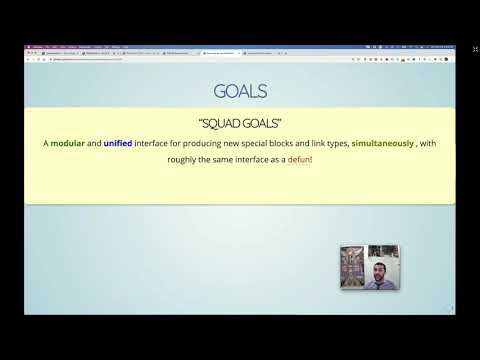
4. Goals
“Squad goals”
A modular and unified interface for producing new special blocks and
link types, simultaneously, with roughly the same interface as a
defunDefine NAME as a function.
The definition is (lambda ARGLIST [DOCSTRING] [INTERACTIVE] BODY...).
DECL is a declaration, optional, of the form (declare DECLS...) where
DECLS is a list of elements of the form (PROP . VALUES). These are
interpreted according to ‘defun-declarations-alist’.
INTERACTIVE is an optional ‘interactive’ specification.
The return value is undefined.
(fn NAME ARGLIST [DOCSTRING] [DECL] [INTERACTIVE] BODY...)
!
⇒ defblockDeclare a new special block, and link, in the style of ‘defun’.
To remove support for a block NAME, simply use ‘org-undefblock’.
A full featured example is at the end of this documentation string.
This is an anaphoric macro that provides export support for
special blocks *and* links named NAME. Just as an Org-mode
src-block consumes as main argument the language for the src
block, our special blocks too consume a MAIN-ARG; it may be a
symbol or a cons-list consisting of a symbolic name (with which
to refer to the main argument in the definition of the block)
followed by a default value, then, optionally, any information
for a one-time setup of the associated link type.
The main arg may be a sequence of symbols separated by spaces,
and a few punctuation with the exception of comma ‘,’ since it is
a special Lisp operator. In doubt, enclose the main arg in
quotes.
Then, just as Org-mode src blocks consume key-value pairs, our
special blocks consume a number of keyword arguments.
Together, the main and keyword arguments form KWDS, written as a
‘cl-defun’ arglist; by way of example,
(&optional (title "Details") &key (color "green") style)
declares main argument TITLE, defaulting to "Details", and
keyword arguments COLOR and STYLE. As with ‘cl-defun’, a header
line’s unknown keywords are an export-time error unless KWDS writes
‘&allow-other-keys’; so, () takes no arguments at all.
KWDS may also carry options, which are not arguments:
+ ‘:block nil’ declines block support: #+begin_NAME is left to Org, yet the
link and tag still work, through ‘org-block/NAME’.
+ ‘:link nil’ declines the link type NAME:; ‘:link t’ makes it; and ‘:link
[:face … :display …]’ makes it with that ‘org-deflink’ display, which sees
the link’s arglist (label &optional description backend); e.g.,
[:face =’(:foreground "red")] shows such links in red.
+ ‘:tag nil’ declines the tag: otherwise a section tagged :NAME: exports as a
NAME block around its text; the tag’s underscore-separated items form the
main argument, and the section’s properties supply keyword arguments by
name ---every property bar Org’s own, when the block allows other keys.
E.g., "* Stuck? :details_Hint:" folds its text away under the
title Hint. See ‘org--defblock-section-to-block’.
A block cannot hold a heading, so ‘:tag [:subsections MODE]’ says what becomes
of a tagged section’s subsections: ‘ignore’ leaves them outside the block, as
‘:tag t’ does; ‘error’ refuses a section that has any; and ‘recurse’ wraps
each subsection’s text in a block of its own.
The link and tag default to ‘org-defblock-links-and-tags’; for just one of
them, see ‘org-deflink’ and ‘org-deftag’.
+ ‘:edit-indirect-mode MODE’ makes C-c =’ edit the block in MODE.
+ ‘:latex-head (ITEM …)’ is what a LaTeX document using the block, or its link, needs in its preamble, added once:
a package name, or any preamble line; e.g., unquoted,
:latex-head ("tcolorbox" "\\newtcolorbox{aside}{colback=gray!5}")
Name a package, "tcolorbox", rather than write "\\usepackage{tcolorbox}": a name is left be when the document
loads it already, options and all; a line, only when the document has that very line. See ‘org--load-latex-head’.
+ ‘:html-head (ITEM …)’ is what an HTML page using the block needs in its <head>, added once: a string of HTML, a
symbol whose value is one, or ‘mathjax’ for Org’s own MathJax setup; e.g., unquoted,
:html-head (mathjax my-html-head "<style>.aside {color: gray}</style>")
A symbol shares one head among many blocks, as ‘org--tooltip-html-head’ serves every tooltip. See
‘org--load-html-head’.
+ ‘:fontify [:begin STRING :end STRING :face FACE]’ says how the block looks in Org buffers;
e.g., [:begin "Proof." :end "⏹" :face =’italic] shows “#+begin_proof” as “Proof.”,
“#+end_proof” as “⏹”, and the contents in italics too. Moreover, :keywords =’((REGEXP GROUP FACE) …) shows
each REGEXP match in the contents in FACE; e.g., the ‘math’ block’s “blue:<<Fold>>” shows as a tag, in blue.
And :language "latex" shows the contents as a #+begin_src latex block’s. Each part is optional; see
‘org--fontify-blocks’.
+ ‘:hover STRING’ is prose that eldoc shows, on hovering the block’s #+begin_ line, beneath its docstring’s
first line; e.g., a tip too long for that line. See ‘org--special-block-eldoc’.
+ ‘:manual URL’ is where the block is documented, which eldoc offers as “See the manual”; a URL of #ANCHOR is
that section of ‘org-special-block-extras-manual’; e.g., :manual "#math".
After that is an optional DOCSTRING, a familar feature of DEFUN.
The docstring is displayed as part of the tooltip for the
produced link type.
Finally, the BODY is a (sequence of) Lisp forms ---no progn
needed--- that sees KWDS’ arguments, and whatever else it asks for
after &context in KWDS:
(org-defblock shout (&optional (title "Hey") &context backend contents)
(format (if (eq backend =’html) "<b>%s</b>: %s" "%s: %s") title (upcase contents)))
On offer, as ‘org--block-context-keys’ lists them:
+ backend ⇒ the current export backend; e.g., html, or latex.
+ contents ⇒ the block’s contents, Org-parsed; i.e., Org-markup is
acknowledged ---or the description clause of a link.
+ raw-contents ⇒ the contents unparsed, for the rare body that wants them.
+ args ⇒ the plist of every keyword argument the block was given.
+ link? ⇒ whether we are rendering a link’s description, not a block.
+ anchor ⇒ the block’s #+name:, else nil.
This is dependency injection, by keyword: every block is offered the
whole record, and takes only what it names. Hence BODY sees no name
it did not ask for, so nothing of ours captures a variable of its own;
e.g., a main argument named ‘contents’ is just that. An item we offer
in due time is invisible to the blocks that do not ask for it; and an
item not on offer, such as a misspelt contnets, is an error at once.
An item may be bound under another name, ((:ITEM VAR)), as when KWDS
already uses ITEM’s name; an item named both ways is an error:
(org-defblock quip (&optional contents &context ((:contents text)))
(format "%s, said of %s" contents text)) ;; #+begin_quip Ha! ⇒ “Ha!, said of …”
See “Keyword Parameters” in Practical Common Lisp, a gentle tour of
such renaming: https://gigamonkeys.com/book/functions.html
Finally, this macro exposes two functions:
+ ORG-EXPORT: Wrap the argument in an export block for the current backend.
+ ORG-PARSE: This should ONLY be called within an ORG-EXPORT call,
to escape text to Org, and out of the export block.
⇄ We use “@@html:⋯:@@” when altering CONTENTS, but otherwise use raw HTML *around* CONTENTS.
⇄ For example: (format "<div>%s</div>" (s-replace "#+columnbreak:" "@@html:<hr>@@" contents))
----------------------------------------------------------------------
The relationship between links and special blocks:
[ [type:label][description]]
≈
#+begin_type label
description
#+end_type
----------------------------------------------------------------------
Example declaration, with all possible features shown:
;; We can use variable values when defining new blocks
(setq angry-red ’(:foreground "red" :weight bold))
(org-defblock remark
(&optional (editor "Editor Remark") &key (color "red") (signoff "")
:link [:face angry-red] &context backend contents)
"Top level (HTML & LaTeX) editorial remarks; in Emacs they’re angry red."
(format (if (equal backend ’html)
"<strong style=\"color: %s;\">⟦%s: %s%s⟧</strong>"
"{\color{%s}\bfseries %s: %s%s}")
color editor contents signoff))
;; Personalised defaults, without changing the definition, as Babel’s for a src block of language remark;
;; or, per section, :header-args:remark: :editor "Jasim Jameson" in a heading’s drawer.
(setq org-babel-default-header-args:remark =’((:editor . "Jasim Jameson") (:signoff . "( Aim for success! )")))
Three example uses:
;; ⟨0⟩ As a special blocks with arguments given.
#+begin_remark Bobbert Barakallah :signoff "Thank-you for pointing this out!" :color green
I was trying to explain that ${large (n × (n + 1) over 2}$ is always an integer.
#+end_remark
;; ⟨1⟩ As a terse link, using default values for the args.
;; Notice that Org-mode formatting is recoqgnised even in links.
[ [remark:Jasim Jameson][Why are you taking about "$\mathsf{even}$" here?]]
;; ⟨2⟩ So terse that no editor name is provided.
[ [remark:][Please improve your transition sentences.]]
;; ⟨★⟩ Unlike 0, examples 1 and 2 will have the default SIGNOFF
;; catenated as well as the default red color.
(fn NAME KWDS &optional DOCSTRING &rest BODY) ⇐ |
4.1. Solving the friend's trilemma
(defblock feedback (who) (color "red")
"Top level (HTML & LaTeX) constructive feedback."
(format (if (equal backend 'html)
"<strong style=\"color: %s;\">⟦%s: %s⟧</strong>"
"{\\color{%s}\\bfseries %s: %s}")
color who contents))
Huh?
There are 3 main parts …
4.2. Line 1: Declare a block
1: (defblock feedback (who) (color "red")
2: "Top level (HTML & LaTeX) constructive feedback."
3: (format (if (equal backend 'html)
4: "<strong style=\"color: %s;\">⟦%s: %s⟧</strong>"
5: "{\\color{%s}\\bfseries %s: %s}")
6: color who contents))
Line 1: def-ine a new block named feedback whose main argument is who wrote the feedback, and optionally a color —which is red by default.
4.3. Line 2: Document the block
1: (defblock feedback (who) (color "red")
2: "Top level (HTML & LaTeX) constructive feedback."
3: (format (if (equal backend 'html)
4: "<strong style=\"color: %s;\">⟦%s: %s⟧</strong>"
5: "{\\color{%s}\\bfseries %s: %s}")
6: color who contents))
Line 2: Just as when you write a function, you write what it does.
Moreover, this documentation is used as a tooltip for the Org link form of feedback —for Corwin--- within Emacs!
4.4. Lines 3-6: Do the thing!
1: (defblock feedback (who) (color "red")
2: "Top level (HTML & LaTeX) constructive feedback."
3: (format (if (equal backend 'html)
4: "<strong style=\"color: %s;\">⟦%s: %s⟧</strong>"
5: "{\\color{%s}\\bfseries %s: %s}")
6: color who contents))
Line 3: Depending on whether we're exporting to HTML —for Sacha--- or to PDF —for Amin--- we use HTML divs or LaTeX macros.
4.5. Anaphoric?
1: (defblock feedback (who) (color "red")
2: "Top level (HTML & LaTeX) constructive feedback."
3: (format (if (equal backend 'html)
4: "<strong style=\"color: %s;\">⟦%s: %s⟧</strong>"
5: "{\\color{%s}\\bfseries %s: %s}")
6: color who contents))
4.6. How do the feedback?
Sacha 😍 Org/HTML
#+begin_feedback Sacha Speculates
I think we should do …
#+end_feedback
[Sacha Speculates:
I think we should do …
]Amin 😻 Org/PDF
#+begin_feedback Amin :color green
I think we should do …
#+end_feedback
[Amin:
I think we should do …
]Corwin 💌 Org/Terse
[[feedback:Corwin][Guys, let's wrap up already!]]
[Corwin: Guys, let's wrap up already! ]
5. More Blocks!
Using a few lines of Lisp …
write text in parallel
Place ideas side-by-side, possibly with a separator. There are COLS many columns, and they may be separated by solid vertical rules if BAR is a non-nil (colour) value. + COLS is either a number or a sequence of the shape: 10% 20% 30%. + BAR is either ‘t’, ‘nil’, or a colour such as ‘red’ or ‘blue’. ---------------------------------------------------------------------- “Soft Columns”: Writing “#+begin_parallel 𝓃 :bar t” will produce 𝒏-many parallel columns, possibly separated by solid rules, or a “bar”. This style allows text to freely move between columns, depending on the size of the browser, which may dynamically shrink and grow. BAR can either be ‘t’, ‘nil’, or any (backend)-valid colour specification; such as ‘red’ or ‘green’. “Hard Columns”: Alternatively, for non-uniform column widths, COLS may instead be a specification of the widths of the columns. However, this extra flexibility comes at an additional cost: The contents of the block must now contain 𝒏-1 lines consisting of ‘#+columnbreak:’, when the specification determines 𝒏 columns, as shown in the following example. #+begin_parallel 20% 60% 20% :bar green Hello, to the left! #+columnbreak: A super duper wide middle margin! #+columnbreak: Goodbye (“God-be-with-ye”) to the right! #+end_parallel The specification is 𝒏 measurements denoting widths; which may be in any HTML recognisable units; e.g., “5em 20px 30%” is valid. I personally advise only the use of percentage measurements. In the Soft Columns style above, any ‘#+columnbreak:’ are merely ignored. With LaTeX export, the use of ‘#+columnbreak:’ is used to request a column break. Regarding the Lisp function: + BACKEND refers to the current export backend. + RAW-CONTENTS refers to the text as the user wrote it, sans its least indentation. ⇒ Its body asks, by &context, for CONTENTS: the ‘org parsed’ version of user text. ⇒ CONTENTS and RAW-CONTENTS are identical for the description of a link; whence the LINK? of &context is non-nil. For example, upon LaTeX export, the Org special block #+begin_parallel Hello, world #+end_parallel is rewritten to the result of the call (org-block/parallel ‘latex "Hello, world")columns… to save on vertical whitespace
- hide away technical details
Enclose contents in a folded up box, for HTML. For LaTeX, this is just a boring, but centered, box. By default, the TITLE of such blocks is “Details”, its TITLE-COLOR is green, and BACKGROUND-COLOR is “#e5f5e5”. In HTML, we show folded, details, regions with a nice greenish colour. Regarding the Lisp function: + BACKEND refers to the current export backend. + RAW-CONTENTS refers to the text as the user wrote it, sans its least indentation. ⇒ Its body asks, by &context, for CONTENTS: the ‘org parsed’ version of user text. ⇒ CONTENTS and RAW-CONTENTS are identical for the description of a link; whence the LINK? of &context is non-nil. For example, upon LaTeX export, the Org special block #+begin_details Hello, world #+end_details is rewritten to the result of the call (org-block/details ‘latex "Hello, world")for the interested reader only - enclose text in a pretty box
Enclose text in a box, possibly with a TITLE. By default, the box’s BACKGROUND-COLOR is green for HTML and red for LaTeX; for LaTeX, there are also FRAME-COLOR and TITLE-BACKGROUND-COLOR. SHADOW is an alternate style of boxing: It shows the contents in a centred box with a shadow colour being the given non-nil value of SHADOW. If SHADOW is a hexadecimal colour, it should be a string enclosed in double quotes. More accurately, the following are all valid uses: #+begin_box title :shadow t #+begin_box title :shadow inset #+begin_box title :shadow "pink" #+begin_box title :shadow pink #+begin_box title :shadow (cyan pink orange yellow) #+begin_box title :shadow (cyan "inset pink" orange) #+begin_box title :shadow (:left cyan :right pink :deep-right orange :deep-left yellow) Notice that prefixing colours with ‘inset’ causes the colour to be within the box, rather than spread, with blur, around the box. The use of ‘inset’ swaps left and right. The HTML export uses a padded div, whereas the LaTeX export requires the tcolorbox package; Markdown, sans colours, gets a quote opening with TITLE in bold. Regarding the Lisp function: + BACKEND refers to the current export backend. + RAW-CONTENTS refers to the text as the user wrote it, sans its least indentation. ⇒ Its body asks, by &context, for CONTENTS: the ‘org parsed’ version of user text. ⇒ CONTENTS and RAW-CONTENTS are identical for the description of a link; whence the LINK? of &context is non-nil. For example, upon LaTeX export, the Org special block #+begin_box Hello, world #+end_box is rewritten to the result of the call (org-block/box ‘latex "Hello, world") - Educational material blocks: spolier
Hide text enclosed in double parens ((like this)) as if it were spoilers. LEFT and RIGHT may be other kinds of delimiters. The main argument, COLOR, indicates which color to use. For LaTeX, this becomes “fill in the blanks”, with the answers in the footnotes; for Markdown, whose renderers strip <style>, numbered blanks with the answers folded away beneath them. Regarding the Lisp function: + BACKEND refers to the current export backend. + RAW-CONTENTS refers to the text as the user wrote it, sans its least indentation. ⇒ Its body asks, by &context, for CONTENTS: the ‘org parsed’ version of user text. ⇒ CONTENTS and RAW-CONTENTS are identical for the description of a link; whence the LINK? of &context is non-nil. For example, upon LaTeX export, the Org special block #+begin_spoiler Hello, world #+end_spoiler is rewritten to the result of the call (org-block/spoiler ‘latex "Hello, world"), solutionShow the answers to a problem, but with a reprimand in case no attempt was made. Regarding the Lisp function: + BACKEND refers to the current export backend. + RAW-CONTENTS refers to the text as the user wrote it, sans its least indentation. ⇒ Its body asks, by &context, for CONTENTS: the ‘org parsed’ version of user text. ⇒ CONTENTS and RAW-CONTENTS are identical for the description of a link; whence the LINK? of &context is non-nil. For example, upon LaTeX export, the Org special block #+begin_solution Hello, world #+end_solution is rewritten to the result of the call (org-block/solution ‘latex "Hello, world"), and org-demo/bin/bash: line 1: wn: command not found
Finally, blocks compose: They're building blocks for new and better ideas!
More details and examples at
| https://alhassy.com/org-special-block-extras |
6. Bye!
Thanks for listening in!
The org-special-block-extras Library:
https://alhassy.com/org-special-block-extras
… has examples, tutorial, and is a literate program! (•̀ᴗ•́)و
A 5-page PDF covering ELisp fundamentals:
These slides:
https://github.com/alhassy/org-special-block-extras/blob/master/emacs-conf-2020.org




Life & Computing Science by Musa Al-hassy is licensed under a Creative Commons Attribution-ShareAlike 3.0 Unported License