
Colours






⭐ The code lives at github.com/alhassy/org-special-block-extras —star it, or discuss it there! 
Let's develop blocks for colouring text and link types for inline colouring;
e.g., colorFormat text according to a given COLOR, which is black by default.
Regarding the Lisp function:
+ BACKEND refers to the current export backend.
+ RAW-CONTENTS refers to the text as the user wrote it, sans its least indentation.
⇒ Its body asks, by &context, for CONTENTS: the ‘org parsed’ version of user text.
⇒ CONTENTS and RAW-CONTENTS are identical for the description of a link; whence the LINK? of &context is non-nil.
For example, upon LaTeX export, the Org special block
#+begin_color
Hello, world
#+end_color
is rewritten to the result of the call
(org-block/color ‘latex "Hello, world") and tealShow text in teal color.
Regarding the Lisp function:
+ BACKEND refers to the current export backend.
+ RAW-CONTENTS refers to the text as the user wrote it, sans its least indentation.
⇒ Its body asks, by &context, for CONTENTS: the ‘org parsed’ version of user text.
⇒ CONTENTS and RAW-CONTENTS are identical for the description of a link; whence the LINK? of &context is non-nil.
For example, upon LaTeX export, the Org special block
#+begin_teal
Hello, world
#+end_teal
is rewritten to the result of the call
(org-block/teal ‘latex "Hello, world").
- E.g.,
[[brown: Hello, World!]]⇒ Hello, World! - E.g.,
brown:Friends!⇒ Friends! ( Note the ‘!’ is not coloured; use[[...]]! )
Use M-x list-colors-display to see a list of defined colour names in Emacs —see xcolor for the LaTeX side and htmlcolorcodes.com for the HTML side, or just visit http://latexcolor.com/ for both.
A Picture and Block Examples
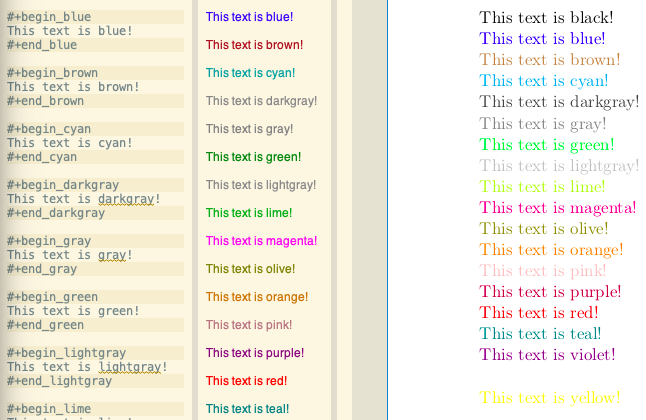
This text is black!
This text is blue!
This text is brown!
This text is darkgray!
This text is gray!
This text is green!
This text is lightgray!
This text is lime!
This text is magenta!
This text is olive!
This text is orange!
This text is pink!
This text is purple!
This text is red!
This text is teal!
This text is violet!
This text is white!
This text is yellow!
Implementation of numerous colour blocks/links
We declare a list of colors that should be available on most systems. Then using this list, we evaluate the code necessary to produce the necessary functions that format special blocks.
By default, Org uses the graphicx LaTeX package which let's us colour text
—see its documentation here. For example, in an #+begin_export latex block,
the following produces blue coloured text.
{ \color{blue} This is a sample text in blue. }
(defvar org--named-colors
  '(black blue brown cyan darkgray gray green lightgray lime
          magenta olive orange pink purple red teal violet white
          yellow)
  "Colours that should be available on all systems.")

(cl-loop for colour in org--named-colors
         do (eval `(org-defblock ,colour
                     (&optional (the-color "black") &context backend contents)
                     (vector :face `(:foreground ,(format "%s" (quote ,colour))))
                     ,(format "Show text in %s color." colour)
                     (let ()
                       (format (pcase backend
                                 (`latex "\\begingroup\\color{%s}%s\\endgroup\\,")
                                 (_  "<span style=\"color:%s;\">%s</span>"))
                               (quote ,colour) contents)))))
Let's have some sanity tests…
(deftest "It is an HTML span styled red that contains the user's text"
  [color red block]
  (⇝ (⟰ "#+begin_red
          My cool thoughts...
          #+end_red")
     "<span style=\"color:red;\">"
     (* anything)
     "My cool thoughts"
     (* anything)
     "</span>"))

;; We have an HTML span styled with the user's color and it contains the user's text
(deftest "It works as expected"
  [color pink block]
  (⇝ (⟰ "#+begin_color pink
          My cool thoughts...
          #+end_color")
     "<span style=\"color:pink;\">"
     (* anything)
     "My cool thoughts"
     (* anything)
     "</span>"))
Implementation of ‘color’
For faster experimentation between colours, we provide a generic color block
that consumes a color argument.
(org-defblock color
  (&optional (color black) &context backend contents)
  (vector :face (lambda (colour) `(:foreground ,(format "%s" colour))))
  "Format text according to a given COLOR, which is black by default."
  (format (pcase backend
            (`latex "\\begingroup\\color{%s}%s\\endgroup\\,")
            (`html  "<span style=\"color:%s;\">%s</span>"))
          color contents))
[Posterity] Old version which did not allow wombo colour:
(org-defblock color (&optional (color black) :face (lambda (colour)
           (if (member (intern colour) org--named-colors)
               `(:foreground ,(format "%s" colour))
             `(:height 300
               :underline (:color "red" :style wave)
               :overline  "red" :strike-through "red")))) nil
  "Format text according to a given COLOR, which is black by default."
  (format (pcase backend
            (`latex "\\begingroup\\color{%s}%s\\endgroup\\,")
            (`html  "<span style=\"color:%s;\">%s</span>"))
          color contents))
Moreover, we have that the syntax red:text renders ‘text’ with the colour red
in both the Emacs interface and in exported backends.
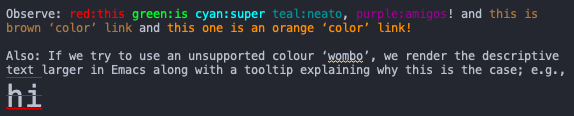
Observe: this is super neato, amigos! and this is brown ‘color’ link and this one is an orange ‘color’ link!
Also: If we try to use an unsupported colour ‘wombo’, we render the
descriptive text larger in Emacs along with a tooltip explaining why this is
the case; e.g.,
[[color:wombo][hi]].
[[color:#fad][Using Hex colour code!]] ⇒ Using Hex colour code! ;-)
Moreover, it would be nice to extend the color block type to take multiple
arguments, say, c₁ c₂ … cₙ such that:
| n | Behaviour |
|---|---|
| 0 | No colouring; likewise if no arguments altogether |
| 1 | Colour all entries using the given colour c₁ |
| n | Paragraph –region separated by a new line– i is coloured by cₖ where k = i mod n |
Besides having a colourful article, another usage I envision for this generalisation would be when rendering text in multiple languages; e.g., use red and blue to interleave Arabic poetry with its English translation.

Life & Computing Science by Musa Al-hassy is licensed under a Creative Commons Attribution-ShareAlike 3.0 Unported License